
Crystal Reports Runtimes
The SBN Report and Email Reports services require the SAP Crystal Reports runtime to be installed on the same Windows machine. Other SBN services do not need it. For installing and running these services, see SBN Service Manager.
The runtime version must match the SBN release of the services you are running. Installing a mismatched runtime is a common cause of report failures.
SBN release | Crystal Reports runtime |
Up to release 92 | See the screenshot below for the exact version. |
Release 93 and later (v95 services line) | SAP Crystal Reports runtime engine 13.0.40xx (Crystal Reports for Visual Studio / .NET Framework 4.0, 64-bit/32-bit as appropriate). The v95 services build against the |
Up to release 92 the version is:

In release 93 and later the runtime is the SAP Crystal Reports engine 13.0.40xx (the 13.0.4000.0 assembly family). The screenshot below shows the version to look for:

NOTE: If you are a developer, then the Visual Studio install must be the same version as the runtime.

Use this link to access SAP’s download archive:
Downloads for SAP Crystal Reports and others
Filter by Visual Studio:
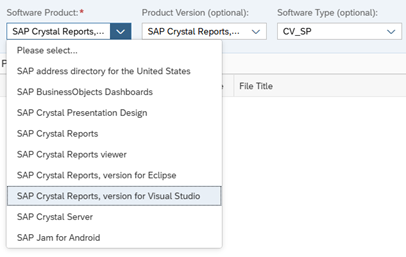
Download the appropriate version. The following screenshot highlights the files for SBN version 93+.
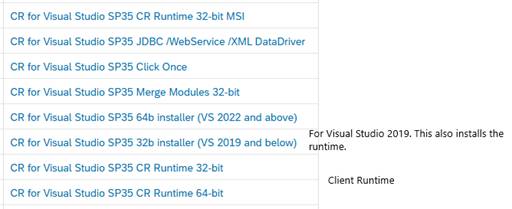
After the download is completed run the installer.
After installing, confirm the correct runtime version appears in Windows Settings > Apps (or Programs and Features), and that it matches the release of your SBN services.
Installation Tip
Before installing a new version, uninstall any previous version to avoid leftover files. Installing a new version over an old one may leave outdated files on your system, potentially causing obscure runtime errors in Crystal Reports or the SBN Report service.