
Inventory Close
Inventory Close
Inventory Close
Program #: 703
Module: Account Generation
Overview
Use Inventory Close (program #703) to close specific inventory periods; SBN then updates average item usage and average item cost in Branch Inventory (program #1757). The average item cost computation uses a weighted average and calculates inventory by price per part, not price paid per purchase.
Note: The transfer of average cost to standard cost only occurs when the Year End and Transfer flags are set.
Navigating to Inventory Close
Use the following steps to access the Inventory Close program:
1. From the main SBN toolbar, select Menu.
2. From the drop-down menu, select Go To.
3. In the Go To Program dialog box, type in "703" and press Enter.
w Inventory Close opens.
The Inventory Close Window
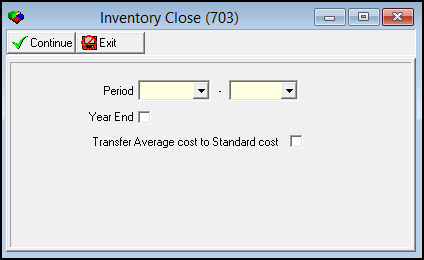
The following graphic shows the Inventory Close window as the program opens.
Field Descriptions
The following table describes the fields used in the Inventory Close window.
|
Field |
Description |
|
Period |
|
|
Date - From |
Select a range of dates in which your branch received items to calculate the average monthly usage and to update the Average Cost field of program #1757 for items received within the range; select the beginning date. |
|
Date - To |
Select a range of dates in which your branch received items to calculate the average monthly usage and to update the Average Cost field of program #1757 for items received within the range; select the ending date. |
|
Year End |
Select this check box to identify this as a year-end close, which then updates the standard cost of items in program #1757. |
|
Transfer Average Cost to Standard Cost |
Select this check box to update the standard cost with the average cost of items in program #1757. Note: If you leave this field blank, SBN copies the last price paid to the standard cost field. SBN only updates the standard cost of the item if you purchased it during the selected time period. |
Closing Inventory
Use the Inventory Close window to close inventory transactions for a selected period.
Use the following steps to close the inventory period:
1. Select beginning and ending dates for the period you want to close.
2. Select the Year End or Transfer Average Cost to Standard Cost flags, as needed.
3. Choose Continue.
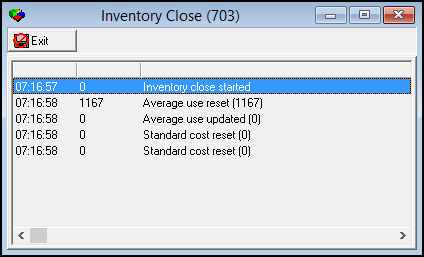
w The Inventory Close Process window appears and displays the process. When the process finishes, SBN displays a confirmation message.
4. Choose Exit.
Related Programs
The following table lists programs related to Inventory Close.
|
Program |
Number |
Document Link |
Description |
|
Branch Inventory |
1757 |
Manage inventories by branch. Inventory Close updates the average cost and average use of items in Branch Inventory. |
|
|
Purchasing |
571 |
Convert inventory requisitions into purchase orders. Inventory Close updates the average use of items in the Availability screen of Purchasing. |
Modifications and Updates to Inventory Close
The following table lists modifications and updates to the Inventory Close document.
|
Mod Number |
Date |
Description |
|
n/a |
07/18/08 |
document rewritten |
|
n/a |
07/14/14 |
Images updated. |