
Z-Micro Interface
Z-Micro Interface
Z-Micro Interface
Module: Utilities
Overview
Z-Micro Interface is a standalone program you can install and use in conjunction with SBN. Z-Micro extracts certain data out of SBN and saves it in a predefined flat file format on your server. Dealers can then import these files from your server to see changes that have been made to their customer accounts.
All users must have an SBN login to use Z-Micro Interface; the application uses the SBN login to authenticate all connections.
With Z-Micro Interface, you can choose to run an incremental download or a full download. An incremental download compares the current date with the date of the last incremental download and includes only those customer installations that have been changed within that period. A full download includes all changes made to all installations.
Note: Contact IBS if you are interested in purchasing the Z-Micro Interface application.
The Z-Micro Interface Window
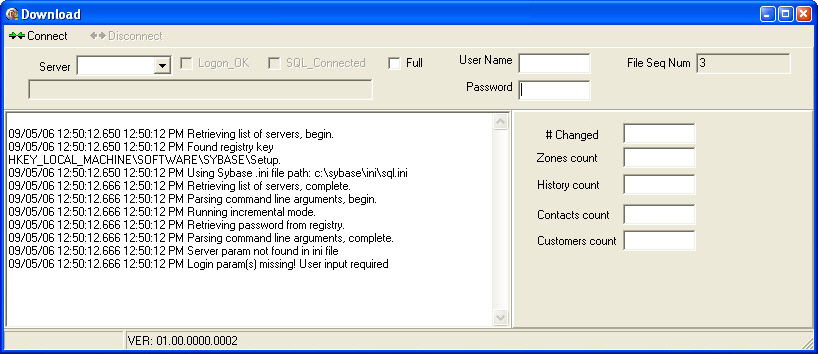
The following graphic shows Z-Micro as the program opens.
Field Descriptions
The following table describes the fields used in Z-Micro Interface.
|
Field |
Description |
|
Server |
Select the server you want to connect to from the drop-down menu. |
|
Logon OK |
This is a read-only field. If this box displays a check mark, you are logged onto the application. |
|
SQL Connected |
This is a read-only field. If this box displays a check mark, you are connected to the SQL server. |
|
Full |
Select this check box if to run a full download. If you do not select this check box, Z-Micro runs an incremental download. |
|
User Name |
Enter your SBN user name. User names and passwords are case sensitive. |
|
Password |
Enter your SBN password. |
|
File Seq Number |
This is a read-only field. The file sequence number corresponds with the file created by the current download. As a result, this field also corresponds to the total number of times you have run the application. |
|
# Changed |
The number of installations that have changed since the last download. |
|
Zones Count |
Total number of records from the Zones tab that have changed since the last download. |
|
History Count |
Total number of alarm records from the Alarm Log that have changed since the last download. |
|
Contacts Count |
Total number of contact records from the Action Plans tab that have changed since the last download. |
|
Customers Count |
Total number of Data Entry (program #559) records that have changed since the last download. |
Using Z-Micro Interface
Before using Z-Micro Interface, read the zmicro_ReadMe.txt file that comes with the application. The file describes the format of the output files a download produces.
Use the following steps to download changes using Z-Micro:
1. Select the correct server from the Server drop-down menu.
2. Enter your SBN user name and password in the corresponding fields.
3. Click Connect.
w Z-Micro interfaces with SBN and downloads the updated data.
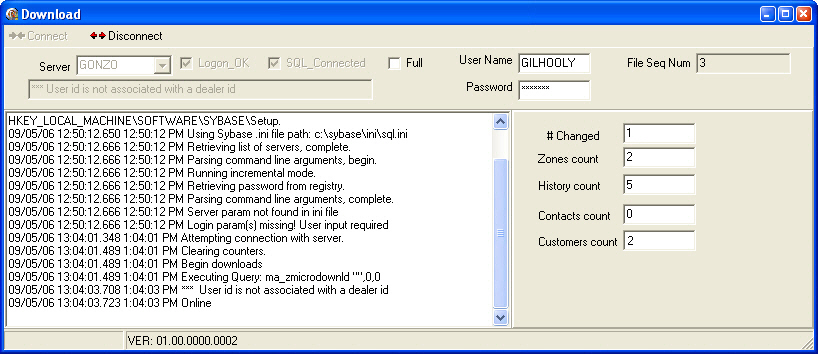
4. Verify that Z-Micro Interface downloaded the data by observing the right panel fields.
5. Click Disconnect to exit the Z-Micro Interface application.
Button Functions
The following table displays the buttons, describes the shortcut keys, actions and functionality.
|
Button |
Name |
Description |
|
|
Connect |
Interface with SBN through Z-Micro to download data. |
|
|
Disconnect |
Disconnect from the SBN/Z-Micro interface. |


Modifications and Updates to Z-Micro Interface
The following table lists modifications and updates to the Z-Micro Interface document.
|
Mod Number |
Date |
Description |