
Report Priorities
Report Priorities
Report Priorities
Program #: 1509
Module: Reference
Overview
This chapter provides information on setting up and printing reports in SBN. In order for SBN to print reports correctly you must
-
Install Report Services
-
Set a print directory in each terminal
-
Set up report parameters in four system administration programs:
q Report Default Parameters (program #1561)
q Report Priorities (program #1509)
q Printer Profile Updates (program #1559)
q Report Messages (program #1766)
-
Define the report parameters in the individual report (see Report Parameters Pane)
-
Use the Report Queue
Report Priorities
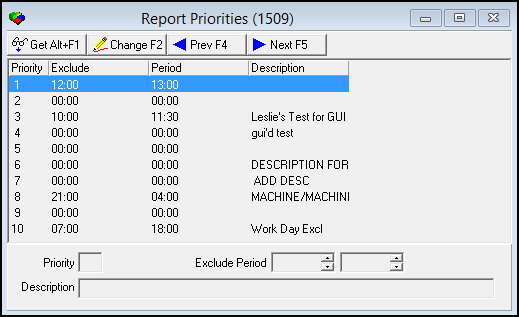
Use Report Priorities (program #1509) to maintain report priorities. You can define up ten (10) priorities. Priorities define at what times specific reports print. An exclude period allows you to define when reports with a given priority do not print.
SBN initially sets all ten priorities to an exclude period of 00:00 - 00:00. All reports with this time range print. You must change these times to define an exclude period.
Priority definitions always appear in the report parameters section of each system report, and in Report Default Parameters (program #1561).
To access this program, select Report Priorities (program #1509) from the main menu of SBN.
The Report Priorities Window
The following graphic shows Report Priorities as the program opens.
Field/Column Descriptions
The following table describes the fields and columns used in Report Priorities.
|
Field/Column |
Description |
|
Priority |
Priority number. |
|
Exclude / Period |
Begin and end times of period in which reports with the specified priority number do not print. O Select time according to Central Standard Time; the exclude period displays in Report Parameters with the user’s corresponding time zone. |
|
Description |
Text description of priority. |
Using Common Functions
See the reference document Common Functions in SBN for more information.
Button Functions
The following table displays the buttons, describes the shortcut keys, actions, and functionality.
|
Button |
Name |
Shortcut Key |
Action |
Description |
|
|
Get |
ALT+F1 |
1502/ 1 |
Get record. |
|
|
Change |
F2 |
1502/ 2 |
Change selected record. |
|
|
Previous |
F4 |
1502/ 999 |
Select last record. |
|
|
Next |
F5 |
1502/ 999 |
Select next record. |




Modifications and Updates to Report Priorities
The following table lists modifications and updates to the Report Priorities document.
|
Mod Number |
Date |
Description |
|
n/a |
8/25/14 |
Images updated. |