
McCullough Transmitters
McCullough Transmitters
McCullough Transmitters
Program #: 1776
Module: System Administration
Overview
Use McCullough Transmitters (program #1776) to define the signal matrix for McCullough transmitters. These transmitters send rounds of numbers rather than individual alpha characters for alarm types. SBN checks arriving rounds of numbers against the matrix. When a round of numbers within a defined number of seconds matches an entry in the matrix, the status of the signal changes according the match.
To access this program, select McCullough Transmitters (program #1776) from the main menu of SBN.
The McCullough Transmitters Window
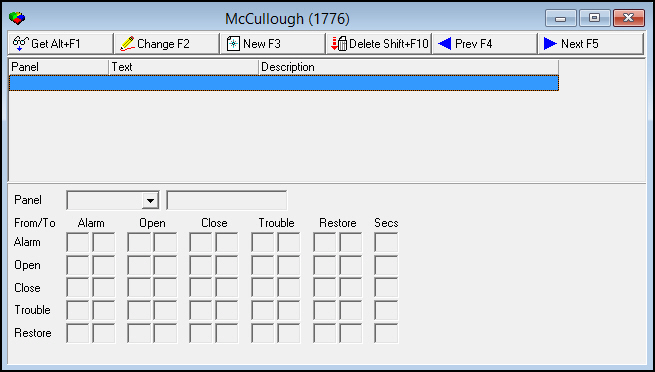
The following graphic shows McCullough Transmitters as the program opens. The upper pane displays previously defined McCullough transmitters.
Field/Column Descriptions
The following table describes the columns and fields used in McCullough Transmitters.
|
Field/Column |
Description |
|
Panel |
Panel type. |
|
Text |
Text description of the panel type. |
|
Description |
Text description of the panel from program #1742. |
|
Panel |
(This menu originates from program #1742.) |
|
Panel Text (No label) |
Text description of the panel type. |
|
Matrix |
|
|
From l Alarm l Open l Close l Trouble l Restore |
Current status of a signal. |
|
To l Alarm l Open l Close l Trouble l Restore |
New status of the signal. |
|
Seconds |
The number of seconds within which rounds of numbers that match entries in the matrix must arrive to change a status. |
Using Common Functions
See the reference document Common Functions in SBN for more information.
Example Matrix
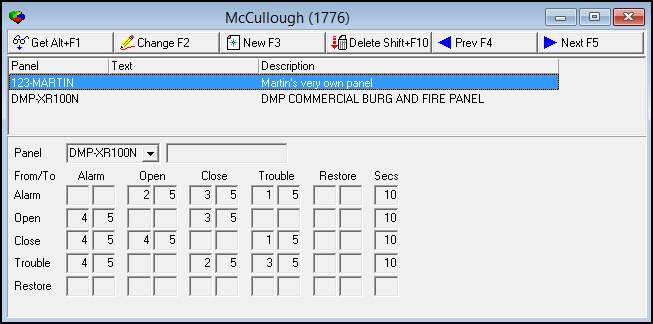
The graphic below shows an example matrix for McCullough Transmitters.
Example 1
If the account is in Alarm status and receives (2 + (a multiple of 5 rounds)) within 10 seconds, the status changes to Open. For example, if the account status is Alarm when the selected panel sends a �17� - the only combination on the matrix that equals 17 is (2 + (3*5)) - the status changes to Open.
Example 2
If the account is in Open status and receives (3 + (a multiple of 5 rounds)) within 10 seconds, the status changes to Close. For example, if the account status is Open when the selected panel sends an �18� - the only combination on the matrix that equals 18 is (3 + 3*5)) - the status changes to Close.
Example 3
If the account is in Close status and receives (4 + (a multiple of 5 rounds)) within 10 seconds, the status changes to Alarm. For example, if the account status is Close when the selected panel sends a �19� - the only combination on the matrix that equals 19 is (4 + (3*5)) - the status changes to Alarm.
Button Functions
The following table displays the buttons, describes the shortcut keys, actions, and functionality.
|
Button |
Name |
Shortcut Key |
Action |
Description |
|
|
Get |
ALT+F1 |
1776/ 1 |
Get record. |
|
|
Change |
F2 |
1776/ 2 |
Change selected record. |
|
|
New |
F3 |
1776/ 3 |
Create new record. |
|
|
Delete |
SHIFT+F10 |
1776/ 4 |
Delete selected record. |
|
|
Previous |
F4 |
1776/ 999 |
Select last record. |
|
|
Next |
F5 |
1776/ 999 |
Select next record. |






Modifications and Updates to McCullough Transmitters
The following table lists modifications and updates to the McCullough Transmitters document.
|
Mod Number |
Date |
Description |
|
n/a |
8/19/14 |
Images updated. |