
Reminder Profiles
Reminder Profiles
Reminder Profiles
Module: System Administration
Overview
Use Reminder Profiles (program #1562) to define profiles for reminders. You may associate a specific dealer ID with a reminder profile. A menu of Reminder Profiles appears in the Contract Master (program #548).
Reminder Profiles contains a sublevel in which you define the groups for reminder profiles.
To access this program, select Reminder Profiles (program #1562) from the main menu of SBN.
The Reminder Profiles Window
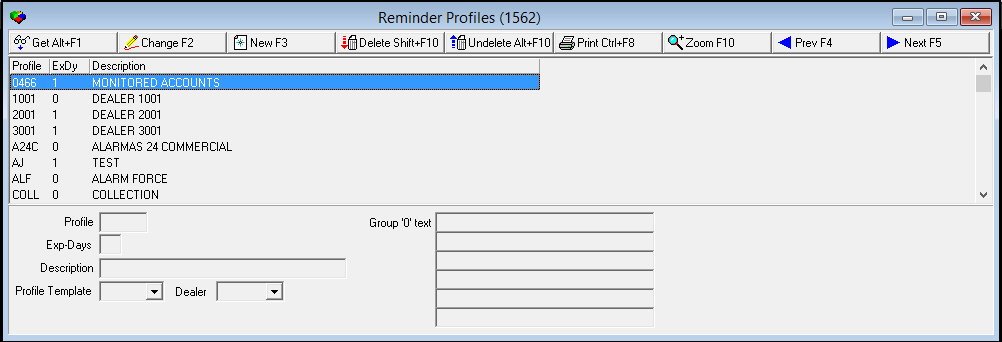
The following graphic shows Reminder Profiles as the program opens. The upper pane displays previously defined reminder profiles.
Field/Column Descriptions
The following table describes the fields and columns used in the main window of Reminder Profiles.
|
Field/Column |
Description |
|
Profile |
Identifies the selected reminder profile. |
|
Expire Days |
The minimum number of days between the creation of two identical reminders. O If this field displays a 0 (zero), you may create two identical reminders on the same day; reminder group levels shift accordingly. |
|
Description |
Text description of the selected reminder profile. |
|
Profile Template |
You can select a previously defined reminder profile to use as a template. |
|
Dealer |
ID of the dealer associated with the selected reminder profile. |
|
Group '0' text |
Free-form text that appears on reminder exports for group 0 records. O Group 0 records include all current invoices. |
Using Common Functions
See the reference document Common Functions in SBN for more information.
Zooming into the Sublevel of Reminder Profiles
Reminder Profiles contains a sublevel in which you can manage groups associated with reminder profiles.
The Reminder Profiles Details Tab
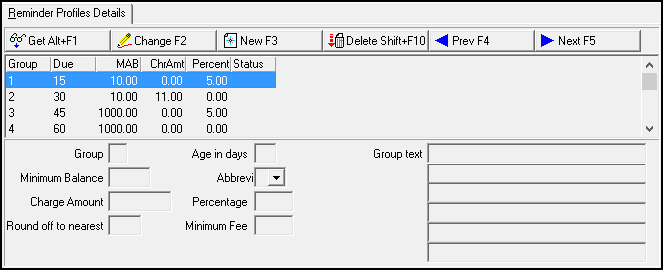
The following graphic displays the Reminder Profiles Details tab. The tab displays groups previously associated with the selected reminder profile.
Field/Column Descriptions
The following table describes the fields and columns used in the Reminder Profiles Details tab.
|
Field/Column |
Description |
|
Group |
SBN-assigned number that identifies the selected group. O All current records belong to Group 0. |
|
Due |
The number of days an invoice is past due to receive this level of reminder. |
|
Minimum Account Balance |
The minimum outstanding balance for an account to receive this level of reminder. |
|
Charge Amount |
Amount of late charge on the outstanding balance. |
|
Percent |
The percentage of the outstanding balance charged as a late fee. |
|
Status |
The status associated with the selected reminder level. Generally, the status is only used to identify accounts that have been sent to collections. |
|
Charge Amount |
You may type a flat dollar amount to charge as a late fee. |
|
Round off to nearest |
You may type an amount in dollars and cents to use for rounding. |
|
Age in days |
The number of days an invoice is past due to receive this level of reminder. |
|
Abbreviation |
The status associated with the selected reminder level; used to identify accounts that have been sent to collections. |
|
Percentage |
You may type a percentage of the outstanding balance to charge as a late fee. |
|
Minimum Fee |
You may type a minimum late fee to charge for the selected reminder level. |
|
Group text |
Free-form text that appears on reminder exports for the selected reminder level. |
Button Functions
The following table displays the buttons, describes the shortcut keys, actions, and functionality.
|
Button |
Name |
Shortcut Key |
Action |
Description |
|
|
Get |
ALT+F1 |
1562/ 1 |
Get record. |
|
|
Change |
F2 |
1562/ 2 |
Change selected record. |
|
|
New |
F3 |
1562/ 3 |
Create new record. |
|
|
Delete |
SHIFT+F10 |
1562/ 4 |
Delete selected record. |
|
|
Undelete |
ALT+F10 |
1562/ 5 |
Restore deleted record. |
|
|
|
CTRL+F8 |
1562/ 6 |
Print selected records. |
|
|
Zoom |
F10 |
1562/ 999 |
Zoom in/out of sublevel. |
|
|
Previous |
F4 |
1562/ 999 |
Select last record. |
|
|
Next |
F5 |
1562/ 999 |
Select next record. |









Modifications and Updates to Reminder Profiles
The following table lists modifications and updates to the Reminder Profiles document.
|
Mod Number |
Date |
Description |
|
n/a |
8/22/14 |
Images updated. |