
Connectivity Without the Sybase Client
Deploying SBN Without the Sybase Client
SBN products SBN and BackupHostImport no longer require the Sybase Open Client to be installed on the host machine. A clean Windows box with no sql.ini, no CT-Lib DLLs, and no SYBASE environment variable is now a supported deployment target.
What Changed (In General)
Prior to this enhancement, every SBN workstation required a local Sybase Open Client install plus a carefully maintained sql.ini that mapped server names to host:port. If the Sybase client was missing, the wrong version, or the sql.ini drifted out of sync, SBN could not connect.
That dependency has been replaced by a pure-.NET Sybase driver shipped directly alongside the SBN binary. The driver speaks TDS 5.0 over TCP -- the same wire protocol CT-Lib used -- so the server side does not change. Only the client changes:
- No Sybase install on workstations. Nothing to download from Sybase, nothing to license, nothing to patch.
- No
sql.iniedits. Server names are resolved from a JSON file that the app can edit through its own UI. - No legacy file dependencies. A new workstation does not need
sql.iniat all. - Same experience for users. The login screen, server dropdown, and all database behavior look identical.
The Two Assemblies (Essential)
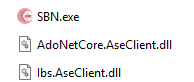
Every product that connects to Sybase now ships with two additional files next to its .exe. Both must be present or the app falls back to CT-Lib (which may not exist on the box).
Together they replace every native Sybase file that was previously required. Both assemblies are copied automatically by each product's post-build script -- you should never have to handle them manually. If you are doing a bare-hands install, just confirm both DLLs sit in the same directory as the executable.
A complete install directory therefore contains, at minimum:
No libsybct*.dll, no libsybcs*.dll, no sybintl.dll. No registry keys under HKLM\SOFTWARE\Sybase. No SYBASE or SYBROOT environment variables.
Server Name Resolution
Where CT-Lib read server names from %SYBASE%\ini\sql.ini, the managed driver reads them from:
Schema (relevant portion):
- The file is shared across SBN.exe, Concentrator, and BackupHostImport -- edits in one are picked up by all of them.
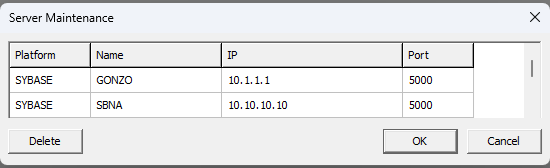
platformdetermines the connection path:SYBASEuses the managed driver,MSSQLuses ADO.NET (unchanged).- A built-in Server Maintenance grid lets users add, edit, and remove entries through the UI.
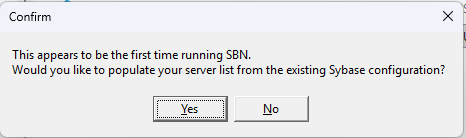
Add/Edit/Remove controls on the toolbar.
Walkthrough -- SBN.exe
SBN.exe ships with both assemblies:
- Log in normally. If
servers.jsonis empty, the login server dropdown is empty. - Click the
...button next to the server name. - The Server Maintenance window opens. Click Add and enter each server (name, platform, host, port) provided by your administrator.
- Close the dialog. Every imported server now appears in the login dropdown.
- Log in -- the managed driver connects directly over TDS with no further configuration.
From that point on, adding, renaming, or removing servers is a GUI operation. sql.ini is never touched again and may be deleted.
Walkthrough -- SBN BackupHostImport
BackupHostImport is the backup-server importer. It reads from a remote Sybase backup host and writes to the primary database.
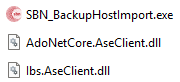
To deploy on a clean box:
- Copy the BackupHost install directory. Confirm both assemblies are present alongside
messages.txt. - Launch
SBN_BackupHostImport.exe. Ifservers.jsonis empty, add the backup-host server entry through the same Server Maintenance grid the other products use . - On the main form, pick the server name from the dropdown and run the import. The managed driver connects, and the import proceeds exactly as before.
BackupHostImport has its own LoadBHServersJson for its backup-server list; that file is separate from the shared servers.json and is not involved in Sybase connection resolution. Do not edit it when adding Sybase servers.
What Can Prevent a Sybase Connection
Removing the Sybase client removed one set of failure modes and introduced a different, smaller set. The list below enumerates every cause -- roughly ordered from most common to least -- that can block a connection in this deployment model.
Client-Side Prerequisites
- Either assembly missing. If
Ibs.AseClient.dllorAdoNetCore.AseClient.dllis not present next to the exe, the CLR host fails to instantiateTIbsSybaseConnandIBS_SQLfalls back to CT-Lib -- which isn't installed on the box. Connection fails at startup. Fix: confirm both DLLs sit next to the exe. servers.jsonmissing, empty, or no matching entry for the server name the user picked.IBS_SQL.GetDBTypereturns not-found and there is nothing to connect to. Fix: add the entry via Server Maintenance, or Import fromsql.ini. Log signature:LoadServersJson file-not-foundorGetDBType: not-found.- Wrong
platformvalue in the entry. An entry marked"MSSQL"routes through ADO.NET and never reaches the managed Sybase driver; an entry marked"SYBASE"does the opposite. Fix: correct the platform field. - CLR can't host. Very rare on modern Windows, but a badly-broken .NET Framework install makes
IBS_CLRHostfail at startup, before any Connect attempt. Fix: repair .NET Framework. Log signature: CLR-host init exception at the top ofpid_<pid>.log. messages.txtmissing. Does not block the connection itself, but producesUNKNOWNX/UNKNOWNYlabels that often make users think the connection is broken. Fix: copy the file next to the exe. The app checks the exe directory first, then%LOCALAPPDATA%\IBS\SBN\.
Network / Firewall
- TCP to
host:portblocked. The managed driver still needs direct TCP access to the Sybase server -- removing the Sybase client did not remove the network requirement. Firewall rules, VPN not connected, or a wrong IP / port inservers.jsonall produce the same symptom. Fix: confirm TCP reachability from the workstation (telnet,Test-NetConnection). Log signature: socket-level failure underIBS_CLRHostinpid_<pid>.log. - Going through SBN Tunnel, but the tunnel isn't up. If a
tunnelLicenseKeyis set, all Sybase traffic routes through127.0.0.1:<localPort>. If the helper never opened a channel, that port has nothing listening and the driver reports connection refused. This is distinct from the tunnel key being absent entirely -- absence falls back cleanly to direct. Fix: see the SBN Tunnel page for tunnel-side diagnostics; verify the helper process started.
Sybase-Side
- Login / password wrong. The driver and tunnel are transparent to authentication -- the SQL login still has to be valid on the server. Fix: confirm credentials on the server. Log signature: TDS login rejection under
IBS_CLRHostinpid_<pid>.log. - Packet size mismatch (older builds only). Pre-08.96 builds hardcoded
PacketSize=4096, which can fail against servers that negotiate a smaller maximum packet size. Current builds negotiate the packet size with the server. Fix: upgrade the client. Log signature: login handshake failure. - Connection charset mismatch. Driver defaults to
iso_1(Windows-1252), matching what CT-Lib did. A server configured differently will mangle accented characters but won't block the connection. Fix: do not override the charset without a specific reason. - Server offline or at its concurrent-connection limit. Sybase itself rejects the login. Fix: check Sybase server health and
sp_whocounts. Log signature: explicit Sybase error number and severity underIBS_CLRHostinpid_<pid>.log.
What Specifically Does Not Matter Anymore
Their absence used to block connections. In this deployment model they are all ignored:
- No
SYBASE/SYBROOTenvironment variables. - No
sql.ini. - No
libsybct*.dll,libsybcs*.dll,sybintl.dll, or any other native Sybase DLL. - No registry entries under
HKLM\SOFTWARE\Sybase. - No ODBC Driver for Sybase.
If anyone troubleshooting a problem starts installing or re-installing the Sybase Open Client to "fix" things, they are working against the design of this deployment. The driver is in the two managed assemblies, and nothing else.
Fastest Triage
Open log\pid_<pid>.log and look for the last successful phase in this sequence:
LoadServersJson-- file read and parsedIBS_SQL GetDBType-- server name matched to aservers.jsonentryIBS_CLRHost Connect-- managed driver Connect call
The first phase that fails pins the cause to one of the items above. If Connect is the first failure, search the same pid log for IBS_CLRHost.Connect, then TIbsSybaseConn.LastError on the line that follows -- that names the root cause explicitly (login rejected, socket refused, login timeout, etc.).
Diagnosing Problems -- The ./log/ Directory
Every SBN product writes detailed diagnostic logs next to its exe, in a log\ subdirectory. When a connection problem is reported, these logs contain everything needed to determine a root cause without requiring server-side access.
What You'll Find in ./log/
One pid_<pid>.log is written per product instance. The PID in the filename prevents conflicts when multiple instances run on the same box. The filename's last-modified time matches the session's lifetime -- open the file, read the top few lines for startup metadata (user, server name, timestamp), and you'll know which run it represents.
Which Log to Read First
Work outside-in: start with the main product log (pid_<pid>.log) for the flow-level story, then consult the driver log (pid_<pid>.log (search for IBS_CLRHost)) for SQL-level details.
What Each Log Contains
pid_<pid>.log -- written by IbsLog from every unit. Key sections:
server_json--LoadServersJson/SaveServersJson-- file path, parse status, server counts.IBS_SQL-- top-level connection orchestration;GetDBTypetrace showing whichservers.jsonentry matched and what platform it resolved to (SYBASE vs MSSQL).IBS_CLRHost-- the Delphi ? managed-driver boundary. Records Connect attempts, Disconnect events, ExecuteWithTimeout access violations, IsConnectionAlive exceptions, BcpOut/BcpIn with parameters and row counts.- Standard MsgSys/InterpretFile entries confirming
messages.txtwas found and parsed (resolved path, message count; look forUNKNOWNX/UNKNOWNYindicating missing entries).
the same pid_<pid>.log (the IBS_CLRHost entries cover TDS-level events) -- written directly by Ibs.AseClient.dll. Records every managed-driver operation at TDS level:
Connect:host, port, user, database, charset, packet size negotiated with the server.Execute:the SQL statement, parameters, and outcome.FetchRow,NextResult,GetValue-- per-row reads for debugging data issues.BcpIn/BcpOut-- bulk-copy row counts and errors.Disconnect:clean vs abnormal teardown reason.- Any TDS-level protocol error surfaced by AdoNetCore.AseClient.
This log is often the fastest path to a real root cause when the main app log just says "database error".
Workflow: Reviewing Logs Remotely
When a user reports a problem:
- Ask for the most recent
log\pid_<pid>.lognext to their running exe. - (SQL-level errors land in the same pid log under the IBS_CLRHost tag -- no separate file.)
- Open the main log first, search for the timestamp of the failure, trace the phase:
server_json LoadServersJson?IBS_SQL GetDBType?IBS_CLRHost Connect?IBS_CLRHost Execute. - The failure is almost always at the transition between phases -- find the last phase that succeeded, read the first entry of the next phase, and the error message there names the root cause.
What You Get
- Clean deployments. A new workstation needs the SBN product and nothing else for Sybase connectivity.
- GUI server management. Server names are added, edited, and removed through the app's own UI, not by editing files.
- One source of truth. All three products read the same
servers.json. - Forward-compatible. The same managed driver supports connecting through SBN Tunnel with no extra configuration -- see the SBN Tunnel page.
- Complete client-side diagnostics in
./log/-- every event from app to TDS lands in the samepid_<pid>.lognext to the exe.
Troubleshooting
"[Microsoft][ODBC SQL Server Driver][DBNETLIB]" error on login
If the login dialog shows an error matching any of the screenshots below:
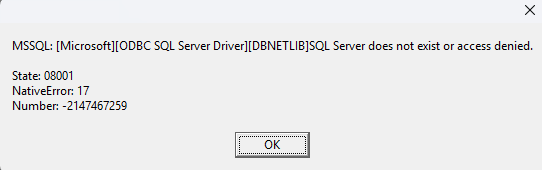
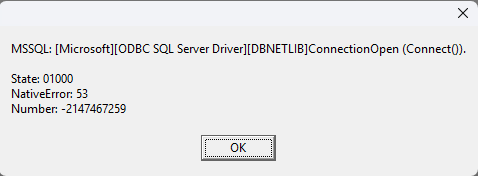

...the workstation has been told to talk to the server using the Microsoft SQL Server driver, even though the server is actually a Sybase server. The two are different protocols and the connection cannot succeed. SBN 8.92.75+ replaces this error with a clearer message that names the missing entry; if you are seeing the raw DBNETLIB text above, you are on an older build (8.92.74.1 or earlier) and the cause below applies.
Cause: the server name you typed at the login screen does not match an entry in the workstation's servers.json. When the lookup misses, older builds of SBN silently default to the MSSQL ODBC path and try to connect over DBNETLIB. The Sybase server doesn't speak that protocol, so the driver returns the error above. Common reasons for the lookup to miss:
- The server name was entered with different spelling, casing, or extra whitespace than the entry in
servers.json. - The
servers.jsonfile does not contain this server at all (first-time setup that did not complete, or the file was overwritten). - The
servers.jsonentry has"platform": "MSSQL"when the server is actually Sybase. (For a Sybase server, the entry must be"platform": "SYBASE".) - The
servers.jsonentry is missing one of the required fields (name,platform,host,port).
Fix
- Open the
servers.jsonfile. Its location depends on the product: - SBN.exe:
%LOCALAPPDATA%\IBS\SBN\servers.json - SBN Concentrator:
%LOCALAPPDATA%\IBS\Concentrator\servers.json - BackupHostImport:
%LOCALAPPDATA%\IBS\SBN_BackupHostImport\servers.json - Confirm there is an entry whose name field matches exactly what you type in the login dialog (case-sensitive on lookup).
- Confirm
"platform"is"SYBASE"(uppercase). Any other value, including a missing field, will not be treated as Sybase. - Save the file and re-launch SBN. Type the server name into the login dialog exactly as it appears in the
namefield.
"App locks up" after the error
The same root cause produces an apparent lock-up on some Windows builds: the ODBC driver's TCP connect attempt against a non-MSSQL server can take 30+ seconds to time out, during which the SBN window does not respond. Closing the error dialog and waiting for the underlying connect to time out releases the window. Fixing the servers.json entry as above eliminates the lock-up because SBN no longer attempts the MSSQL connect path.