
Insurance Companies
Insurance Companies
Insurance Companies
Program #: 1541
Module: System Administration
Overview
Insurance Companies (program #1541) enables you to create profiles of insurance companies. A drop-down menu of insurance companies appears in Data Entry Master (program #559).
Navigating to Insurance Companies
Use the following steps to navigate to Insurance Companies:
1. From the main SBN toolbar, select Menu.
2. From the drop-down menu, select Go To [ALT+F1].
3. In the Go To Program dialog box, type in "1541."
w Insurance Companies opens.
The Insurance Companies Screen
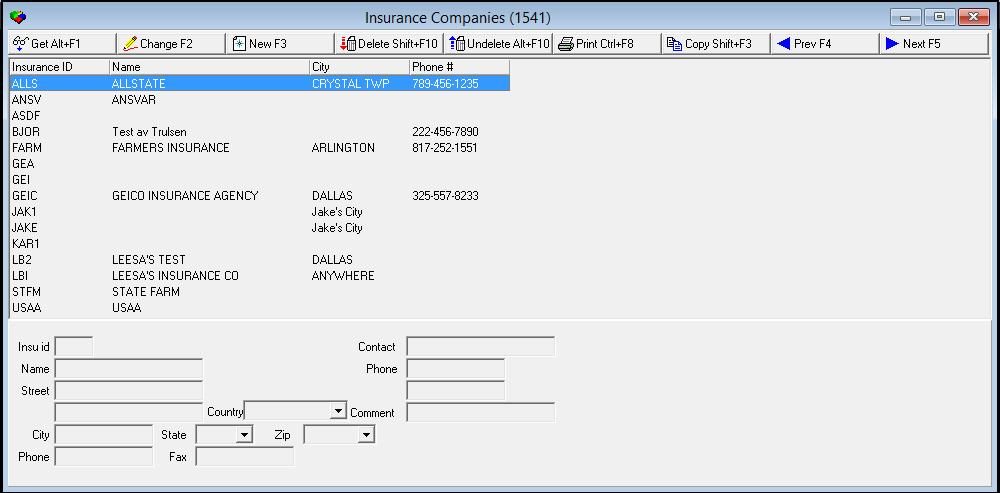
The following graphic shows the Insurance Companies screen as the program opens.
Field/Column Label Descriptions
The following table describes the field and column labels contained in the Insurance Companies screen.
|
Field/Column Label |
Description |
|
Insurance ID |
Abbreviation that identifies the selected insurance company. |
|
Name |
Name of the insurance company. |
|
Street |
Street address of the insurance company. |
|
Additional Street Address |
Additional information for the street address, if applicable. |
|
City |
City in which the insurance company is located. |
|
State |
State where the insurance company is located. (This field holds a maximum of 60 characters.) |
|
Zip |
Zip code of the insurance company. |
|
Country |
Country where the insurance company is located. |
|
Phone |
Primary phone number for the insurance company. |
|
Fax |
Fax number for the insurance company. |
|
Contact |
Name of the contact for the insurance company. |
|
Phone |
Phone number for the contact. |
|
Secondary Phone (No label) |
Secondary phone number for the contact. |
|
Comment |
Free-form text comment about the insurance company or contact. |
Viewing Details of an Insurance Company
Use the following steps to view details of an insurance company:
1. In Insurance Companies, select the insurance company for which you want to view details.
2. Choose Get Record.
w The fields in the bottom portion of the screen fill with the details of the insurance company.
Changing a Definition of an Insurance Company
Use the following steps to change the definition of an insurance company:
1. In Insurance Companies, select the insurance company you want to change.
2. Choose Get Record.
w The fields in the bottom portion of the screen fill with the details of the selected insurance company.
3. Choose Change Record.
w Fields in the bottom portion of the screen open.
4. Enter changes in the fields.
5. Choose Save.
Adding an Insurance Company
Use the following steps to add an insurance company:
1. In Insurance Companies, choose New.
w Fields in the bottom portion of the screen open.
2. Enter new details in the fields.
3. Choose Save.
Deleting an Insurance Company
You can delete any insurance company defined in this program. You can later restore any deleted insurance company.
Use the following steps to delete an insurance company:
1. In Insurance Companies, highlight the insurance company you wish to delete.
2. Choose Delete Record.
w SBN asks you to confirm your selection.
3. Choose Yes.
Restoring an Insurance Company
After an insurance company has been deleted, you can restore that insurance company back into the system by using the Undelete function.
Use the following steps to restore an insurance company:
1. In Insurance Companies, choose Undelete.
w The Undelete window appears.
2. Find the insurance company you wish to restore in the list, and double-click the line, or press [Enter].
w The insurance company returns to the active list of defined companies.
Using a Template for a New Insurance Company Profile
You can use the profile of one insurance company as a template for a profile of another insurance company.
Use the following steps to create a new insurance company profile from a template:
1. In Insurance Companies, select the insurance company you want to use as a template.
2. Choose Copy Current Record.
w The fields in the bottom portion fill with the details of the selected insurance company, but remain open for changes.
3. Change any information needed for the new profile of an insurance company.
4. Choose Save.
w SBN adds the new profile of the insurance company to the list of defined insurance companies.
Button Functions
The following table displays the buttons, describes the shortcut keys, actions, and functionality.
|
Button |
Name |
Shortcut Key |
Action |
Description |
|
|
Get |
ALT+F1 |
1541/ 1 |
Get record. |
|
|
Change |
F2 |
1541/ 2 |
Change selected record. |
|
|
New |
F3 |
1541/ 3 |
Create new record. |
|
|
Delete |
SHIFT+F10 |
1541/ 4 |
Delete selected record. |
|
|
Undelete |
ALT+F10 |
1541/ 5 |
Restore deleted record. |
|
|
|
CTRL+F8 |
1541 |
Zoom in/out of sublevel. |
|
|
Copy |
Shift+F3 |
1541 |
Copy the selected record as a template. |
|
|
Previous |
F4 |
1541/ 999 |
Select last record. |
|
|
Next |
F5 |
1541/ 999 |
Select next record. |
|
|
Exit without saving |
ESC |
1541/ 999 |
Exit without saving changes to record. |
|
|
Save New Record |
ENTER |
1541/ 999 |
Save changes to record. |











Modifications and Updates to Insurance Companies
The following table lists modifications and updates to the Insurance Companies document.
|
Mod Number |
Date |
Description |
|
n/a |
8/19/14 |
Images updated. |