
Sources
Sources
Sources
Program #: 1710
Module: System Administration
Overview
Use Sources (program #1710) to define and maintain the list of marketing sources.
A menu of Sources appears in the New window and the New Inquiry dialog box in Marketing (program #562). The sources displayed in the menu vary based on
-
The branch and program selected in the New window or New Inquiry dialog box
Note: If you select a branch and program, the menu of sources displays only those sources associated with
q Both the selected branch and selected program
q All branches and the selected program
q The selected branch and all programs
q All branches and all programs
or...
-
The dealer ID selected in the New window or New Inquiry dialog box
Note: If you select a Dealer ID, the menu of sources displays only those sources associated with
q The selected dealer ID
q All dealer IDs
To access this program, select Sources (program #1710) from the main menu of SBN.
The Sources Window
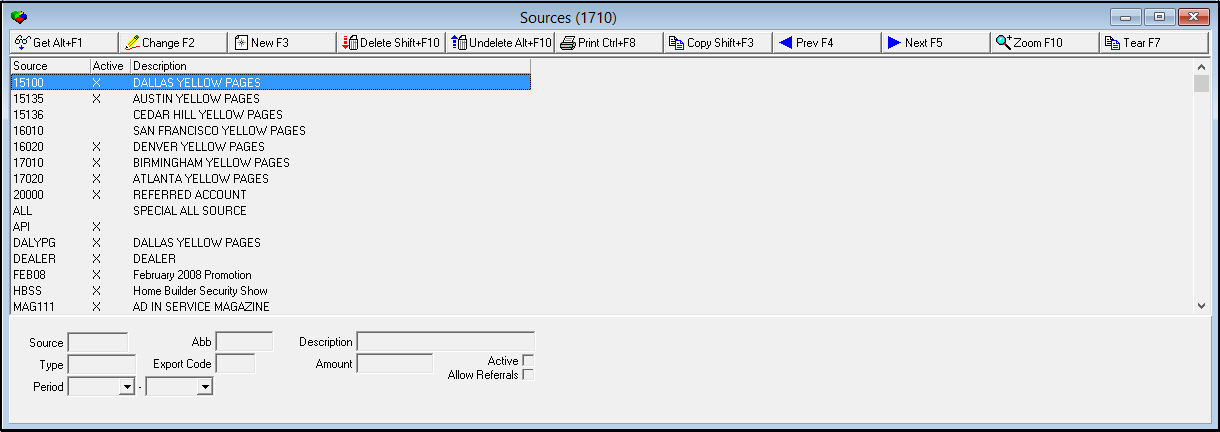
The following graphic shows the Sources window as the program opens. The window displays previously defined sources.
Field/Column Descriptions
The following table describes the fields and columns used in the main window of Sources.
|
Field/Column |
Description |
|
Source |
An alphanumeric code that identifies the source from which the prospect heard about your company. |
|
Abbreviation |
Abbreviation of the selected source. |
|
Description |
Free-form text description of the selected source. |
|
Type |
Free-form text used to group sources. This field is informational only. |
|
Export Code |
Company-defined code used for exports. |
|
Amount |
The cost of using the selected source for the time specified in the Period field. |
|
Active |
If this box displays a check mark, the selected source is active. |
|
Period - From |
The beginning date of a period covered by the cost of the selected source. |
|
Period - To |
The ending date of a period covered by the cost of the selected source. |
|
Allow Referrals |
If this box displays a check mark, referral payments are allowed on the marketing source. O If this box remains blank, you cannot access the referral fields in marketing. |
Using Common Functions
See the reference document Common Functions in SBN for more information.
Zooming into the Sublevel
Sources contains a sublevel with five tabs:
-
Programs
-
Log
-
Branches
-
Dealers
Note: Actions 1710/40-42 control access to the Dealers tab and functions.
-
Translations
Note: Actions 1710/50-54 control access to the Translations tab and functions.
You may use the Programs, Branches, or Dealer tabs to associate a source with specific programs, branches, or dealers. Then, the menus of Sources throughout Marketing display only those sources valid for a selected branch, program, or dealer. However, you may associate a source with all programs, branches, or dealers. See Zooming into the Sublevel. See Examples for scenarios in which you would associate sources.
The Programs Tab
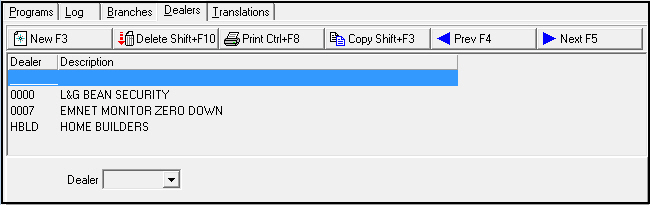
Use the Programs tab to associate a source with programs. The tab displays previously associated programs.
Field/Column Descriptions - Programs Tab
The following table describes the fields and columns used in the Programs tab.
|
Field/Column |
Description |
|
Program |
Identifies the program to associate with the selected source. (This menu originates from program #1701.) O If this column displays _________, the selected source is associated with all programs. |
|
Description |
Free-form text description of the program to associate with the selected source. |
The Log Tab
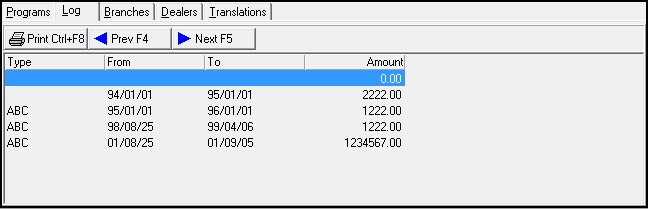
Use the Log tab to view a history of the cost of using a selected source during the time specified in the Period fields in the main window of Sources.
Column Descriptions - Log Tab
The following table describes the columns used in the Log tab in the sublevel of Sources.
|
Column |
Description |
|
Type |
Identifies the type of the selected source. |
|
From |
The beginning date of a period covered by the cost of the selected source. |
|
To |
The ending date of a period covered by the cost of the selected source. |
|
Amount |
The cost of the selected source during the period. |
The Branches Tab
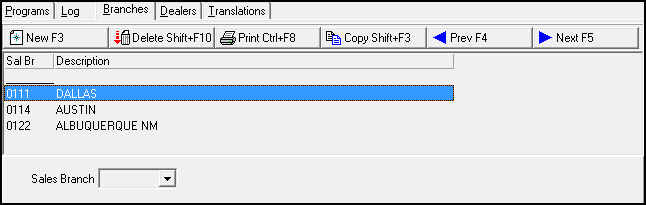
Use the Branches tab to associate a selected source with branches. The tab displays previously associated branches.
Field/Column Descriptions - Branches Tab
The following table describes the fields and columns used in the Branches tab in the sublevel of Sources.
|
Field/Column |
Description |
|
Sales Branch |
Identifies the branch to associate with the selected source. (This menu originates from program #1530.) O If this column displays _________, the selected source is associated with all branches. |
|
Description |
Free-form text description of the branch to associate with the selected source. |
The Dealers Tab
Use the Dealers tab to associate a selected source with dealers. The tab displays previously associated dealers.
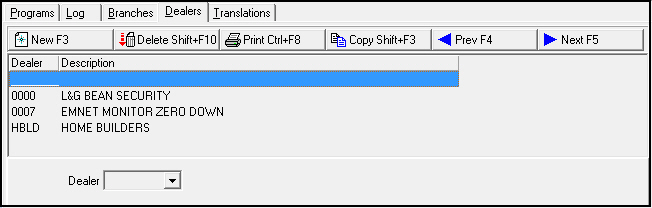
Note: Actions 1710/40-42 control access to the Dealers tab.
Field/Column Descriptions - Dealers Tab
The following table describes the fields and columns used in the Dealers tab.
|
Field/Column |
Description |
|
Dealer |
Identifies the dealer to associate with the selected source. (This menu originates from program #1537.) O If this column displays _________, the selected source is associated with all dealers. |
|
Description |
Text description of the selected dealer. |
Translations Tab
Use the Translations tab to attach translations to sources. The menus of Sources in Marketing then display the sources in the user’s language.
Note: Actions 1710/50-54 control access to the Translations tab and functions.
The tab displays previously defined translations.
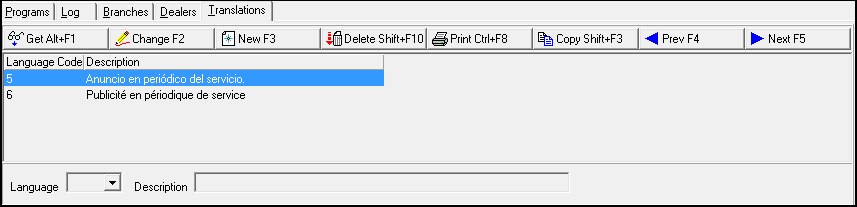
Field/Column Descriptions
The following table describes the fields and columns used in the Translations tab.
|
Field/Column |
Description |
|
Language Code |
Code that identifies the language of the associated translation. |
|
Description |
Text description, in the associated language, of the selected source. |
Creating a Global Source
You may associate a source with all
-
Branches
-
Programs
-
Dealers
In Marketing, menus of Sources then display that source for all branches, programs, or dealers.
Use the following steps to create a global source:
1. In Sources (program #1710), select the source that you want to associate with all branches, programs, or dealers.
2. Choose Zoom in/out of Sublevel.
‰ The sublevel tabs appear below the main window of Sources.
3. Select the tab in which you want to associate the source.
4. In the tab, choose New Record.
‰ The single field in the lower pane of the tab opens.
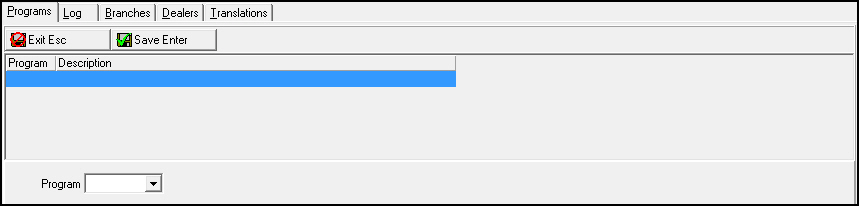
Note: Fields vary by tab:
q Sales Branch - in Branches tab
q Program - in Program tab
q Dealer - in Dealer tab
5. Leave the field blank.
6. Choose Save.
‰ The list of defined sources for that branch, program, or dealer displays a line (________) to identify the source associated with all branches, programs, or dealers.
Examples
The following examples depict scenarios in which a system administrator has associated a source
-
With all branches, programs, or dealers
-
With specific branches, program, or dealers
Example 1
Company A has placed an advertisement for their security services in a national newspaper. The advertisement discusses a range of services. The system administrator for Company A created a source in program #1710 named National Ad. Because this advertisement was designed to reach customers from all across the country who are interested in various services, the system administrator accessed the Branch, Program, and Dealer tabs and associated National Ad with all branches, programs and dealers.
Example 2
Company B advertises its residential security services in the local telephone directory. However, it advertises its commercial security services in a special mailer to local businesses. The system administrator for Company B created two sources in program #1710 named Local Directory and Special Mailer. In the Dealer tab, the system administrator associated Local Directory with Dealer 102, who exclusively sells residential systems and associated Special Mailer with Dealer 245, who exclusively sells commercial systems.
Button Functions
The following table displays the buttons, describes the shortcut keys, actions, and functionality.
|
Button |
Name |
Shortcut Key |
Action |
Description |
|
|
Get |
ALT+F1 |
1710/ 1 |
Get record. |
|
|
Change |
F2 |
1710/ 2 |
Change selected record. |
|
|
New |
F3 |
1710/ 3 |
Create new record. |
|
|
Delete |
SHIFT+F10 |
1710/ 4 |
Delete selected record. |
|
|
Undelete |
ALT+F10 |
1710/ 5 |
Restore deleted record. |
|
|
|
CTRL+F8 |
1710/ 6 |
Print selected records. |
|
|
Copy |
SHIFT+F3 |
1710/ 999 |
Copy selected field. |
|
|
Zoom |
F10 |
1710/ 999 |
Zoom in/out of sublevel. |
|
|
Tear |
F7 |
1710/ 999 |
Display selected source description. |
|
|
Previous |
F4 |
1710/ 999 |
Select last record. |
|
|
Next |
F5 |
1710/ 999 |
Select next record. |











Modifications and Updates to Sources
The following table lists modifications and updates to the Sources document.
|
Mod Number |
Date |
Description |
|
n/a |
8/26/14 |
Images updated. |