
Contract Search
Contract Search
Contract Search
Module: Accounting
Overview
Use the Contract Search tab to select search parameters to identify
Installations that are not being invoiced
Contracts that are being invoiced although the installation is inactive
The tab remains blank until you perform a search. After you perform a search, you can scroll through the records and print the results.
To access this program, select Contract Master (program #548) from the main menu of SBN and then choose the Contract Search tab.
The Contract Search Screen
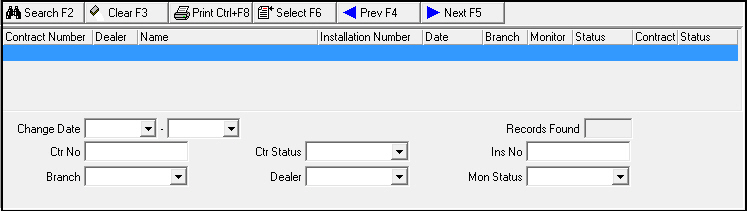
The following graphic shows the Contract Search tab with examples of selected search parameters and search results displayed in the columns.
Field/Column Descriptions
The following table describes the fields and columns used in this tab.
Field/Column |
Description |
Contract Number |
Contract number of the account on this line. |
Dealer |
Identification number of the dealer attached to this contract. |
Name |
Name of the primary person attached to this contract. |
Installation Number |
Installation number attached to the contract on this line. |
Date |
Date that the contract on this line was created. |
Branch |
Installation branch responsible for monitoring this contract. |
Monitoring |
Current monitoring status for this installation. |
Status |
Last date that the monitoring status was changed on this installation. |
Contract |
Current contract status for this contract. |
Status |
Last date that the contract status was changed on this contract. |
Change Date |
Beginning status change date to include in this search. |
Change
Date |
Ending status change date to include in this search. |
Contract Number |
Specific contract number, if any, to include in this search. |
Contract Status |
Specific contract status or SQL query string to include in this search. O You can use this field in conjunction with the monitoring status to look for accounts that you monitor but do not invoice or those that you do not monitor but continue to invoice. |
Installation Number |
Specific installation number, if any, to include in this search. |
Branch |
Specific installation branch, if any, to include in this search. |
Dealer |
Specific dealer extension, if any, to include in this search. |
Monitoring Status |
Specific monitoring status or SQL query string to include in this search. O You can use this field can in conjunction with the contract status to look for accounts that you monitor but do not invoice or those that you do not monitor, but continue to invoice. |
Records Found |
Number of records that match your search parameters. |
Searching for a Contract
To search for an existing contract:
1. In the Contract Search tab, select your search parameters.
Note: See Field/Column Descriptions of this document for more details on the search parameters.
2. Choose Search.
‰ The upper pane of the window displays the search results.
Note: Once you have searched for a contract and scroll through the results, you can choose [Enter] to return to the top of the list.
3. Choose Select to retrieve additional information about the selected line.
4. To conduct another search, choose Clear.
5. Repeat steps 1-2.
Using Common Functions
See the reference document Common Functions in SBN for more information.
Button Functions
The following table displays the buttons, describes the shortcut keys, actions, and functionality.
Button |
Name |
Shortcut Key |
Action |
Description |
|
Search |
f2 |
548/82 |
Search for existing contract. |
|
Clear Search Screen |
f3 |
548/81 |
Clear search parameters. |
|
Print selected records |
ctrl+f8 |
548/83 |
Print selected records. |
|
Select |
f6 |
548/84 |
Retrieve additional information about the selected line. |
|
Previous Record |
f4 |
548/85 |
Go to previous record. |
|
Next Record |
f5 |
548/86 |
Go to next record. |
|
Exit without saving |
ESC |
Exit without saving changes. |
|
|
Save New Record |
ENTER |
Save existing changes to record. |








Modifications and Updates to Contract Search
The following table lists modifications and updates to the Contract Search document.
Mod Number |
Date |
Description |
n/a |
8/02/14 |
Images updated. |