
Work Types
Work Types
Work Types
Program #: 1526
Module: System Administration
Overview
Use Work Types (program #1526) to define work types for scheduling. Menus of Work Types appear in the Service Log tab of Data Entry (program #559) and in several other programs throughout SBN.
You may define the default work types that appear in these menus by associating a selected work type with an action/index from Action Profiles (program #1502) and then associating that action/index with a user action profile. While you may use any action/index from program #1502 for this purpose, actions 1526/10-19 are specifically designated for defining default work types.
The defaults appear if:
-
Any work type is associated with an action
-
The user’s action profile also contains that action
SBN uses the first matching action in the user’s action profile as the default for the Work Types field and populates the menu with
-
All the work types for which the user has a matching action/index
-
All work types not associated with an action/index
If no work types are associated with an action/index, the default of the Work Type field is blank and SBN populates the menu with all work types.
To access this program, select Work Types (program #1526) from the main menu of SBN.
The Work Types Window
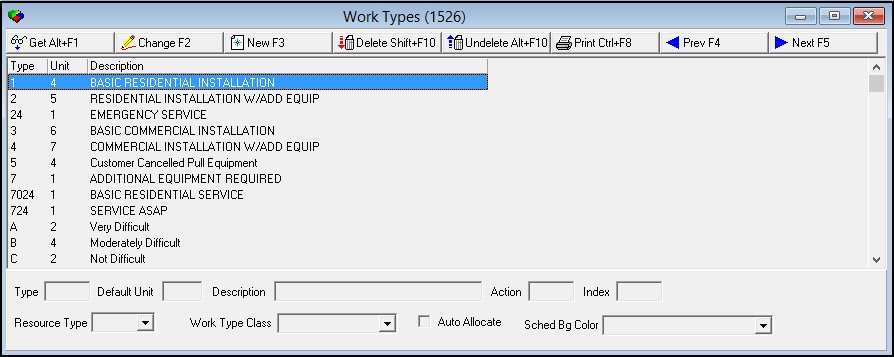
The following graphic shows the Work Types window as the program opens. The window displays previously defined work types.
Field/Column Descriptions
The following table describes the fields and columns used in the Work Types window.
|
Field/Column |
Description |
|
Type |
Identifies the work type. This field accepts up to four characters. |
|
Default Unit |
The number of time units set as the default for the selected work type. O Use option scsize to define the Default Unit. |
|
Description |
Text description of the work type. |
|
Action |
You may define the default work type and the menu of work types by entering an action/index to associate with the selected work type. For example, for action 1526/10, 1526 is the action number. O While you may use any action/index in program #1502, actions 1526/10-19 are specifically designated for this purpose. O You may define multiple work types with the same action/index. O If you leave this field blank, the selected work type appears in the Work Type menu for any user who has access to Scheduling and Schedule Request. O For more information on defining the defaults, see Overview and Defining Default Work Types. |
|
Index |
You may define the default work type and the menu of work types by entering an action/index to associate with the selected work type. For example, for action 1526/10, 10 is the index number. O You may define multiple work types with the same action/index. |
|
Resource Type |
You may define the resource type that will default into the Schedule Type field of the Service Request dialog box when the associated work type is selected in that dialog box. |
|
Work Type Class |
You may select a work type class for the work type. (This menu originates from program #1590/71.) Work type class is used to restrict Work Type menus in various programs, including:
|
|
Auto Allocate |
When a work type with this check box selected is used in the Schedule Request window of Marketing (program #562), SBN automatically allocates the schedule request to the selected salesperson in Scheduling (program #563). When a work type that does not have this check box selected is used in the Schedule Request of Marketing, SBN creates a schedule request in Scheduling, but does not allocate it to a salesperson. |
|
Sched Bg Color |
Select a background color from this drop-down menu to color code allocated jobs on the Scheduling board (program #563) by work type. Be sure to select a color that contrasts sufficiently with black so that the text on the job is legible. Allocated jobs with work types for which a background color has not been selected appear on the Scheduling board as white by default. |
Using Common Functions
See the reference document Common Functions in SBN for more information.
Defining Default Work Types
You may use action profiles to define the default work types that appear in the Work Types menu - in Scheduling (program #1563) and Schedule Request in Data Entry - for various users. You may want to restrict the Work Types menu to display only sales-related work types to sales persons, or only installation-related work types to installers.
Use the following steps to define default work types:
Note: In the following steps, you may substitute any action/index from program #1502 for actions 1526/10-19.
1. Navigate to Action Profiles (program #1502) > Main Menu > 411System Administration > 420 Basic Profiles > 417 Scheduling Profiles > 1526 Work Types.
2. Determine which actions of 1526/10-19 to associate with which work types.
3. In Work Types (program #1526), select the work type you want to associate to an action.
4. Choose Change Record.
‰ The fields in the lower pane of the window open for changes.
5. Complete the Action and Index fields:
l In Action - type .
l In Index - type the indexed number (10-19) of the action that corresponds to that work type.
6. Choose Save.
7. Repeat steps 3-6 for each work type to associate with an action/index. You may associate multiple work types with the same action/index.
8. Return to Action Profiles (program #1502).
9. Update the appropriate user profile to include the action associated with the work type. See Action Profiles.
Example
Company A wants to define defaults for Work Types for Installers and for Sales persons.
1. In Action Profiles (program #1502), the system administrator decides to associate
l Action 1526/10 with installation-related work types
l Action 1526/11 with sales-related work types
2. In Work Types (program #1526), the system administrator associates
l All installation-related work types with action/index 1526/10
l All sales-related work types with action/index 1526/11
3. In Action Profiles again, the system administrator updates the following action profiles:
l Installer action profile to include action 1526/10
l Sales person action profile to include action 1526/11
‰ When Installers use Scheduling (program #563) or Schedule Request in Data Entry, the Work Types menu displays only
q Those associated with action 1526/10
q Those not associated with an action/index
‰ When Sales persons use Scheduling (program #563) or Schedule Request in Data Entry, the Work Types menu displays only
q Those associated with action 1526/11
q Those not associated with an action/index
Button Functions
The following table displays the buttons, describes the shortcut keys, actions, and functionality.
|
Button |
Name |
Shortcut Key |
Action |
Description |
|
|
Get |
ALT+F1 |
1526/ 1 |
Get record. |
|
|
Change |
F2 |
1526/ 2 |
Change selected record. |
|
|
New |
F3 |
1526/ 3 |
Create new record. |
|
|
Delete |
SHIFT+F10 |
1526/ 4 |
Delete selected record. |
|
|
Undelete |
ALT+F10 |
1526/ 5 |
Restore deleted record. |
|
|
|
CTRL+F8 |
1526/ 6 |
Print selected records. |
|
Misc Numbers |
1526/ 10 - 1526/ 19 |
Indexed number of the action that corresponds to that work type. |
||
|
|
Previous |
F4 |
1526/ 999 |
Select last record. |
|
|
Next |
F5 |
1526/ 999 |
Select next record. |








Modifications and Updates to Work Types
The following table lists modifications and updates to the Work Types document.
|
Mod Number |
Date |
Description |
|
07.79.22960, 08.79.09408 08.79.22929, 08.79.09394 |
9/20/2013 |
Added Sched Bg Color drop-down menu. |
|
n/a |
8/27/2014 |
Images updated. |
F1 Help
| Delphi Forms | badealidlogform, servicequeueform |
| Program Numbers | 547 |