
Tax Profiles
Tax Profiles
Tax Profiles
Module: System Administration
Overview
Use Tax Profiles (program #1514) to define tax profiles. A menu of Tax Profiles appears in the Contract Master (program #548). To access this program, select Tax Profiles (program #1514) from the main menu of SBN.
The Tax Profiles Window
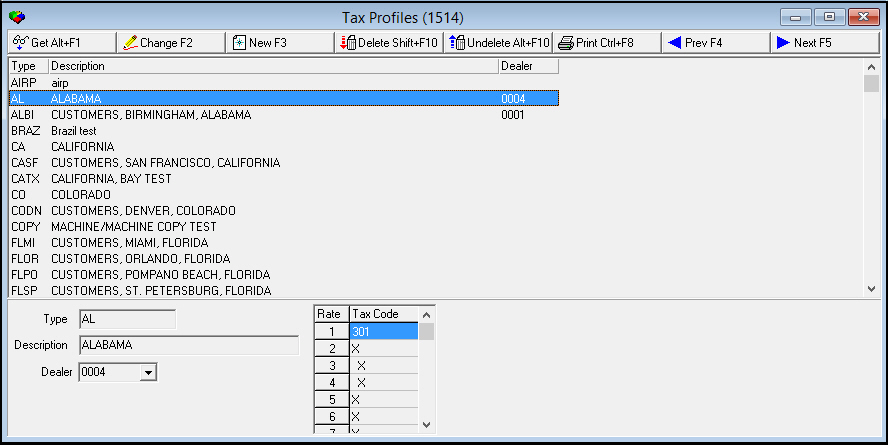
The following graphic shows Tax Profiles. The upper pane displays previously defined tax profiles.
Field/Column Descriptions
The following table describes the fields and columns used in Tax Profiles.
Field/Column |
Description |
Type |
Identifies the selected tax profile. O For U.S. customers: If option bl020 is on, type the 2-character state abbreviation. SBN matches the state field from the installation address along with the zip code entered in Tax Codes (program #1515) to determine the tax profile instead of using the tax profile field from the contract master. O If a tax profile has been selected on the contract master, SBN uses that profile regardless of option settings. (This field holds a maximum of 60 characters.) |
Description |
Text description of selected tax profile. |
Dealer |
Dealer profile assigned to the selected user. (This menu originates from program #1743.) |
Rate (1-9) |
Correlate to specific services. Rates link to services in the Rate field of Revenue Types (program #1512). |
Tax Code |
If the service for the corresponding rate field is taxable, you may select an applicable tax code from the menu, or you may select the extra tax code that identifies the service as taxable. O Leave this field blank to identify the service for the corresponding rate field as non-taxable. |
Using Common Functions
See the reference document Common Functions in SBN for more information.
Button Functions
The following table displays the buttons, describes the shortcut keys, actions, and functionality.
Button |
Name |
Shortcut Key |
Action |
Description |
|
Get |
ALT+F1 |
1514/ 1 |
Get record. |
|
Change |
F2 |
1514/ 2 |
Change selected record. |
|
New |
F3 |
1514/ 3 |
Create new record. |
|
Delete |
SHIFT+F10 |
1514/ 4 |
Delete selected record. |
|
Undelete |
ALT+F10 |
1514/ 5 |
Restore deleted record. |
|
Zoom |
F10 | 1514/ 7 |
Zooms into WO Alternate Tax window. |
|
CTRL+F8 |
1514/ 6 |
Print selected records. |
|
|
Previous |
F4 |
1514/ 999 |
Select last record. |
|
Next |
F5 |
1514/ 999 |
Select next record. |








Work Order Alternate Tax Tab
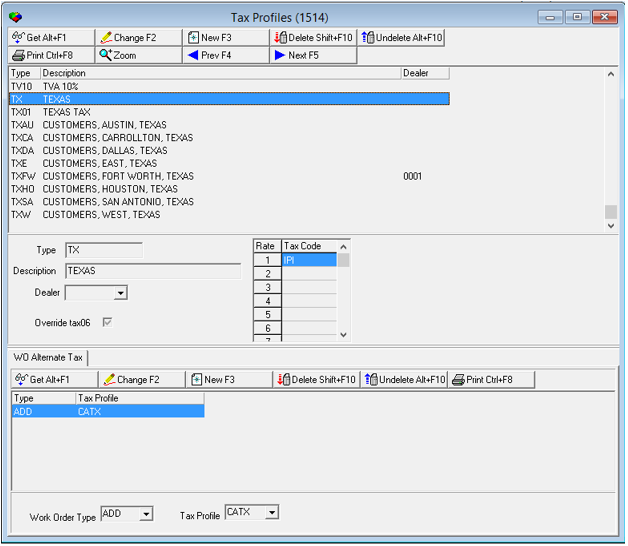
When zoomed into a Tax Profile, the "WO Alternate Tax" window will appear. A user can then create/choose an additional tax that will be a applied within a Work Order if the "Override tax06" check box is checked.
Field/Column Descriptions
The following table describes the fields and columns used in Tax Profiles.
Field/Column |
Description |
Work Order Type |
Types of work orders often defined by Price List Groups and contract types. |
Tax Profile |
Profile that is set up for taxes that has previously defined parameters that can be applied to a Work Order. Once a tax profile is set up (upper pane window), a user can click it once and all previously set parameters will be applied so user will not have to define every parameter each time. |
Button Functions
The following table displays the buttons, describes the shortcut keys, actions, and functionality of WO Alternate Tax window.
Button |
Name |
Shortcut Key |
Action |
Description |
|
Get |
ALT+F1 |
1514/ 1 |
Get record. |
|
Change |
F2 |
1514/ 2 |
Change selected record. |
|
New |
F3 |
1514/ 3 |
Create new record. |
|
Delete |
SHIFT+F10 |
1514/ 4 |
Delete selected record. |
|
Undelete |
ALT+F10 |
1514/ 5 |
Restore deleted record. |
|
CTRL+F8 |
1514/ 6 |
Print selected records. |
Modifications and Updates to Tax Profiles
The following table lists modifications and updates to the Tax Profiles document.
Mod Number |
Date |
Description |
n/a |
8/26/14 |
Images updated. |
08.87.11106, 07.87.25444, 07.87.25442, 07.87.25434, 08.87.11088 |
10/11/17 |
New WO Alternate Tax Window, drop downs, and buttons documented. |
n/a |
10/11/17 |
Images updated. |