
Skill Monitor
Skill Monitor
Skill Monitor
Program #: 1890
Module: System Administration
Overview
Use Skill Monitor (program #1890) to set parameters for removing skill limitations assigned to the customer, operators, or terminals until a skilled operator is available to handle the alarm. Thus, if an alarm comes in with specific skill routing, but all operators with those skills are unavailable, the Skill Monitor determines how long the alarm waits for the skill before moving on to an operator without the skill.
Note: The skill monitor ONLY applies to Queues 1, 2, and 15.
To access this program, select Skill Monitor (program #1890) from the main menu of SBN.
The Skill Monitor Window
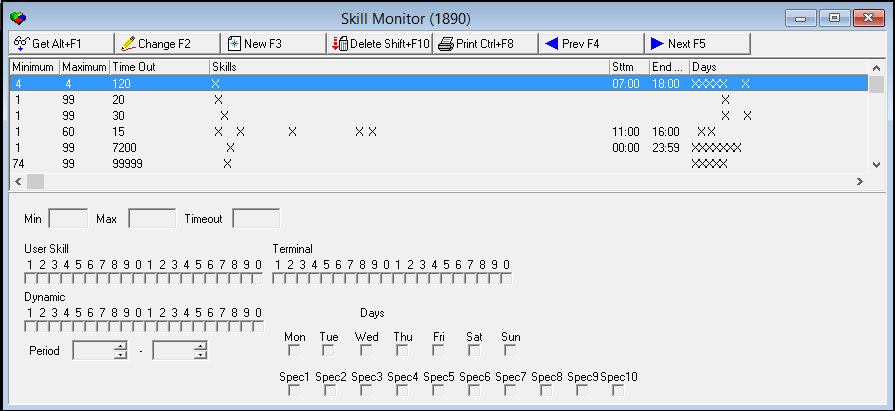
The following graphic shows Skill Monitor with information displayed.
Field/Column Descriptions
The following table describes the fields and columns used in Skill Monitor.
|
Field/Column |
Description |
|
Min |
Minimum priority level for the incoming signal. |
|
Max |
Maximum priority level for the incoming signal. |
|
Time Out |
Time in seconds that the signal stays in the queue with skills before having the skill designation removed. |
|
Skills |
Skills affected by these parameters. These skills are broken down into three categories: l User skills l Terminal skills l Dynamic skills |
|
Start Time |
Beginning time for the skill monitor to run. |
|
End Time |
End time for the skill monitor entry. |
|
Days |
Specific days the skill monitor applies. These days include both days of the week and holiday day numbers. (The holiday day numbers originate from program #1746.) |
Using Common Functions
See the reference document Common Functions in SBN for more information.
Button Functions
The following table displays the buttons, describes the shortcut keys, actions, and functionality.
|
Button |
Name |
Shortcut Key |
Action |
Description |
|
|
Get |
ALT+F1 |
1890/ 1 |
Get record. |
|
|
Change |
F2 |
1890/ 2 |
Change selected record. |
|
|
New |
F3 |
1890/ 3 |
Create new record. |
|
|
Delete |
SHIFT+F10 |
1890/ 4 |
Delete selected record. |
|
|
|
CTRL+F8 |
1890/ 6 |
Print selected records. |
|
|
Previous |
F4 |
1890/ 999 |
Select last record. |
|
|
Next |
F5 |
1890/ 999 |
Select next record. |







Modifications and Updates to Skill Monitor
The following table lists modifications and updates to the Skill Monitor document.
|
Mod Number |
Date |
Description |
|
n/a |
8/25/14 |
Images updated. |