
Commission Payroll Codes
Commission Payroll Codes
Commission Payroll Codes
Module: System Administration
Overview
Use Commission Payroll Codes (program #1854) to create and maintain commission codes for
-
Items
-
Source/package combinations
-
Sources
-
Branches
-
Work orders
The commission payroll codes are available in menus in related commission programs.
To access this program, select Commission Payroll Codes (program #1854) from the main menu of SBN.
The Commission Payroll Codes Window
The following graphic shows Commission Payroll Codes as the program opens. The upper pane displays previously defined commission payroll codes.
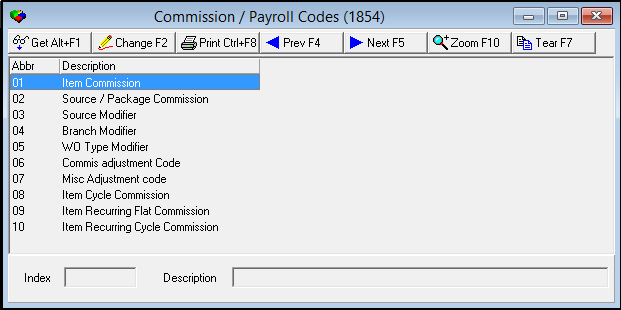
Field/Column Descriptions
The following table describes the fields and columns used in Commission Payroll Codes.
|
Field/Column |
Description |
|
Abbr/Index |
Indexed placement of the commission payroll code. Identifies the commission payroll code. |
|
Description |
Text description of the commission payroll code. |
Using Common Functions
See the reference document Common Functions in SBN for more information.
Zooming into the Sublevel of Commission Payroll Codes
In the sublevel of Commission Payroll Codes you can define commission codes to associate with the related commission payroll code.
The Commission Codes Details Tab
The following graphic shows the Commission Codes Details tab. The tab displays the commission codes associated with the selected commission payroll code.
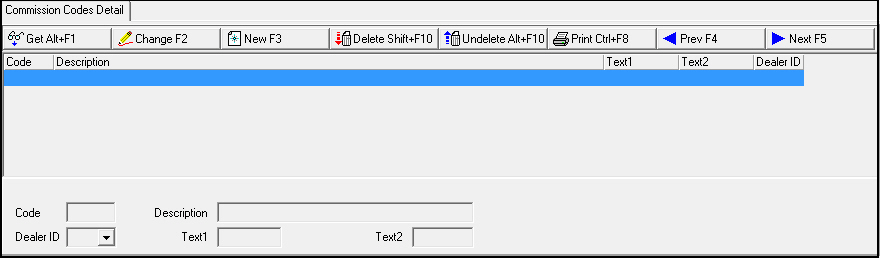
Field/Column Descriptions
The following table describes the fields and columns used in the Commission Codes Detail tab.
|
Field/Column |
Description |
|
Code |
Customer-defined, one-digit, alpha-numeric code. |
|
Description |
Text description of the commission payroll code. |
|
Text 1 |
Text description field 1 |
|
Text 2 |
Text description field 2 |
|
Dealer ID |
Unique ID for a dealer. Displays in program 559. Commission Payroll Codes are now dealer restricted. The restriction is added in program 1854. The picklist on 559 is now restricted to Payroll codes for the dealer assigned to the installation. Users cannot change a dealer on an existing record. |
Button Functions
The following table displays the buttons, describes the shortcut keys, actions, and functionality.
|
Button |
Name |
Shortcut Key |
Action |
Description |
|
|
Get |
ALT+F1 |
1854/ 1 |
Get record. |
|
|
Change |
F2 |
1854/ 2 |
Change selected record. |
|
|
|
CTRL+F8 |
1854/ 6 |
Print selected records. |
|
|
Zoom |
F10 |
1854/ 999 |
Zoom in/out of sublevel |
|
|
New |
F3 |
1854/ 13 |
Create new record. |
|
|
Delete |
SHIFT+F10 |
1854/ 14 |
Delete selected record. |
|
|
Undelete |
ALT+F10 |
1854/ 15 |
Restore deleted record. |
|
|
Previous |
F4 |
1854/ 999 |
Select last record. |
|
|
Next |
F5 |
1854/ 999 |
Select next record. |









Modifications and Updates to Commission Payroll Codes
The following table lists modifications and updates to the Commission Payroll Codes document.
|
Mod Number |
Date |
Description |
|
n/a |
8/15/14 |
Images updated. |