
Open Close Log
Open Close Log
Open/Close Log
Module: Account Management
Overview
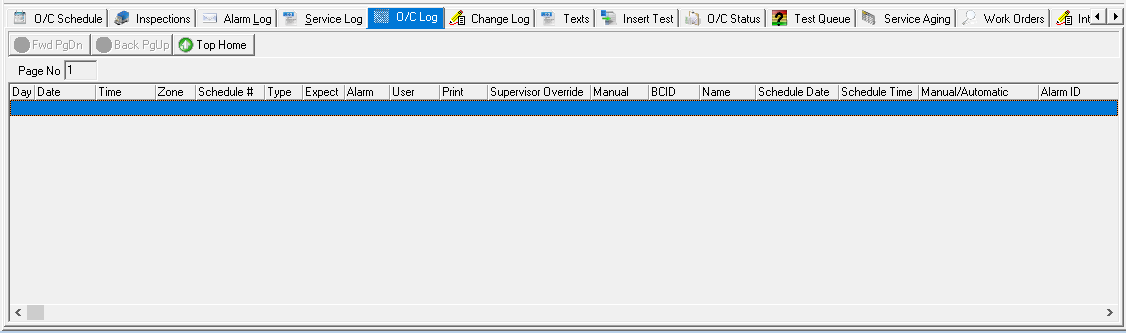
Use the Open/Close (O/C) Log tab to view recorded Open/Close incidents for the selected installation. The log displays all Open/Close incident details when SBN receives a signal.
Navigating to the Open/Close Log
Use the following steps to navigate to the Open/Close Log:
1. From the main SBN toolbar, select Menu.
2. From the drop-down menu, select Go To.
3. In the Go To Program dialog box, type in "559" and press Enter.
w Data Entry Master and Basics opens.
4. Choose the O/C Log tab in the lower pane of Data Entry.
The Open/Close Log Tab
The following graphic shows the Open/Close Log tab with installation information displayed.
Column Descriptions
The following table describes the columns used in the Open/Close Log tab.
Column |
Description |
Page No |
Page number currently displayed in the Open/Close Log tab. |
Day |
Day of the week the event occurred. |
Date |
Date this event entered the Open/Close Log. This field is based on either the customer's or operator's time zone. Note: Use Toggle Operator/Premises Time in Data Entry Master to switch between time zones. |
Time |
Time this event entered the Open/Close Log. This field is based on either the customer's or operator's time zone. Note: Use Toggle Operator/Premises Time in Data Entry Master to switch between time zones. |
Zone |
Zone from which the event was received. |
Schedule # |
Schedule number attached to the zone from where event was received. (This column originates from the O/C Schedule tab.) |
Type |
Type of event recorded: Open, Close or Change. |
Expect |
Shows the event SBN expected: Missing or Log-Only. |
Alarm |
If this column displays an X, SBN generated an alarm from the signal received. |
User |
User number of the person that sent the Open/Close. |
If this column displays an X, the incident does not print when you generate a report. |
|
Supervisor Override |
If this column displays an X, a supervisor marked the incident so it does not print when you generate a report. |
Manual |
If this column displays an X, the date and time for this event were manually entered; SBN did not enter the date and time. |
Backup CID |
CID number from which the signal was received. This field only displays a CID if the signal was received from an installation with multiple CIDs.
Note: When option ba219 is on, SBN uses a base number of zero (0) for the CID index in the log; thus the first CID index is 0. When option ba219 is off, the first CID is index 1. |
Name |
Name of active user or an additional comment. |
Schedule Date |
Date the event was scheduled to occur. |
Schedule Time |
Time the event was scheduled to occur. |
Manual/Automatic (M/A) |
Indicates whether schedule Date/Time refers to an automatic schedule entry or a manually modified entry. |
Alarm ID |
Alarm ID attached to the Event. |
Scrolling through the Open/Close Log
To move backward and forward through the multiple pages in the Open/Close Log, use the blue arrow buttons.
Fwd - Scroll forward one page
Back - Scroll to the previous page
Top - Scroll to the top of the log
Note: None of the navigation buttons are available if only one page is present.
Related Programs
The following table lists programs related to the Open/Close Log.
Program |
Number |
Document Link |
Description |
Open/Close Schedule tab |
N/A |
Manage schedules for installations for which you want to monitor open/close times. |
|
Open/Close Status |
N/A |
View the open/close status of zones attached to a passcard. |
|
Data Entry Master and Basics |
559 |
The program from which you can access the Open/Close Log. Use the Toggle Operator/Premises Time to switch between customer and operator time zones. |
Button Functions
The following table displays the buttons, describes the shortcut keys, actions, and functionality.
Button |
Name |
Shortcut Key |
Action |
Description |
|
Scroll Forward 1 Page |
PGDN |
559/41 |
Scroll forward one page. |
|
Scroll Backward 1 Page |
pgup |
559/42 |
Scroll backward one page. |
|
Go to top of log |
home |
559/43 |
Go to top of log. |


Modifications and Updates to Open/Close Log
The following table lists modifications and updates to the Open/Close Log document.
Mod Number |
Date |
Description |
n/a |
05/14/09 |
document rewritten |
n/a |
07/25/14 |
Images updated. |
08.90.11572, 07.90.26071 |
12/18/18 |
Image updated. Alarm ID column added within Open/Close Log. |