
Transaction Types
Transaction Types
Transaction Types
Program #: 1586
Module: System Administration
Overview
Use Transaction Types (program #1586) to set up payment transaction types to use when creating payment batches. These codes appear in the Transaction Code menu in Open Batches (program #1577).
To access this program, select Transaction Types (program #1586) from the main menu of SBN.
The Transaction Types Window
The following graphic shows Transaction Types as the program opens. The upper pane displays previously defined transaction types.
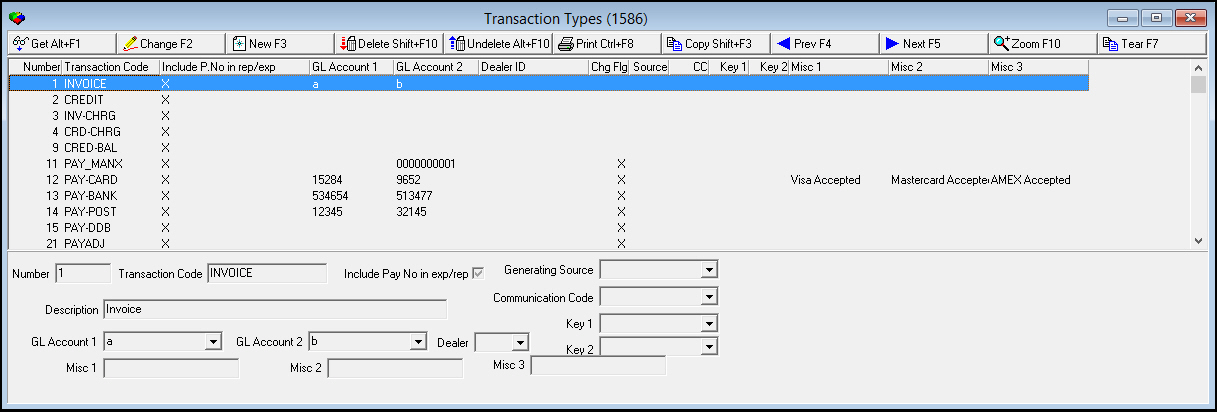
Field/Column Descriptions
The following table describes the fields and columns used in the main window of Transaction Types.
|
Field/Column |
Description |
|
Number |
Displays the SBN-assigned transaction code number. |
|
Transaction Code |
Code that identifies this transaction type in SBN. This field accepts up to 20 characters. |
|
Include P. No in rep/ exp |
If this column displays an X, SBN includes the pay number (credit card or bank account number) in exports and reports that include the selected transaction type. |
|
Description |
Text description of the transaction type. |
|
GL Account No |
General ledger account number. O If option bl058 is off, a menu appears with General Ledger account numbers created in program #1835. If the option is on, GL numbers are information-only and SBN does not validate them. |
|
GL - Account |
Type the GL account number for this transaction type. (This field only appears when option bl058 is on.) |
|
GL - Department |
Type the GL department number for this transaction type. (This field only appears when option bl058 is on.) |
|
Dealer ID |
Allows you to associate a single dealer with transaction types greater than number 102. If you wish to associate a dealer with transaction types 1-102 or multiple dealer IDs with any transaction types, use the sublevel. For more information on adding dealers in the sublevel, see O When you associate a dealer ID with a transaction type, SBN restricts menus of transaction types to l Those associated with the same dealer ID as the transaction type l Those transaction types not associated with a dealer ID |
|
Change Flag |
Flag indicates if the transaction type can be changed. Those without the flag are system defined and cannot be changed. |
|
Generating Source |
Select a generating source for the selected transaction type. SBN produces entries in the Communication Log (program #1888) in Account Mode for each transaction on an account when a user posts a payment batch with the selected transaction code. (This menu originates from program #1518.) |
|
Communication Code |
Select a communication code for the selected transaction type. SBN produces entries in the Communication Log (program #1888) in Account Mode for each transaction on an account when a user posts a payment batch with the selected transaction code. (This menu originates from program #1517.) |
|
Key 1 |
Select a Key 1 company-defined variable for defining reports and searches for the selected transaction type. SBN produces entries in the Communication Log (program #1888) in Account Mode for each transaction on an account when a user posts a payment batch with the selected transaction code. (This menu originates from program #1519.) |
|
Key 2 |
Select a Key 2 company-defined variable for defining reports and searches for the selected transaction type. SBN produces entries in the Communication Log (program #1888) in Account Mode for each transaction on an account when a user posts a payment batch with the selected transaction code. (This menu originates from program #1519.) |
|
Misc 1 |
Customer-defined field; no functionality in SBN. This field accepts up to 20 characters. |
|
Misc 2 |
Customer-defined field; no functionality in SBN. This field accepts up to 20 characters. |
|
Misc 3 |
Customer-defined field; no functionality in SBN. This field accepts up to 20 characters. |
Using Common Functions
See the reference document Common Functions in SBN for more information.
Zooming into the Sublevel
Transaction Types contains the Dealer / Translation tab for attaching dealer IDs and translations to transaction types. Transaction Types then appear in SBN in the user’s language.
Note: Actions 1586/10-16 control access to the Dealer / Translation tab and functions.
The Dealer / Translation Tab
The following graphic shows the Dealer Translation tab. The tab displays previously defined records for the selected transaction type.
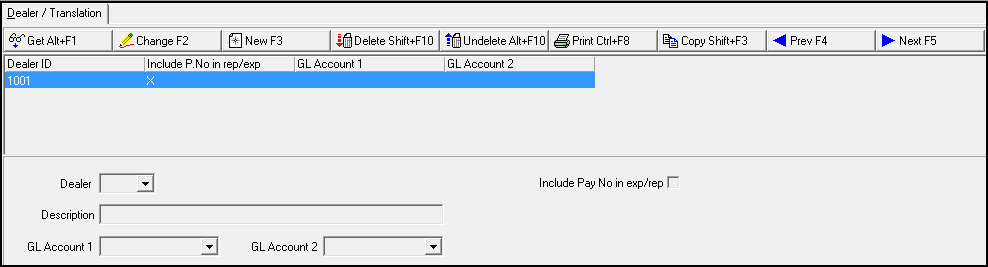
Field/Column Descriptions
The following table describes the fields and columns used in the Dealer / Translation tab.
|
Field/Column |
Description |
|
Dealer |
Dealer ID to tie to the transaction type. (This list originates in program #1537). |
|
Include Payment Method? |
Check mark indicates that this payment type should use the payment code number (credit card or bank account number). |
|
Description |
Text description, in the associated language, of the selected transaction types. |
|
GL Account No |
General ledger account number for this dealer specific record. O If option bl058 is off, a menu appears with General Ledger account numbers created in program #1835. If the option is on, GL numbers are information-only and SBN does not validate them. |
Button Functions
The following table displays the buttons, describes the shortcut keys, actions, and functionality.
|
Button |
Name |
Shortcut Key |
Action |
Description |
|
|
Get |
ALT+F1 |
1586/ 1 |
Get record. |
|
|
Change |
F2 |
1586/ 2 |
Change selected record. |
|
|
New |
F3 |
1586/ 3 |
Create new record. |
|
|
Delete |
SHIFT+F10 |
1586/ 4 |
Delete selected record. |
|
|
Undelete |
ALT+F10 |
1586/ 5 |
Restore deleted record. |
|
|
|
CTRL+F8 |
1586/ 6 |
Print selected records. |
|
|
Copy |
SHIFT+F3 |
1586/ 999 |
Copy selected field. |
|
|
Zoom |
F10 |
1586/ 999 |
Zoom in/out of sublevel. |
|
|
Tear |
F7 |
1586/ 999 |
Display transaction details.. |
|
|
Previous |
F4 |
1586/ 999 |
Select last record. |
|
|
Next |
F5 |
1586/ 999 |
Select next record. |











Modifications and Updates to Transaction Types
The following table lists modifications and updates to the Transaction Types document.
|
Mod Number |
Date |
Description |
|
n/a |
8/26/14 |
Images updated. |
F1 Help
| Delphi Forms | bltrantpform |
| Program Numbers | 1586 |