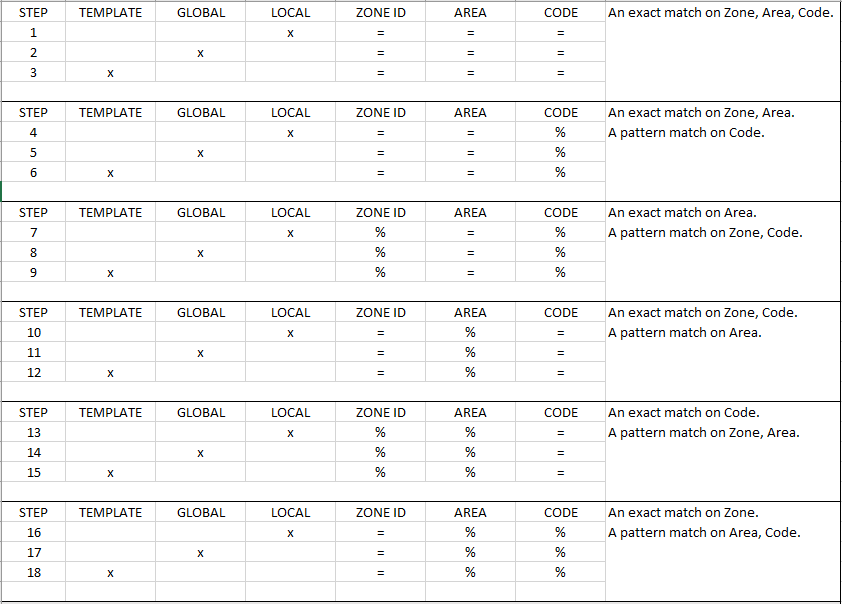
18 Step Zone Matching
SBN follows 18 steps to match an inbound signal to the correct Zone definition. The order of operations are detailed below.
TEMPLATE
A template defined on the customer installation in
- The local installation CID grid or
- The CID Panel Type
GLOBAL
The customer installation zone definitions where the Zone is shared across all CIDs (i.e., CID field in Zones contains % and the CID grid indicates "Shared").
LOCAL
The customer installation zone definitions where the Zone specifies a CID.
X
We are looking at either the local, global, or template installation for a match
=
We are looking for an exact match (i.e., zone '037' is equal to '037')
%
We are looking for a pattern match (i.e., zone '037' is like '%37')
The 18 steps
The steps run in order; the first hit wins, and the step number that matched is recorded with the alarm. The ladder tries six zone-entry shapes, from most specific to least, and inside every shape always checks Local first, then Global, then Template.
| Steps | Level order | Zone entry | Area | Code |
|---|---|---|---|---|
| 1–3 | Local → Global → Template | The signal's zone id | must match | must match |
| 4–6 | Local → Global → Template | The signal's zone id | must match | blank on the zone entry |
| 7–9 | Local → Global → Template | The any-zone entry | must match | blank on the zone entry |
| 10–12 | Local → Global → Template | The signal's zone id | blank on the zone entry | must match |
| 13–15 | Local → Global → Template | The any-zone entry | blank on the zone entry | must match |
| 16–18 | Local → Global → Template | The signal's zone id | blank on the zone entry | blank on the zone entry |
- Exact (
=) versus pattern (%) zone-id matching is a single site-wide option (ba202) and applies the same way on every step; the wildcard lives in the zone definition. - When area/code matching is not in use (option ba161 off, or the signal carries neither an area nor a code), only steps 1–3 apply.
- Global steps run only for shared CIDs and when the site's shared-zone options (mo156/mo157) allow them; Template steps run only when the account actually has a template (from the CID grid or the panel type). A site option (mo127) controls whether the any-zone steps 7–9 run.
- The any-zone entry is the zone defined with the special catch-all id, matching any zone number.