
Commission WO Types
Commission WO Types
Commission WO Types
Module: System Administration
Overview
Use Commission WO Types (program #1808) to define program multipliers that adjust commissions based on the work order type. This program displays a default record that contains a blank work order type and a qualifier of 100%, which does not modify the commissions calculated. This enables you to create only those work order type records that actually modify commissions.
To access this program, select Commission WO Types (program #1808) from the main menu of SBN.
The Commission WO Types Window
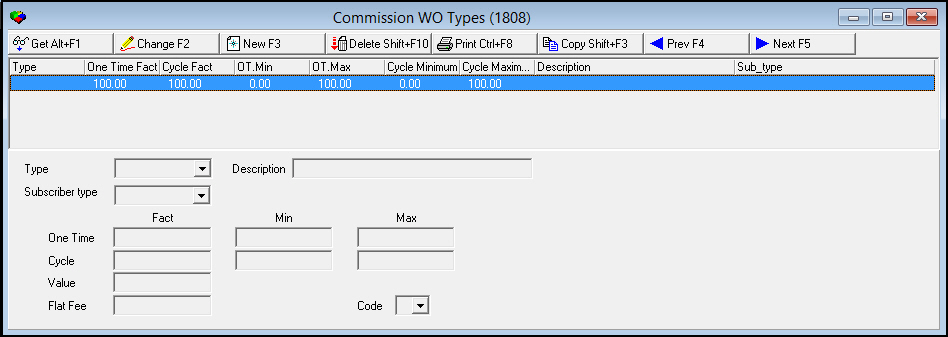
The following graphic shows Commission WO Types as the program opens. The upper pane displays previously defined commission work order types.
Field/Column Descriptions
The following table describes the fields and columns used in Commission WO Types.
|
Field/Column |
Description |
|
Type |
Abbreviation that identifies the type of work order. |
|
Subscriber Type |
Abbreviation that identifies the type of customer (residential or commercial for example) at the installation on the work order. |
|
One Time Fact |
Qualifier percentage for one-time commissions. |
|
Cycle Fact |
Qualifier percentage for cycle fee commissions. |
|
One Time Minimum |
Minimum one-time commission percentage for this source. |
|
One Time Maximum |
Maximum one-time commission percentage for this source. |
|
Cycle Minimum |
Minimum cycle fee commission percentage for this source. |
|
Cycle Maximum |
Maximum cycle fee commission percentage for this source. |
|
Description |
Displays the description from the table of work order types. |
|
Type |
Select the abbreviation that identifies the type of work order. (This menu originates from program #1796.) |
|
Description |
Displays the description from the table of work order types. |
|
One Time Fact |
Type the qualifier percentage for one-time commissions. |
|
One Time Min |
Type the minimum one-time commission percentage for this source. |
|
One Time Max |
Type the maximum one-time commission percentage for this source. |
|
Cycle Fact |
Type the qualifier percentage for cycle fee commissions. |
|
Cycle Min |
Type the minimum cycle fee commission percentage for this source. |
|
Cycle Max |
Type the maximum cycle fee commission percentage for this source. |
|
Value |
Type the adjustment value percentage for this work order type. |
|
Flat Fee |
Type the flat fee commission adjustment for this work order type. |
|
Code |
Select the company-defined code that indicates that a match to a work order type commission has occurred. |
Button Functions
The following table displays the buttons, describes the shortcut keys, actions, and functionality.
|
Button |
Name |
Shortcut Key |
Action |
Description |
|
|
Get |
ALT+F1 |
1808/ 1 |
Get record |
|
|
Change |
F2 |
1808/ 2 |
Change selected record. |
|
|
New |
F3 |
1808/ 3 |
Create new record. |
|
|
Delete |
SHIFT+F10 |
1808/ 4 |
Delete selected record. |
|
|
|
CTRL+F8 |
1808/ 6 |
Print selected records. |
|
|
Previous |
F4 |
1808/ 999 |
Select last record. |
|
|
Next |
F5 |
1808/ 999 |
Select next record. |







Modifications and Updates to Commission WO Types
The following table lists modifications and updates to the Commission WO Types document.
|
Mod Number |
Date |
Description |
|
n/a |
8/15/14 |
Images updated. |
F1 Help
| Delphi Forms | commiswotypesform |
| Program Numbers | 1808 |