
Callout Log Report
Callout Log Report
Call Out Log Report
Report #: 2167
Module: Account Generation
Overview
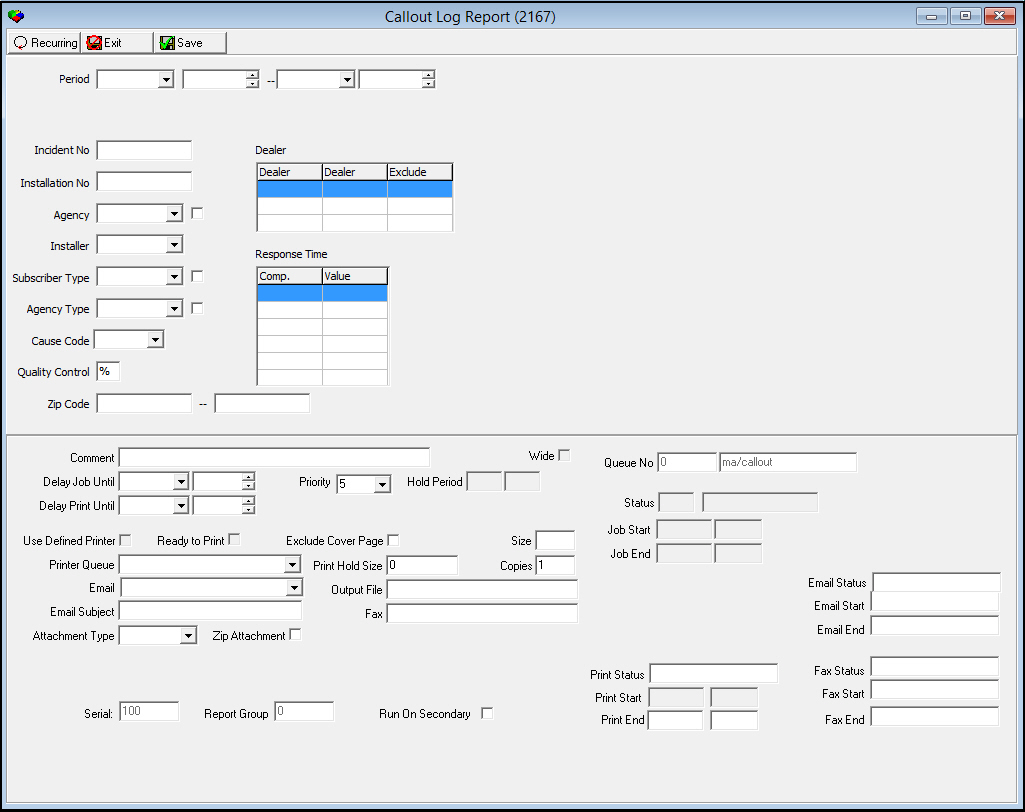
Use the Call Out Log report to list events from the Call Out Log (program #705). To access this report, select program #2167 from the main menu of SBN.
The Call Out Log Report
This window contains two panes: use the upper pane to define the contents of the report; use the lower pane to define the job output — how, when, and where you want to print the report.
Field Descriptions
The following table describes the fields used in the upper pane of this report.
|
Field |
Description |
|
Period |
|
|
Date — From |
You may select a range of dates to limit the report to Data Entry Log entries that occurred during that range. Select the beginning date of the range. |
|
Date — To |
You may select a range of dates to limit the report to Data Entry Log entries that occurred during that range. Select the beginning date of the range |
|
Date — To |
You may select a range of dates to limit the report to Data Entry Log entries that occurred during that range. Select the ending date of the range. |
|
Time — To |
You may select a range of time to limit the report to Data Entry Log entries that occurred during that range. Select the ending time of the range |
|
Incident Number |
Incident number assigned from Dispatch attached to the event. |
|
Installation No |
Installation number attached to the event. |
|
Agency |
Agency ID of the agency dispatched for that event. |
|
Exclude (No label) |
Select check box to exclude the selected agency ID. |
|
Installer |
Installer ID assigned to the installation attached to the event. |
|
Subscriber Type |
Subscriber type assigned to the installation attached to the event. |
|
Exclude (No Label) |
Select check box to exclude the selected subscriber type. |
|
Agency Type |
Agency type of the agency dispatched for that event. |
|
Exclude (No Label) |
Select check box to exclude the selected cause code. |
|
Cause Code |
Cause code of the incident. (This list originates from program #1590/46.) |
|
Quality Control |
Status of quality control for the event. Valid statuses are:
|
|
Zip Code Range |
Range of zip codes assigned to the installation attached the event. Note: Previously, entering a range of zip codes did not effect the search results. This parameter can now be used to limit a search. |
|
Dealer Range |
Dealer ID range for installations with a specific dealer id for the events. |
|
Response Time Range |
Range of response times logged for the events. |
|
Response Time Range Comparison |
Comparison operators to limit the report results. The drop-down list contains >, <, <=, >=, and =. |
|
Response Time Value |
Number of response time minutes to limit the report to. Note: For example, if you wish to run a report for all incidents that had a response time equal to or greater than 30 minutes, you would choose the Comp - >=, with 30 in the value field. |
Running and Viewing a Report
For information on running and viewing a report, see Common Functions in SBN.
Report Example
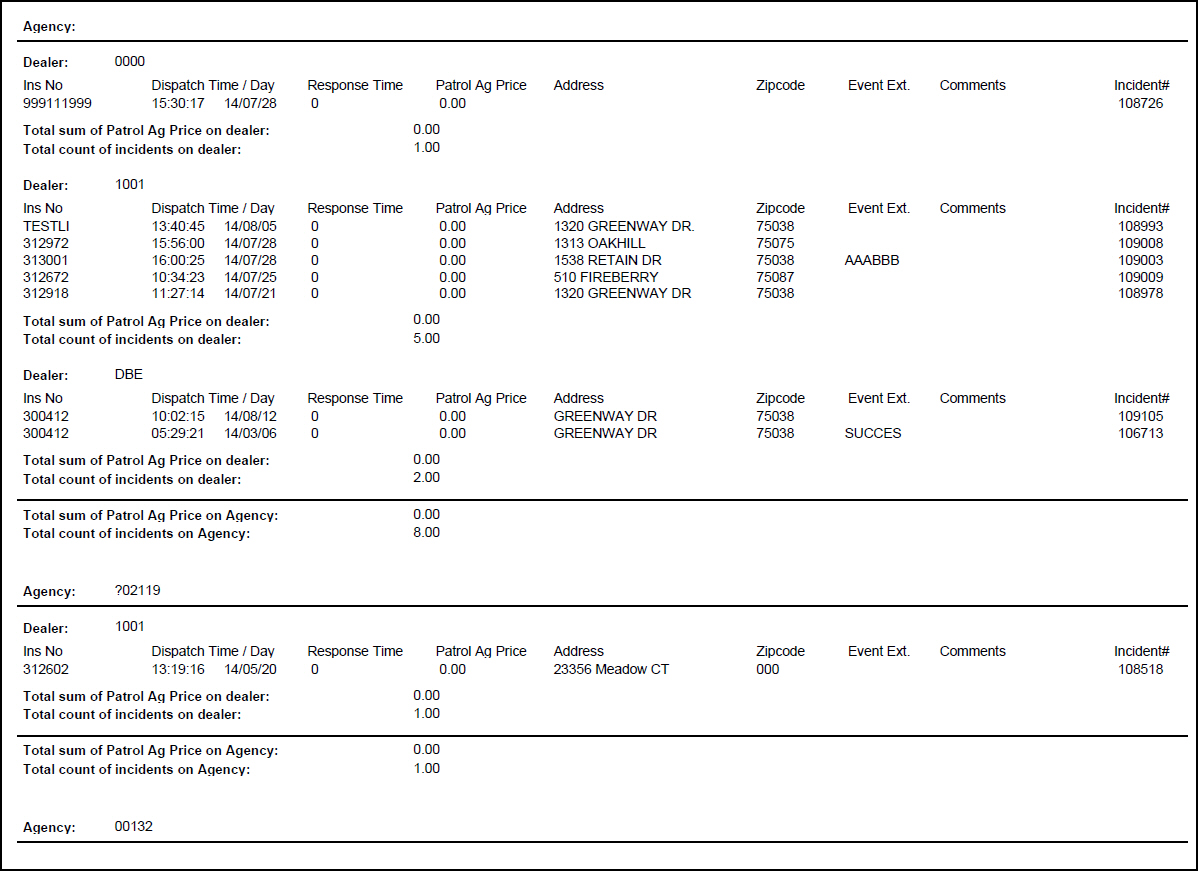
The following graphic shows an example of the output of the Call Out Log report.
Column Descriptions
The following table describes the columns used in the report output.
Note: This report may span several pages for a single record depending on the number of items in the equipment list and on the length of comments.
|
Column |
Description |
|
Agency |
Agency ID for call out events. |
|
Dealer |
Dealer ID for call out events. Note: For Company 120, the report displays Subscriber Type data in the place of Dealer information. |
|
Ins No |
Installation number attached to the specific event. |
|
Dispatch Date / Time |
Date and time the event was dispatched to the agency. |
|
Response Time |
Number of minutes until the agency responded. |
|
Patrol Ag Price |
Amount charged by the agency for the call out. |
|
Address |
Installation street address. |
|
Zip code |
Installation zip code. |
|
Event Ext |
Alarm event extension for the incident. |
|
Comments |
Comments entered by the operator in the patrol ticket. |
|
Total Sum of Patrol Ag Price on Dealer |
Total dollar amount charged by the agency for all incidents for the specific dealer. |
|
Total Count of Incidents on Dealer |
Total number of incidents for the specific dealer. |
|
Grand Total of all call outs |
Total dollar amount of all call outs for all dealers. |
|
Total count of all incidents |
Total number of incidents listed on the report. |
Button Functions
The following table displays the buttons, describes the shortcut keys, actions, and functionality.
|
Button |
Name |
Shortcut Key |
Action |
Description |
|
|
Recurring |
Alt+F1 |
2167 |
Open fields for recurring/template reports. |
|
|
Exit |
Esc |
2167 |
Exit without saving. |
|
|
Save |
Enter |
2167 |
Save existing record. |



Modifications and Updates to Callout Log Report
The following table lists modifications and updates to the Callout Log Report document.
|
Mod Number |
Date |
Description |
|
n/a |
07/17/14 |
Images updated. |