
General Change Log
General Change Log
General Change Log
Module: Utilities
Overview
Use the General Change Log (program #1749) to communicate (track and log) changes not handled by SBN. This program provides free text lines used to enter the specific program and reference numbers plus the date that changes occurred in order to search for specific system changes. In addition, the General Change Log allows modifications to existing changes and creation of new entries.
Note: The General Change Log is not tied to SBN.
The settings of options gclog1-gclog14 determine whether SBN records changes in the General Change Log.
-
Option gclog1 - When on, SBN logs new entries and changes to the Installers, Sales Persons, Users, Managers, and Technicians tabs of Personnel (program #1811) in the General Change Log.
-
Option gclog2 - When on, SBN logs changes to GUI Messages (program #1606) in the General Change Log.
-
Option gclog3 - When on, SBN logs changes to the New User ID field in the Users tab of Personnel (program #1811) in the General Change Log.
-
Option gclog4 - When on, SBN logs changes to Alarm Translation Tables (program #1876) in the General Change Log.
-
Option gclog5 - When on, SBN logs changes to Queue Routing (program #1738) in the General Change Log.
-
Option gclog6 - When on, SBN logs changes to option settings in Options (program #1887) in the General Change Log.
-
Option gclog7 - When on, SBN logs new entries and changes to the Item Kit and Item Vendor tabs of Items (program #1535) in the General Change Log.
-
Option gclog8 - When on, SBN logs changes to the option settings of program #1887, along with the dealer and language of each changed option, in the General Change Log.
-
Option gclog9 - When on, SBN logs changes to Required Fields (program #1843) in the General Change Log.
-
Option gclog13 - When on, SBN logs new entries in the Commission Type field of the Installers, Sales Persons, Users, Managers, and Technicians tabs of Personnel (program #1811) in the General Change Log.
Note: SBN logs only new entries in the Commission Type field; it does not log changes from one type to another.
-
Option gclog14 - When on, SBN logs changes to the VRU Code field of the Installers, Sales Persons, Users, Managers, and Technicians tabs of Personnel (program #1811) in the General Change Log.
-
Option maxque - Use this option to limit the number of records returned in a search.
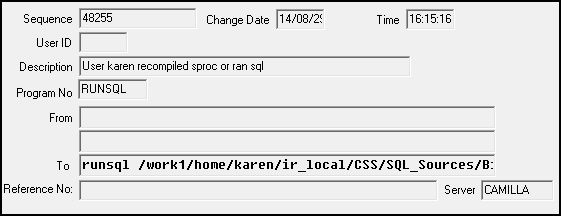
The General Change Log records changes to several fields in the Installers, Sales Persons, Users, Managers, and Technicians tabs of Personnel (program #1811). The user profile that was changed appears as a line item in the General Change Log with a list of field IDs for certain fields in the tabs. (The Users tab fields for which the General Change Log records changes are listed in a table in the Personnel document with the field IDs that appear in the General Change Log.) The Old Value and New Value columns and the From and To fields display the data that users changed in each field. You may expand the Old Value and New Value columns to view all the field changes, or click on the From and To fields and use the scroll buttons on your keyboard to view all changes.
Note: If a system administrator makes changes to the Users tab or Sales Persons tab of program #1811, the General Change Log displays a blank user ID for the entry.
Note: You can include -r directly after the word runsql and before the file name when running a runsql command in Interactive SQL (program #550) to add an alphanumeric reference number to the General Change Log. For example:
runsql -r99918 <file name> <database> <server>
This text adds 99918 to the refno column of table ba_gen_chg_log.
The General Change Log Window
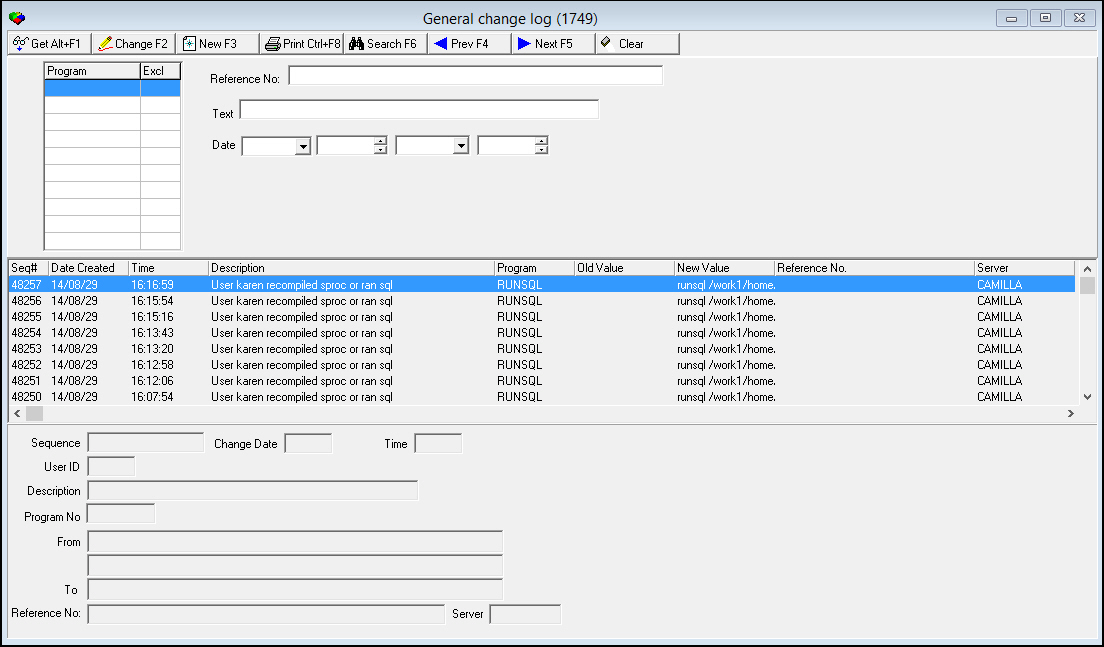
The following graphic shows General Change Log as the program opens.
Field/Column Descriptions
The following table describes the fields and columns used in the General Change Log window.
|
Field/Column |
Description |
|
Program Search Grid |
|
|
Program |
You may enter up to 10 program numbers to search for changes that have been made in those programs. |
|
Exclude |
You may enter an X for each program number you want to exclude from the search. |
|
Reference No |
Search parameter for the Reference number assigned to the change. |
|
Text |
Search parameter for New Value text of the change. (This field accepts the % wildcard in search text.) |
|
Date |
Search parameter for the date the change was made. |
|
Sequence |
Number that displays the order of respective entered changes. |
|
User ID |
ID of the user responsible for the change. |
|
Description |
Description of the change log. |
|
Program No |
Change log program number. |
|
From |
Original data before the user made the change. |
|
To |
New data after the user made the change. |
|
Reference No |
Reference number assigned to the change. Note: This field now accepts up to 50 characters. |
|
Change Date |
Date that the log is entered. |
|
Time |
Time of day that the log was changed. |
|
Server |
Name of the server where the change was made. This column was added to clarify, during replication, what was patched to each server. |
Viewing the Summary Layout
The following graphic shows the Change Request Log in summary layout with information displayed.
Button Functions
The following table displays the buttons, describes the shortcut keys, actions and functionality.
|
Button |
Name |
Shortcut Key |
Action |
Description |
|
|
Get Record |
alt+f1 |
1749/ 1 |
View details of selected record. |
|
|
Change Record |
f2 |
1749/ 2 |
Change details of selected record. |
|
|
New Record |
f3 |
1749/ 3 |
Create new record. |
|
|
Print Selected Records |
ctrl+f8 |
1749/ 6 |
Print selected logs. |
|
|
Search |
f6 |
1749/ 7 |
Search for change logs. |
|
|
Previous Record |
f4 |
1749/ 1 |
Go to previous record. |
|
|
Next Record |
f5 |
1749/ 1 |
Go to next record. |
|
|
Clear |
1749/ 1 |
Clear the text entered into the fields. |








Modifications and Updates to General Change Log
The following table lists modifications and updates to the General Change Log document.
|
Mod Number |
Date |
Description |
|
n/a |
9/02/14 |
Images updated. |
|
07.84.24591 |
02/16/16 |
New DL-Core Options - dlc_p and dlc_u |
|
08.85.10436 |
02/16/16 |
Set DL Core for http Header |
F1 Help
| Delphi Forms | isqlform, requiredfieldsform |
| Program Numbers | 550, 1843 |