
Referral Log
Referral Log
Referral Log
Module: Account Generation
Overview
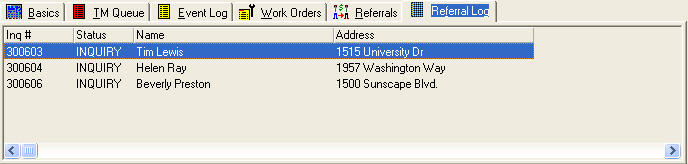
The Referral Log displays all referrals for an account in Marketing. This log shows the status of each referral, along with the name and address. Entries in the Referral Log originate both from the New Referral dialog box and the Referrals tab. This tab is read-only.
Navigating to the Referral Log
Use the following steps to access the Referral Log:
1. From the main SBN toolbar, select Menu.
2. From the drop-down menu, select Go To.
3. In the Go To Program dialog box, type in "562" and press Enter.
w Marketing and Marketing Basics opens.
4. Choose the Referral Log tab in the lower pane of Marketing.
The Referral Log Tab
The following graphic shows an example of the Referral Log.
Column Descriptions
The following table describes the columns used in the Referral Log tab.
Column |
Description |
Inquiry Number |
Inquiry number for the referred account. |
Status |
Current status of the referred account. |
Name |
Name on the referred account. |
Address |
Street address of the referred account. |
Related Programs
The following table lists programs related to the Referral Log.
Program |
Number |
Document Link |
Description |
Marketing |
562 |
Create new referrals for potential customers that appear in the Referral Log. |
|
Referrals Tab |
n/a |
Enter referral information for potential customers that appears in the Referral Log. |
Modifications and Updates to the Referral Log
The following table lists modifications and updates to the Referral Log document.
Mod Number |
Date |
Description |
n/a |
07/22/08 |
document rewritten |
n/a |
10/30/14 |
Images updated. |