
Link/Unlink Reasons
Link/Unlink Reasons
Link/Unlink Reasons
Program #: 1662
Module: Utilities
Overview
Use Link/Unlink Reasons (program #1662) to define the Reason Code drop-down menu of reasons for linking/unlinking billing accounts in the Linked Billing Accounts tab of Contract Master (program #548). Only those link/unlink reason codes with the Active check box selected in program #1662 appear in the Reason Code menu of the Linked Billing Accounts tab.
When you use a link or unlink reason in the Linked Billing Accounts tab that has the Communication Log fields defined in program #1662, SBN creates an entry in the Communication Log (program #1888).
This document covers the following topics:
Navigating to Link/Unlink Reasons
The Link/Unlink Reasons Window
Viewing Details of a Link/Unlink Reason
Changing Details of a Link/Unlink Reason
Creating a New Link/Unlink Reason
Navigating to Link/Unlink Reasons
Use the following steps to navigate to Link/Unlink Reasons:
1. From the main SBN toolbar, select Menu.
2. From the drop-down menu, select Go To.
3. In the Go To Program dialog box, type in "1662" and press enter.
w The Link/Unlink Reasons program opens.
The Link/Unlink Reasons Window
The following graphic shows Link/Unlink Reasons as the program opens.
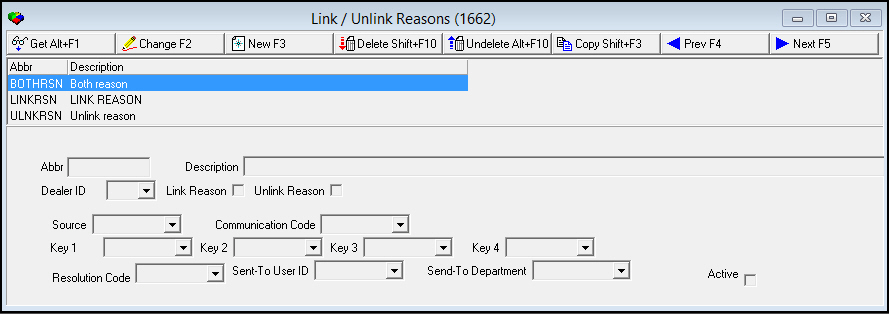
Field/Column Descriptions
The following table describes the fields and columns used in Link/Unlink Reasons.
|
Field/Column |
Description |
|
Abbr |
Abbreviation of the link/unlink reason. |
|
Description |
Description of the link/unlink reason. |
|
Dealer ID |
Dealer ID associated with the link/unlink reason. |
|
Link Reason |
Select this check box to define the record as a link reason. |
|
Unlink Reason |
Select this check box to define the record as an unlink reason. |
|
Communication Log Fields Note: These fields are optional. When you use a link or unlink reason in the Linked Billing Accounts tab that has the Communication Log fields defined in program #1662, SBN creates an entry in the Communication Log (program #1888). |
|
|
Source |
You may select a source code that SBN uses for Communication Log (program #1888) entries that are created when you use the selected reason code in the Linked Billing Accounts tab of program #548. This code tells you which program the Communication Log entry originated from. (This menu originates from program #1518.) |
|
Communication Code |
You may select a communication code that SBN uses for Communication Log (program #1888) entries that are created when you use the selected reason code in the Linked Billing Accounts tab of program #548. The communication code explains the type of entry in the Communication Log. (This menu originates from program #1517.) |
|
Key 1 |
You may select a Key 1 code that SBN uses for Communication Log (program #1888) entries that are created when you use the selected reason code in the Linked Billing Accounts tab of program #548. The Key 1 code is a company-defined variable used for defining reports and searches. (This menu originates from program #1519). |
|
Key 2 |
You may select a Key 2 code that SBN uses for Communication Log (program #1888) entries that are created when you use the selected reason code in the Linked Billing Accounts tab of program #548. The Key 2 code is a company-defined variable used for defining reports and searches. (This menu originates from program #1519). Note: The drop-down menu selections in this field are limited by the selection in the Key 1 field. |
|
Key 3 |
You may select a Key 3 code that SBN uses for Communication Log (program #1888) entries that are created when you use the selected reason code in the Linked Billing Accounts tab of program #548. The Key 3 code is a company-defined variable used for defining reports and searches. (This menu originates from program #1519). Note: The drop-down menu selections in this field are limited by the selection in the Key 2 field. |
|
Key 4 |
You may select a Key 4 code that SBN uses for Communication Log (program #1888) entries that are created when you use the selected reason code in the Linked Billing Accounts tab of program #548. The Key 4 code is a company-defined variable used for defining reports and searches. (This menu originates from program #1519). Note: The drop-down menu selections in this field are limited by the selection in the Key 3 field. |
|
Resolution Code |
You may select a resolution code that SBN uses for Communication Log (program #1888) entries that are created when you use the selected reason code in the Linked Billing Accounts tab of program #548. If this field contains a resolution code, SBN automatically closes the entry that it creates in the Communication Log. The resolution code indicates how the Communication Log entry was resolved. (This menu originates from program #1877.) |
|
Send-To User ID |
You may select a Send-To User ID that SBN uses for Communication Log (program #1888) entries that are created when you use the selected reason code in the Linked Billing Accounts tab of program #548. This is the User ID of the person the entry in the Communication Log is sent to for further action. (This menu originates from program #1590/28). |
|
Send-To Department |
You may select a Send-To Department that SBN uses for Communication Log (program #1888) entries that are created when you use the selected reason code in the Linked Billing Accounts tab of program #548. Department the entry in the Communication Log is sent to for further action, if any. (This menu originates from program #1590/28.) |
|
Active |
Select this check box to define the link/unlink reason code as active. Only those reason codes with this check box selected appear in the drop-down menu of the Reason Code field in the Linked Billing Accounts tab of program #548. |
Viewing Details of a Link/Unlink Reason
You can view the details of link/unlink reasons listed in the upper pane.
Use the following steps to view link/unlink reasons:
1. Select the link/unlink reason you want to view from the upper pane.
2. Double-click your selection or choose Get.
w The fields in the lower pane display the details of the link/unlink reason.
Changing Details of a Link/Unlink Reason
Use the following steps to change the details of a link/unlink reason:
1. Select the link/unlink reason you want to change.
2. Choose Change.
w The fields that can be changed open for changes in the lower pane.
3. Enter changes, as needed.
4. Choose Save.
Creating a New Link/Unlink Reason
Use the following steps to create a new link/unlink reason:
1. Choose the New button.
w The fields in the lower panes become available for data entry.
2. Type or select the information into the fields shown in the lower pane.
3. Choose Save.
Deleting a Link/Unlink Reason
Use the following steps to delete a link/unlink reason:
1. From the upper pane, select the reason code you want to delete by double-clicking or choosing Get Record.
w The reason code details appear in the lower pane.
2. Choose Delete Record.
w A confirm dialog box opens: "Are you sure?"
3. Choose Yes.
4. SBN removes the reason code from the list in the upper pane.
Restoring a Deleted Link/Unlink Reason
Use the following steps to restore deleted link/unlink reasons:
1. Choose Select Record to Undelete.
w The Undelete window appears.
2. In the Undelete window, find the reason code you want to restore and double-click it, or choose [ENTER].
w SBN restores the reason code to the list in the upper pane.
Button Functions
The following table displays the buttons, describes the shortcut keys, actions and functionality.
|
Button |
Name |
Shortcut Key |
Action |
Description |
|
|
Get |
alt+f1 |
1662/ 1 |
View details of selected link/unlink reason code. |
|
|
Change |
f2 |
1662/ 2 |
Change details of selected link/unlink reason code. |
|
|
New |
F3 |
1662/ 3 |
Create new link/unlink reason code. |
|
|
Delete |
SHIFT+F10 |
1662/ 4 |
Delete selected link/unlink reason code. |
|
|
Undelete |
ALT+F10 |
1662/ 5 |
Restore a deleted link/unlink reason code. |
|
|
Copy |
SHIFT+F3 |
1662/ 1 |
Copy details of selected link/unlink reason code to a new record. |
|
|
Previous Record |
f4 |
1662/ 1 |
Go to previous record. |
|
|
Next Record |
f5 |
1662/ 1 |
Go to next record. |








Modifications and Updates to Link/Unlink Reasons
The following table lists modifications and updates to the Link/Unlink Reasons document.
|
Mod Number |
Date |
Description |
|
07.79.22865, 08.79.09341, 07.79.22859, 08.79.09339, 07.79.22858, 07.79.22857 |
08/23/2013 |
Document created. |
|
n/a |
09/02/14 |
Images updated. |
F1 Help
| Delphi Forms | bacommunicationcodesform, commresolutioncodesform |
| Program Numbers | 1517, 1877 |