
Miscellaneous Fields Tab
Miscellaneous Fields Tab
Miscellaneous Fields Tab
Module: Accounting
Overview
Use the Miscellaneous Fields tab to enter and track additional information for any contract or installation. All of the fields in the Miscellaneous Fields tab have menus and labels that you can define for your company in Contract Miscellaneous (program #1881).
Navigating to Miscellaneous Fields
Use the following steps to access Miscellaneous Fields:
1. From the main SBN toolbar, select Menu.
2. From the drop-down menu, select Go To.
3. In the Go To Program dialog box, type in "548" and press ENTER.
w Contract Master opens.
4. Select the Miscellaneous Fields tab in the lower pane of Contract Master.
The Miscellaneous Fields Tab
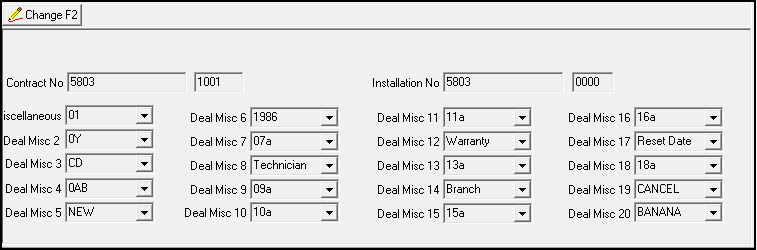
The following graphic shows the Miscellaneous fields tab with information displayed.
Field Descriptions - Miscellaneous Fields
The following table describes the fields in the Miscellaneous Fields tab.
|
Field |
Description |
|
Contract Number |
Contract number of the account that you are viewing. |
|
Contract Dealer ID |
Contract dealer ID for the account that you are viewing. |
|
Installation Number |
Installation number of the account that you are viewing. |
|
Installation Dealer ID (No label) |
Installation dealer ID for the account that you are viewing. |
|
Deal Misc 1-20 |
Define the field names and drop-down menus for the 20 miscellaneous fields in Contract Miscellaneous (program #1881). |
Changing Miscellaneous Information
Use Change Record in the Miscellaneous Fields tab to enter additional information about any billing account. SBN records all changes made in this tab in the Miscellaneous Change Log and in the Contract Change Log.
The Miscellaneous Change Log
Use the Miscellaneous Change Log to view and track changes made to any of the contract miscellaneous fields. Action 548/102 controls access to this tab.
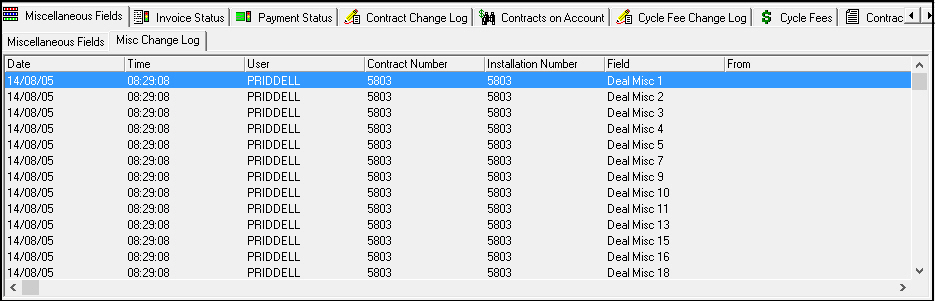
The following graphic displays the Miscellaneous Change Log with information displayed.
Field Descriptions - Miscellaneous Change Log
The following table describes the fields in the Miscellaneous Change Log tab.
|
Field |
Description |
|
Date |
Date the user made the change. |
|
Time |
Time the user made the change. |
|
User |
ID of the user who made the change to a miscellaneous field. |
|
Contract Number |
Contract number of the account on which a user changed a miscellaneous field. |
|
Installation Number |
Installation number tied to the contract you are viewing. |
|
Field |
Field ID (Deal Misc 1-20) that the user changed. |
|
From |
Original value in the miscellaneous field. |
|
To |
New value user chose in the miscellaneous field. |
Related Programs
The following table lists programs related to Miscellaneous Fields.
|
Program |
Number |
Document Link |
Description |
|
Contract Master |
548 |
Program from which you can access the Miscellaneous Fields tab. View account and contract information. |
|
|
Contract Change Log |
N/A |
Records changes made in this tab. |
|
|
Contract Miscellaneous |
1881 |
Choose the field labels and define the drop-down menus for each of the miscellaneous fields in this tab. |
Modifications and Updates to Miscellaneous Fields
The following table lists modifications and updates to the Miscellaneous Fields document.
|
Mod Number |
Date |
Description |
|
07.02.18842, 08.03.06981 |
08/04/09 |
Added Miscellaneous Change Log tab. |
|
n/a |
08/05/14 |
Images updated. |