
One-Time Invoice Report
One-Time Invoice Report
One-Time Invoice Report
Report #: 2509
Module: Accounting
Overview
Use the One-Time Invoice Report (#2509) to generate PDFs of invoices to be sent to customers. (Specific to Company 204)
To access this report, choose One-Time Invoice Report (report #2509) from the main menu of SBN.
The Invoice Export Report
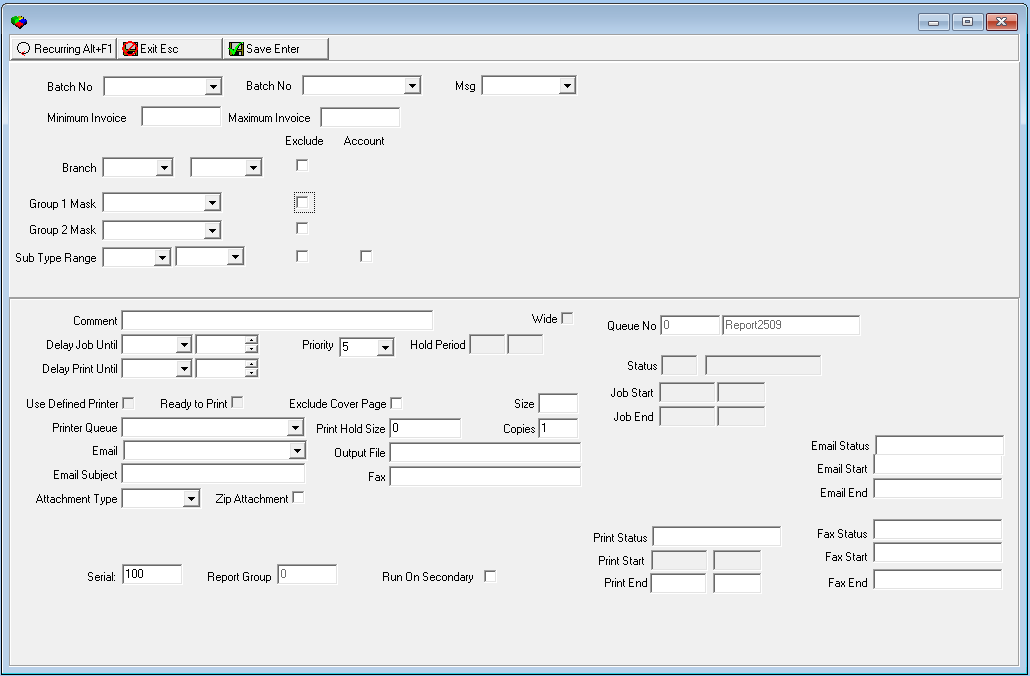
This window contains two panes: use the upper pane to define the contents of the report; use the lower pane to define the job output - how, when, and where you want the report printed.
Note: See Report Parameters Pane for information on the fields in the lower pane, which are the same in every report.
Field Descriptions
The following table describes the fields used in the upper and lower panes of this report.
Field |
Description |
Batch Range |
|
Batch No (From) |
You may select a range of invoice batches to limit the report to invoices contained in the range of batches. Select the beginning batch of the range. (This menu originates from program #1557.) |
Batch No (To) |
You may select a range of invoice batches to limit the report to invoices contained in the range of batches. Select the ending batch of the range. (This menu originates from program #1557.) |
Msg |
You may select message text to appear on the report. (This menu originates from program #1766 and includes only those messages that have the INV check box selected in program #1766.) |
Invoice Range |
|
Minimum Invoice |
You may enter a range of invoice numbers to limit the report to invoices within the range. Enter the beginning invoice number of the range. |
Maximum Invoice |
You may enter a range of invoice numbers to limit the report to invoices within the range. Enter the ending invoice number of the range. |
Branch Range |
|
Branch
- From |
You may select a range of branches to limit the report to invoices associated with branches within the range. Select the beginning branch of the range. (This menu originates from program #1530.) Note: Branch restrictions apply. |
Branch
- To |
You may select a range of branches to limit the report to invoices associated with branches within the range. Select the ending branch of the range. (This menu originates from program #1530.) Note: Branch restrictions apply. |
Exclude |
You may exclude a range of branches from the report by entering the range and then selecting this check box. |
Group 1 Mask |
Mask to include in the report only invoices on contracts matching the selected mask in Group 1. (This menu originates from program #1868.) |
Exclude |
Select this check box to exclude invoices on contracts matching the selected mask in Group 1 from the report. |
Group 2 Mask |
Mask to include in the report only invoices on contracts matching the selected mask in Group 2. (This menu originates from program #1868.) |
Exclude |
Select this check box to exclude invoices on contracts matching the selected mask in Group 2 from the report. |
Sub Type Range |
|
Sub Type - From (No label) |
You may select a range of subscriber types to limit the report to invoices on contracts associated with subscriber types within the range. Select the beginning subscriber type of the range. (This menu originates from program #1534.) |
Sub
Type - To |
You may select a range of subscriber types to limit the report to invoices on contracts associated with subscriber types within the range. Select the ending subscriber type of the range. (This menu originates from program #1534.) |
Exclude |
You may exclude a range of subscriber types from the report by selecting the range and then selecting this check box. |
Account |
Select this check box to limit the report to invoices on billing accounts associated with subscriber types within the selected range. |
Running and Viewing a Report
For information on running and viewing a report, see Common Functions in SBN.
Report Example
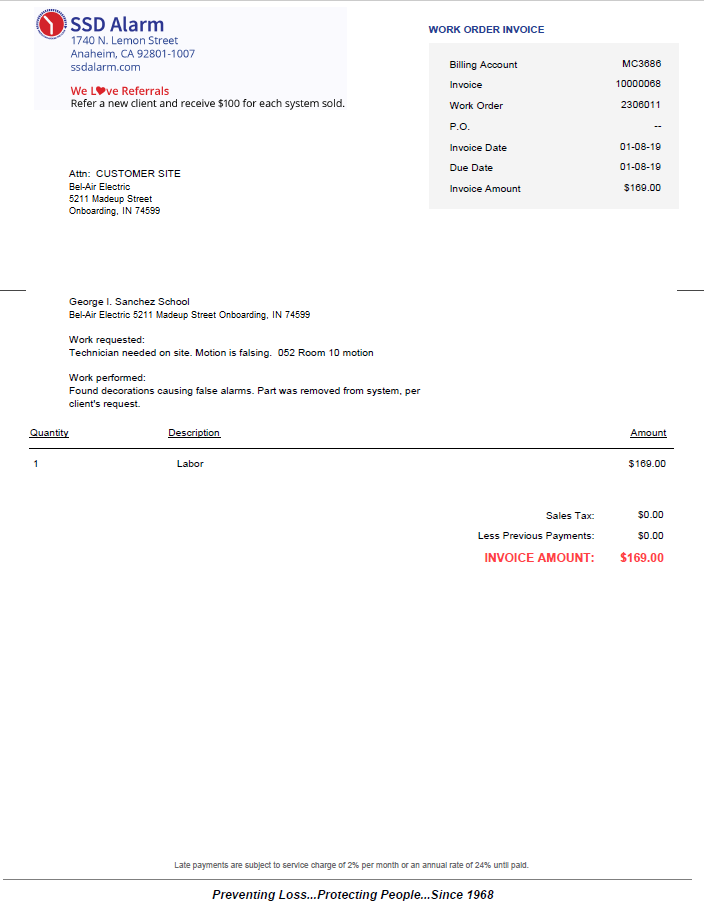
The following graphic shows an example of the output of the One-Time Invoice Report with details.
Field/Column Descriptions
The following table describes the fields and columns used in the output of the report.
Column |
Description |
Name and Address |
Name and Address of person or business being billed. |
| Work Order Invoice Details | |
Billing Account |
Specific account being billed. |
Invoice |
Unique number assigned to any given transaction. |
Work Order |
Sequence number of the work order associated with the installation. As users add work orders to the installation, the sequence number increases. |
P.O. |
Purchase Order number. |
Invoice Date |
Date the Invoice was generated. |
Due Date |
Date the payment for goods and services is due. |
Invoice Amount |
Total amount being billed. |
| Goods and Services | |
Work Requested |
Description of goods and services requested to be performed. |
Work Performed |
Description of goods and services actually performed. |
| Itemized Fees and Totals | |
Quantity |
Number of units |
Description |
Details about what is being charged. |
Amount |
Total before Taxes |
Sales Tax |
A tax on sales or on receipts from sales for goods or services. |
Less Previous Payments |
Amounts already paid subtracted from total. |
Invoice Amount |
Total amount due for the invoice. |
Button Functions
The following table displays the buttons, describes the shortcut keys, actions, and functionality.
Button |
Name |
Shortcut Key |
Action |
Description |
|
Open fields for recurring/template reports |
alt+f1 |
Open fields for recurring/template reports. |
|
|
Exit without saving |
esc |
Exit without saving changes to selected record. |
|
|
Save Existing Record |
enter |
Save changes to selected record. |



Modifications and Updates to Invoice Export Report
The following table lists modifications and updates to the One-Time Invoice Report document.
Mod Number |
Date |
Description |
07.90.26101, 08.90.11620, 07.90.26100, 08.90.11618 |
01/15/18 |
Document created. |