
Commission Items
Commission Items
Commission Items
Module: System Administration
Overview
Use Commission Items (program #1810) to search for, view, and define items used in calculating commission. Other programs rely on the information in this program to interact with the commission calculation process. For more information on commission, see Commission Calculation.
You can define commission rates or flat dollar amounts for each item for specific price lists.
To access this program, select Commission Items (program #1810) from the main menu of SBN.
The Commission Items Window
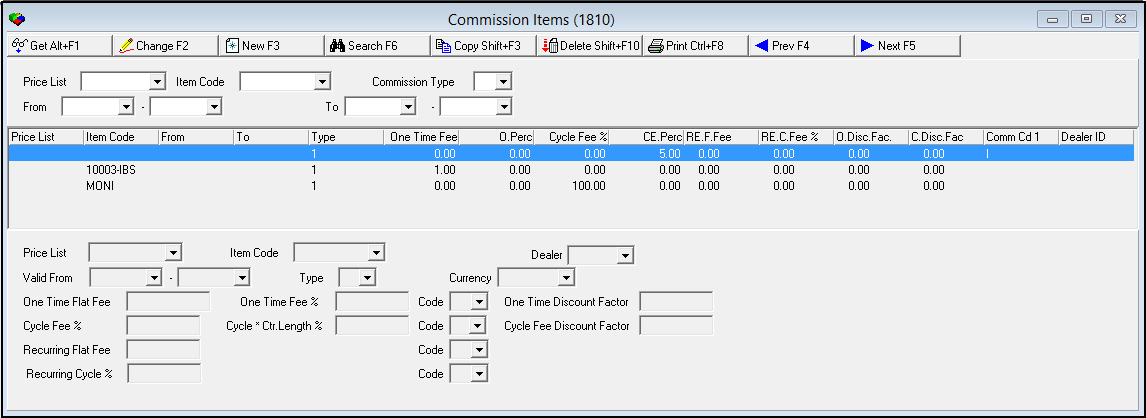
The Commission Items window contains three panes:
-
The upper pane - which contains search parameters
-
The middle pane - which displays defined commission items or search results
-
The lower pane - which contains fields for defining commission items
The following graphic shows Commission Items as the program opens. The window displays previously defined commission items.
Field/Column Descriptions
The following table describes the fields and columns used in Commission Items.
|
Field/Column |
Description |
|
Price List |
Price list code. (This menu originates from program #1533.) |
|
Item Code |
Item code. (This menu originates from program #1535.) Note: Item descriptions appear in the user's selected language when defined in the program #1535 Translations tab. |
|
Dealer |
Allows definition of commission items by dealer. (This menu originates from program #1537.) |
|
Commission Type |
Commission type. (This menu originates from program #1805.) |
|
From |
Range of start dates for a commission item. If you select one of the dates in the range, SBN searches either from the beginning of the file to the ending date or from the starting date to the end of the file. SBN excludes records that do not contain a valid �from� date from the search. |
|
To |
Range of end dates for a commission item. If you select one of the dates in the range, SBN searches either from the beginning of the file to the ending date or from the starting date to the end of the file. SBN excludes records that do not contain a valid �to� date from the search. |
|
Type |
Commission type that receives a commission for sales of the item. (This menu originates from program #1805.) |
|
Currency |
Currency type of the commission item. (This menu originates from program #1635.) |
|
One Time Flat Fee |
Flat dollar amount of commission paid on the NET one-time fee. |
|
One Time Fee % |
Commission percentage paid on the NET one-time fee. |
|
Code |
User-definable code that indicates an item commission match has occurred. (This menu originates from program #1854.) This information displayed within this drop-down is restricted by the value assigned to the Dealer ID field. O This code appears in the last column in the grid in the upper pane of the window. |
|
One Time Discount Factor |
A whole number used in applying a percentage of the discount given on the one-time fee to the commission calculation. O When a discount is given on a one-time fee, and a One-time Discount factor exists, SBN reduces the base commission according to the following formula: |
|
Cycle Fee % |
Commission percentage paid on the NET cycle fee. |
|
Cycle * Ctr Length % |
Commission percentage paid on the NET cycle fee multiplied by the contract term. O Commission = Cycle Fee % * Contract Length |
|
Code |
Additional user-definable code that indicates that an item commission match has occurred. (This menu originates from program #1854.) This information displayed within this drop-down is restricted by the value assigned to the Dealer ID field. |
|
Cycle Fee Discount Factor |
A whole number used in applying a percentage of the discount given on the cycle fee to the commission calculation. O When a discount is given on a cycle fee, and a Cycle Fee Discount Factor exists, SBN reduces the base commission according to the following formula: |
|
Recurring Flat Fee |
Fee amount for recurring flat fee commission calculation that can be used to compute a monthly commission. |
|
Code |
Additional user-definable code that indicates that an item commission match has occurred. (This menu originates from program #1854.) This information displayed within this drop-down is restricted by the value assigned to the Dealer ID field. |
|
Recurring Cycle % |
Amount of recurring cycle fee commission calculation that can be used to compute a monthly commission service fee. |
|
Code |
Additional user-definable code that indicates that an item commission match has occurred. (This menu originates from program #1854.) This information displayed within this drop-down is restricted by the value assigned to the Dealer ID field. |
Searching for Commission Items
The upper pane of Commission Items contains fields for selecting search parameters.
Use the following steps to search for commission items:
1. In Commission Items, select your search parameters.
2. Choose Search.
‰ SBN displays the search results in the middle pane of the window.
Using Common Functions
See the reference document Common Functions in SBN for more information.
Button Functions
The following table displays the buttons, describes the shortcut keys, actions, and functionality.
|
Button |
Name |
Shortcut Key |
Action |
Description |
|
|
Get |
ALT+F1 |
1810/ 1 |
Get record. |
|
|
Change |
F2 |
1810/ 2 |
Change selected record. |
|
|
New |
F3 |
1810/ 3 |
Create new record. |
|
|
Delete |
SHIFT+F10 |
1810/ 4 |
Delete selected record. |
|
|
|
CTRL+F8 |
1810/ 6 |
Print selected records. |
|
|
Search |
F6 |
1810/ 7 |
Searches for commission items based upon entered parameters. |
|
Modify Search |
1810/ 8 |
Allows changes to search parameters. |
||
|
|
Copy |
SHIFT+F3 |
1810/ 9 |
Copies the selected codeword type. |
|
|
Previous |
F4 |
1810/ 999 |
Select last record. |
|
|
Next |
F5 |
1810/ 999 |
Select next record. |








Modifications and Updates to Commission Items
The following table lists modifications and updates to the Commission Items document.
|
Mod Number |
Date |
Description |
|
n/a |
8/15/14 |
Images updated. |