
External Invoices
External Invoices
External Invoices
Program #: 1620
Module: Accounting
Overview
Use External Invoices (program #1620) to define ranges of external invoice numbers to use in the Invoice Manager (program #1557).
This document covers the following topics:
Navigating to External Invoices
Viewing the Details of an External Invoice Range
Adding an External Invoice Range
Changing an External Invoice Range
Deleting an External Invoice Range
Navigating to External Invoices
Use the following steps to navigate to External Invoices:
1. From the main SBN toolbar, select Menu.
2. From the drop-down menu, select Go To.
3. In the Go To Program dialog box, type in "1620" and press Enter.
w External Invoices opens.
The External Invoices Window
This screen displays previously defined ranges of external invoice numbers.
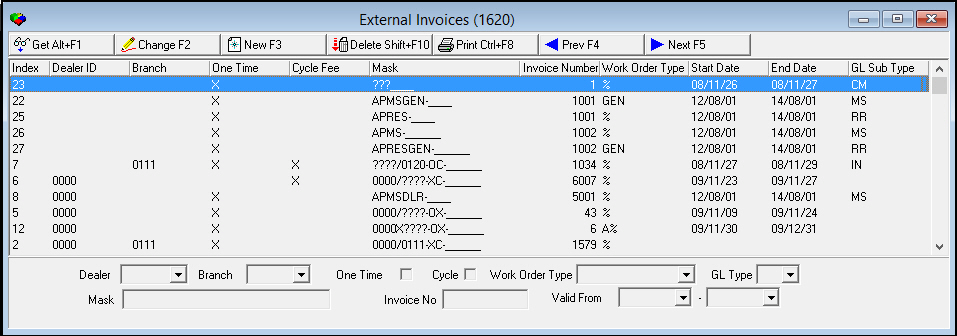
Field/Column Descriptions
The following table describes the fields and columns used in the External Invoices window.
Field |
Description |
Dealer ID |
ID of the dealer associated with the range of external invoice numbers. O An invoice batch may be associated with only one dealer. |
Branch |
ID of the branch associated with the external invoice. |
One Time |
Select this check box to define external invoice numbers for one-time fee invoices. |
Cycle Fee |
Select this check box to define external invoice numbers for cycle fee invoices. |
Mask |
Enter your company-defined mask of invoice numbers to use. |
Invoice Number |
Enter the next sequence number to issue. O As you generate invoice batches in the Calculate Invoices screen of the Invoice Manager (program #1557), SBN updates this number. |
Work Order Type |
You may associate an external invoice number with a work order type. (This menu originates from program #1796.) O Select the % wildcard to associate the external invoice number with all work order types. |
GL Type |
You may associate external invoice numbers with a billing account GL type. (This menu originates from program #1578.) |
Start Date (Valid From) |
Select the date SBN starts applying the selected external invoice number range. SBN compares these dates to invoice dates in Invoice Manager (program #1557). |
End Date (Valid To) |
Select the date SBN stops applying the selected external invoice number range. SBN compares these dates to invoice dates in Invoice Manager (program #1557). |
Viewing the Details of an External Invoice Range
You can view the details of an external invoice range in the fields in the bottom pane.
Use the following steps to view the details of an invoice range:
1. Select the range for which you want to view details.
2. Double-click your selection or choose Get.
w The fields in the bottom pane display the details of the selected range.
Adding an External Invoice Range
Use the following steps to add new external invoice numbers:
1. Choose New.
w The fields in the bottom pane open for changes.
2. Complete the Mask and Invoice fields. Complete the reaming fields, as desired.
3. Choose Save.
w SBN adds the invoice numbers to the list of defined ranges.
Changing an External Invoice Range
Use the following steps to change the details of an invoice range:
1. Select the range you want to change.
2. Choose Change.
w The fields in the bottom pane open for changes.
3. Enter changes, as needed.
4. Choose Save.
Deleting an External Invoice Range
Use the following steps to delete an invoice range:
1. Select the external invoice range you want to delete.
2. Choose Delete.
w A Confirmation dialog box appears: "Delete XXX. Are you sure?"
3. Choose Yes.
w SBN deletes the selected range.
Button Functions
The following table displays the buttons, describes the shortcut keys, actions, and functionality.
Button |
Name |
Shortcut Key |
Action |
Description |
|
Get Record |
alt+f1 |
1620/ 1 |
View details of selected record. |
|
Change Record |
f2 |
1620/ 2 |
Change details of selected record. |
|
New Record |
f3 |
1620/ 3 |
Create a new record. |
|
Delete Record |
shift+f10 |
1620/ 4 |
Delete selected record. |
|
Print selected records |
ctrl+f8 |
1620/ 6 |
Print selected records. |
|
Previous Record |
f4 |
Go to previous record. |
|
|
Next Record |
f5 |
Go to next record. |
|
|
Exit without saving |
esc |
Exit without saving changes to selected record. |
|
|
Save Existing Record |
enter |
Save changes to selected record. |









Modifications and Updates to External Invoices
The following table lists modifications and updates to the External Invoices document.
Mod Number |
Date |
Description |
n/a |
8/04/14 |
Images updated. |