
Communication Codes
Communication Codes
Communication Codes
Module: System Administration
Overview
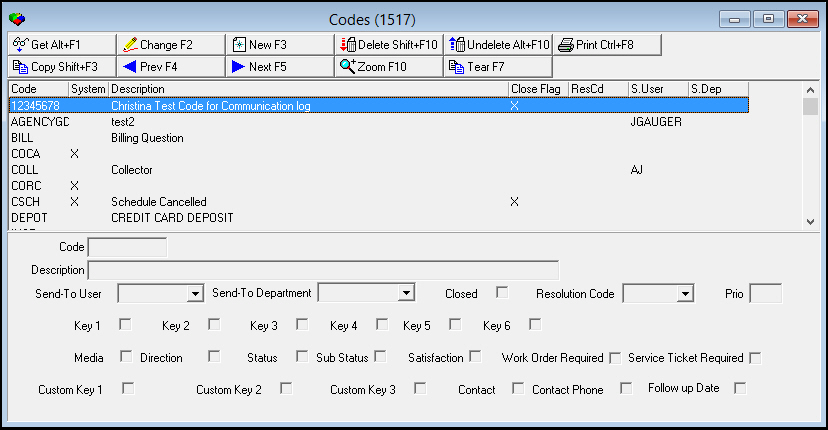
Use Communication Codes (program #1517) to define the menu for the Communication Code field in the Communication Log (program #1888). You can add additional codes, but you cannot delete existing codes that contain an X in the System field.
To access this program, select Communication Codes (program #1517) from the main menu of SBN.
The Communication Codes Window
The following graphic shows Communication Codes with information displayed.
Field/Column Descriptions
The following table describes the fields and columns used in Communication Codes.
|
Field/Column |
Description |
|
Code |
Communication code identifier. (This field accepts up to eight characters.) |
|
System |
If this column displays an X, SBN requires this code and you cannot modify or delete it. |
|
Description |
Text description of the communication code. |
|
Closed Flag |
If this column displays an X, the selected communication code will put a Communication Log entry in closed status. |
|
Resolution Code |
Resolution code to be assigned to a Communication Log entry with the selected communication code. (This menu originates from program #1877.) |
|
Send-To User |
User ID a Communication Log entry with the selected communication code will be sent to. |
|
Send-To Department |
Department a Communication Log entry with the selected communication code will be sent to. (This menu originates from program #1590/28.) |
|
Priority |
Priority level to be assigned to a Communication Log entry with the selected communication code. |
|
Key 1 |
If you select this check box, SBN makes the Key 1 field required when you assign the selected communication code to a Communication Log entry. |
|
Key 2 |
If you select this check box, SBN makes the Key 2 field required when you assign the selected communication code to a Communication Log entry. |
|
Key 3 |
If you select this check box, SBN makes the Key 3 field required when you assign the selected communication code to a Communication Log entry. |
|
Key 4 |
If you select this check box, SBN makes the Key 4 field required when you assign the selected communication code to a Communication Log entry. |
|
Key 5 |
If you select this check box, SBN makes the Key 5 field required when you assign the selected communication code to a Communication Log entry. |
|
Key 6 |
If you select this check box, SBN makes the Key 6 field required when you assign the selected communication code to a Communication Log entry. |
|
Media |
If you select this check box, SBN makes the Media field required when you assign the selected communication code to a Communication Log entry. |
|
Direction |
If you select this check box, SBN makes the Direction field required when you assign the selected communication code to a Communication Log entry. |
|
Status |
If you select this check box, SBN makes the Status field required when you assign the selected communication code to a Communication Log entry. |
|
Sub Status |
If you select this check box, SBN makes the Sub Status field required when you assign the selected communication code to a Communication Log entry. |
|
Satisfaction |
If you select this check box, SBN makes the Satisfaction field required when you assign the selected communication code to a Communication Log entry. |
|
Work Order Required |
If you select this check box, SBN makes the Work Order field required when you assign the selected communication code to a Communication Log entry. |
|
Service Ticket Required |
If you select this check box, SBN makes the Service Ticket field required when you assign the selected communication code to a Communication Log entry. |
|
Custom Key 1 |
If you select this check box, SBN makes the first customer-defined conditional field required when you assign the selected communication code to a Communication Log entry. |
|
Custom Key 2 |
If you select this check box, SBN makes the second customer-defined conditional field required when you assign the selected communication code to a Communication Log entry. |
|
Custom Key 3 |
If you select this check box, SBN makes the third customer-defined conditional field required when you assign the selected communication code to a Communication Log entry. |
|
Contact |
If you select this check box, SBN makes the Contact field required when you assign the selected communication code to a Communication Log entry. |
|
Contact Phone |
If you select this check box, SBN makes the Contact Phone field required when you assign the selected communication code to a Communication Log entry. |
|
Follow Up Date |
If you select this check box, SBN makes the Follow Up Date field required when you assign the selected communication code to a Communication Log entry. |
Using Common Functions
See the reference document Common Functions in SBN for more information.
Zooming into the Sublevel
Commission Codes contains a sublevel tab with two tabs
-
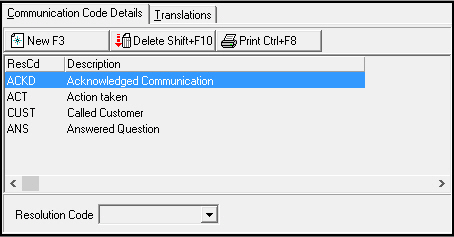
Communication Code Details — in which you attach resolution codes to communication codes. When a communication code exists for a specific communication log entry, the menu of available resolution codes originates from the Communication Codes Details tab.
-
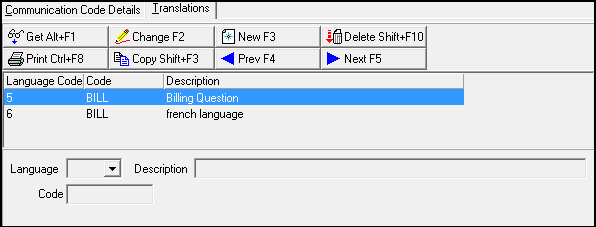
Translations — in which you attach translations to communication codes. Menus of Communication Codes appear in the user’s language.
The Communication Codes Details Tab
The following graphic shows the Communication Code Details tab. The tab displays communication resolution codes attached to the selected communication code.
Field/Column Descriptions
The following table describes the fields and columns used in the Communication Codes Details tab.
|
Field/Column |
Description |
|
Resolution Code |
Code that identifies the communication resolution code. This menu originates from program #1877. |
|
Description |
Text description of the selected communication resolution code. |
The Translations Tab
The following graphic shows the Translations tab as the tab opens. The tab displays previously defined translations for the selected communication code.
Note: Actions 1517/20-24 control access to the Translations tab.
Field/Column Descriptions
The following table describes the fields and columns used in the Translations tab.
|
Field/Column |
Description |
|
Language Code |
Code that identifies the language of the attached translation. O Contact IBS before using codes 11-17. |
|
Code |
Code to identify the translated communication code. |
|
Description |
Text description, in the selected language, of the communication code. |
Related Programs
The following table lists programs related to Communication Codes.
|
Program |
Number |
Document Link |
Description |
|
Communication Log |
1888 |
Log communication between customer and company. |
|
|
Status Codes |
1721 |
Create Status Codes used in the Communication Log to describe the status of an entry. |
|
|
Sources |
1518 |
Create Communication Source codes used in the Communication Log to show in what program an entry originated. |
|
|
Keys |
1519 |
Create and define codes and descriptions that appear in the Communication Log as Key 1, Key 2, Key 3, and Key 4. |
|
|
Media |
1520 |
Create Media Codes used in the Communication Log to describe the type of communication media for an entry. |
|
|
Resolution Codes |
1877 |
Create Resolution Codes used in the Communication Log to describe the resolution for an entry. |
|
|
Misc Communication Fields |
1627 |
Create Miscellaneous Fields used in the Communication Log to describe the substatus, satisfaction level, or priority of an entry. |
|
|
Communication Log Queue |
535 |
Research closed Communication Log entries. |
Button Functions
The following table displays the buttons, describes the shortcut keys, actions, and functionality.
|
Button |
Name |
Shortcut Key |
Action |
Description |
|
|
Get |
ALT+F1 |
1517/ 1 |
Get record. |
|
|
Change |
F2 |
1517/ 2 |
Change selected record. |
|
|
New |
F3 |
1517/ 3 |
Create new record. |
|
|
Delete |
SHIFT+F10 |
1517/ 4 |
Delete selected record. |
|
|
Undelete |
ALT+F10 |
1517/ 5 |
Restore deleted record. |
|
|
|
CTRL+F8 |
1517/ 6 |
Print selected records. |
|
Details 1517/ 10 |
||||
|
|
New |
SHIFT+F10 |
1517/ 13 |
Create new record. |
|
|
Delete |
ALT+F10 |
1517/ 14 |
Delete selected record |
|
|
|
CTRL+F8 |
1517/ 16 |
Print selected records. |
|
Translations |
||||
|
|
Get |
ALT+F1 |
1517/ 21 |
Get record. |
|
|
Change |
F2 |
1517/ 22 |
Change selected record. |
|
|
New |
F3 |
1517/ 23 |
Create new record. |
|
|
Delete |
SHIFT+F10 |
1517/ 24 |
Delete selected record. |
|
|
Previous |
F4 |
1517/ 999 |
Select last record. |
|
|
Next |
F5 |
1517/ 999 |
Select next record. |








Modifications and Updates to Communication Codes
The following table lists modifications and updates to the Communication Codes document.
|
Mod Number |
Date |
Description |
|
n/a |
8/15/14 |
Images updated. |
|
08.82.10024, 07.82.23923, 07.82.23835, 08.82.09940 |
03/11/15 |
Added Work Order Required and Service Ticket Required checkboxes. |