
Commission Source Packages
Commission Source Packages
Commission Source/Packages
Module: System Administration
Overview
Use Commission Source/Packages (program #1852) to define and maintain source/package combinations for commission purposes. You can create a source/package commission combination for specified promotional periods or for unlimited periods. In Commission Source/Packages, you associate each source/package combination with a commission type via a code that represents a specific type of personnel involved in commission related sales, marketing, and installations of products and services.
SBN uses a one-time commission, accrued to a commission type, to calculate the total commission within the work order commission calculation program.
To access this program, select Commission Source/Packages (program #1852) from the main menu of SBN.
The Commission Source/Packages Window
The following graphic shows Commission Source/Packages as the program opens. The window displays previously defined commission source/packages.
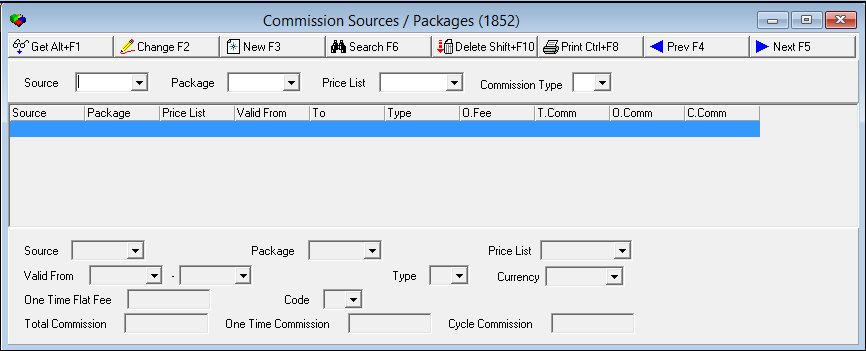
Field/Column Descriptions
The following table describes the fields and columns used in Commission Source/Packages.
|
Field/Column |
Description |
|
Source |
Identifies the media of the advertising program that was used to generate the customer. (This menu originates from program #1710.) Select a source code to search for commission source/package records associated with that source. |
|
Package |
Identifies the package offered in an advertising program for a special promotion. (This menu originates from program #1777.) Select a package code to search for commission source/package records associated with that package. |
|
Price List |
Select a price list code to search for commission source/package records associated with that price list code. (This menu originates from program #1533.) |
|
Commission Type |
Select a commission type code to search for commission source/package records associated with that commission type. The code represents a specific type of personnel involved in sales of products and services. (This menu originates from program #1805.) |
|
Valid From |
Displays the beginning date of the commission source/package plan. O If you leave this field blank, SBN places no date restrictions on commissions that match the other variables: l Source l Package l Commission type |
|
To |
Displays the ending date of the commission source/package plan. O If you leave this field blank, SBN places no date restrictions on commissions that match the other variables: l Source l Package l Commission type |
|
Type |
Identifies the commission type code. |
|
Currency |
Currency type of this source/package combination. (This menu originates from program #1635.) |
|
One Time Flat Fee |
The one-time flat fee commission for this source/package combination. |
|
Total Commission |
The maximum dollar amount of commission to calculate on work orders that contain this source/package combination. |
|
One Time Commission |
The maximum dollar amount of one-time commission to calculate on work orders that contain this source/package combination. |
|
Cycle Commission |
The maximum dollar amount of cycle fee commission to calculate on work orders that contain this source/package combination. |
|
Code |
Company-defined code used to identify the record on the work order commissions calculation window. (This menu originates from program #1854.) |
Searching for a Commission Source/Package
Use the following steps to search for a specific commission source/package:
1. In Commission Source/Packages, select your search parameters from one of the four fields in the upper pane of the window.
2. Choose Search.
‰ SBN displays the commission source/packages that match your search parameters.
Button Functions
The following table displays the buttons, describes the shortcut keys, actions, and functionality.
|
Button |
Name |
Shortcut Key |
Action |
Description |
|
|
Get |
ALT+F1 |
1852/ 1 |
Get record. |
|
|
Change |
F2 |
1852/ 2 |
Change selected record. |
|
|
New |
F3 |
1852/ 3 |
Create new record. |
|
|
Delete |
SHIFT+F10 |
1852/ 4 |
Delete selected record. |
|
|
|
CTRL+F8 |
1852/ 6 |
Print selected records. |
|
|
Search |
F6 |
1852/ 7 |
Search for existing record. |
|
Modify Search |
1852/ 8 |
Allows modification to existing search parameters. |
||
|
|
Previous |
F4 |
1854/ 999 |
Select last record. |
|
|
Next |
F5 |
1854/ 999 |
Select next record. |








Modifications and Updates to Commission Source Packages
The following table lists modifications and updates to the Commission Source Packages document.
|
Mod Number |
Date |
Description |
|
n/a |
8/15/14 |
Images updated. |
F1 Help
| Delphi Forms | commissourpackform |
| Program Numbers | 1852 |