
Installed Components
Module: Account Management
Overview
Use the Installed Components tab in Data Entry to view installed items for a selected installation. From this tab, you may toggle to a log of changes to installed items. These functions enable you to track:
Updates to installed items
Automatic tests and manual inspections performed on items
Note: Actions 559/480-486 control access to this tab and its functions.
To access this program, select Data Entry (program #559) from the main menu of SBN, and then choose the Installed Components tab.
This document covers the following topics:
The Installed Components Tab
The following graphic shows the Installed Components tab with information displayed. The tab displays components installed on the selected CID.
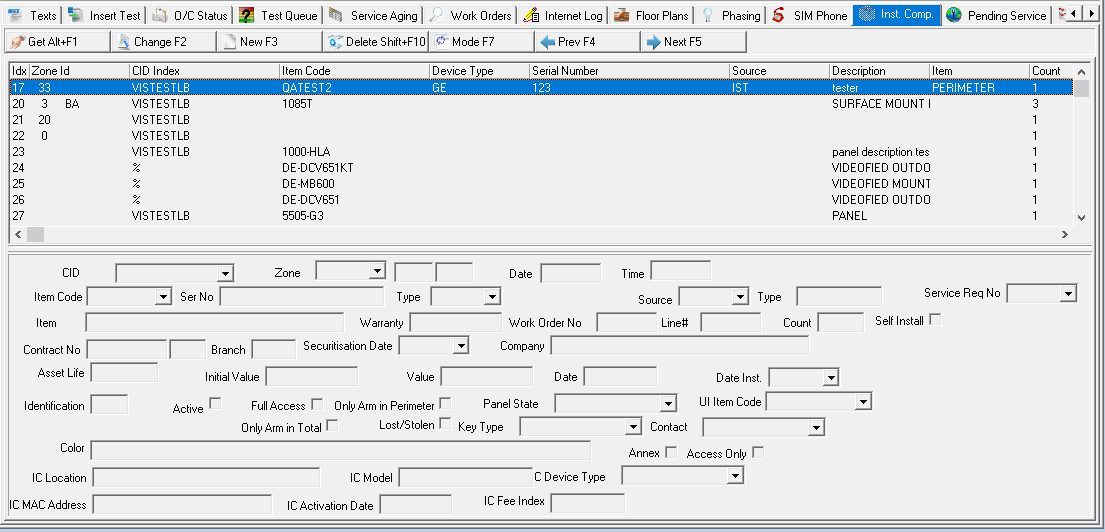
Note: When option bl178 is on, SBN lists the items within a kit on a work order individually in the Installed Components tab. If option bl179 is on, the name of the kit appears along with the individual items in the kit. Items with the Comp Log Expansion check box selected in program #1535 appear on separate lines of the Installed Components tab as well.
Column Descriptions
The following table describes columns used in the Installed Components tab.
Column |
Description |
Index |
Indexed number of item, in ascending order according to date/time at which it was added to the list of Installed Components. |
Zone ID |
ID of the zone on which this item is installed. |
CID Index |
CID on which this item is installed. O If this column displays the %, the item is installed on all CIDs for the selected installation. |
Item Code |
Item code. |
Device Type |
Identifies the type of serial number for the item. |
Serial Number |
Serial number of the item. |
Source |
Identifies the source that generated the item information. |
Description |
Description of the installed item. |
Item |
Text entered if the item is not listed in Items (program #1535). This field accepts up to 50 characters. |
Count |
Count of the selected item(s) installed. |
Warranty |
Warranty length. |
Date |
Transaction date of the item. |
Initial Value |
Initial value of the item on the associated work order. |
Residual Value |
Residual value of the item as of the current date. |
Installation Date |
Date the item was installed. |
Type |
Type of installed component (Normal or Rental; SBN does not allow you to delete Rental components unless action 559/487 is enabled). |
Type (Number) |
ID number of the installed component type. |
Contact |
Action plan contact associated with the installed component. (A contact may be assigned to only one installed component.) |
Field Descriptions
The following table describes the fields used in the Installed Components tab.
Field |
Description |
CID |
Select the CID on which the item is installed. O You may select the % to indicate that this item is installed on all CIDs for the selected installation. |
Zone |
ID of the zone on which this item is installed. (This menu originates from Zones for the selected installation.) O You may not select a template zone for this field. |
(No label) |
Not yet functional. |
(No label) |
Not yet functional. |
Index |
Indexed number of item. |
Date |
Transaction date of the item. (SBN automatically populates this read-only field when a user enters the item in the Installed Components tab.) |
Time |
Transaction time of the item. |
Item Code |
Select the item code for the item. (This menu originates from program #1535.) Note: When option ba217 is on, this menu displays all items in program #1535 that have the Component check box selected. When option ba217 is off, this menu only displays items from work orders for the selected installation. If option ba351 is on, this field may default with the item code entered in Zones (New mode). |
Serial Number |
Type the serial number for the item. Note: If option ba351 is on, this field may default with the serial number entered in Zones (New mode). |
Type |
You may select the type of serial number for the item. (This menu originates from program #1590/50). Note: If option ba351 is on, this field may default with the item code entered in Zones (New mode). |
Source |
You may select the source that generated the item information (i.e., work order, receiver, partner web). (This menu originates from program #1590/51.) |
Type |
Type of installed component (Normal or Rental; SBN does not allow you to delete Rental components unless action 559/487 is enabled). |
Item |
You may type free-form text if the item is not listed in Items (program #1535). This field supports up to 35 characters. |
Warranty |
Warranty length. |
Work Order No |
Work order number referenced when the selected item was installed. (This field automatically populates when a work order is invoiced.) |
Line# |
Line number of the item from the work order referenced when the selected item was installed. (This field automatically populates when a work order is invoiced.) |
Count |
Count of the selected item(s) installed. (This field automatically populates when a work order is invoiced.) |
Contract Number |
Contract associated with the installation work order. (SBN automatically populates this read-only field when a user invoices the associated work order.) |
Contract
Dealer |
Dealer ID associated with the contract for the installation work order. (SBN automatically populates this read-only field when a user invoices the associated work order.) |
Branch |
Branch associated with the contract for the installation work order. (SBN automatically populates this read-only field when a user invoices the associated work order.) |
Securitisation Date |
Customer-defined field. (This field has no SBN function.) |
Company |
Customer-defined field. (This field has no SBN function.) |
Asset Life |
Primary term of the associated rental contract. This field is blank for installed components of the Normal type. (SBN automatically populates this read-only field when a user invoices the associated work order.) |
Initial Value |
Initial value of the item on the associated work order. (SBN automatically populates this read-only field when a user invoices the associated work order.) |
Value |
Residual value of the item as of the current date. (SBN automatically populates this read-only field when a user invoices the associated work order.) |
Date |
Date a user created the installation work order. (SBN automatically populates this read-only field when a user invoices the associated work order.) |
Date Installed |
Date the item was installed. (SBN initially sets this field to the same date as the transaction date for the item, but you may change it if necessary.) |
Identification |
Identification number of the item. (Customer-defined; this field has no SBN function.) |
Active |
Customer-defined check box; no functionality in SBN. |
Full Access |
Customer-defined check box; no functionality in SBN. |
Only Arm in Perimeter |
Customer-defined check box; no functionality in SBN. |
Panel State |
Current state of the installed item. (This menu originates from program #1590/40.) |
UI Item Code |
Customer-defined; this field has no SBN function. (This menu originates from program #1535.) |
Attended |
Customer-defined check box; no functionality in SBN. |
Only Arm in Total |
Customer-defined check box; no functionality in SBN. |
Lost/Stolen |
Customer-defined check box; no functionality in SBN. |
Key Type |
Key type of the installed item. (This menu originates from program #1590/41.) Note: When option mo220 is on, the installed component Key Type appears in the Comment column of the Alarm Log along with the Color and Contact when SBN receives an alarm from the zone associated with an installed component. |
Contact |
Action plan contact associated with the installed item. (This menu is a list of all contacts on all action plans for the installation. A contact may be assigned to only one installed component.) Note: When option mo220 is on, this contact appears in the Comment column of the Alarm Log along with the Key Type and Color when SBN receives an alarm from the zone associated with an installed component. When option mo220 is off, only this contact appears in the Comment column of the Alarm Log. |
Color |
Color associated with the installed item. (Customer-defined; this field has no SBN function.) Note: When option mo220 is on, the installed component Color appears in the Comment column of the Alarm Log along with the Key Type and Contact when SBN receives an alarm from the zone associated with an installed component. |
Annex |
Customer-defined check box; no functionality in SBN. |
Access Only |
Customer-defined check box; no functionality in SBN. |
Service Type Group |
A specific component is covered by a specific service. Service types are defined in program #1692. |
Service Request NO |
Service Request Number. This field comes from Service Log. |
Self Install |
This field is populated when a work order is approved and closed for an item that has the “Self Installed� checkbox selected. |
Using Common Functions
See the reference document Common Functions in SBN for more information.
The Installed Components Log
The Installed Components Log displays a history of changes to components installed at a selected installation. Choose Toggle Mode to toggle the view from the list of installed components to the Installed Components Log.
If option ba351 is on, the following fields default with information entered in the Get One Zone mode of Zones for the selected information:
Serial No
Type
Item Code
If you delete a zone that includes a serial number, type, and item code, SBN deletes the associated item from the list of Installed Components and logs the deletion in the Installed Components Log. A negative item count in the Installed Components Log indicates the item is deleted.
The following graphic shows the Installed Components Log. The log displays changes to components installed on the selected CID.
Field/Column Descriptions
The following table describes the fields and columns used in the Installed Components Log.
Field/Column |
Description |
Index |
Indexed number of item from the list of installed components. |
Order Index |
Indexed number of item, ranked in ascending order according to date/time at which it a change occurred. |
Date |
Date on which the event about the item occurred or is scheduled to occur. |
Time |
Time at which the event about the item occurred or is scheduled to occur. |
Done |
If this column displays a check mark, the event about the item has occurred. |
Work Order # |
Work order number associated with this event. |
Line Index |
Reference to work order row (item_ix). |
Request # |
Service request associated with this event. |
Index |
Reference to service request (ix). |
Manual Check |
If this column displays a check mark, the item has been successfully manually tested in conjunction with the event. |
Automatic (No label) |
If this column displays a check mark, the item has been successfully automatically tested in conjunction with the event. |
Action |
Identifies the resolution code associated with the event. |
Count |
Count of the item. l -1 = item removed l 0 = event does not affect count of items l 1 = item installed |
Item Code |
Item code for the selected item. |
Device Type |
Type of serial number for the selected item. |
Serial Number |
Serial number of the selected item. |
Source |
Source that generated the information for the selected item (i.e., work order, receiver, partner web). |
CID Index |
Identifies the CID on which the selected item is installed. O If this column displays the %, the item is installed on all CIDs for the selected installation. |
Text |
Free-form text about the selected item. |
Button Functions
The following table displays the buttons, describes the shortcut keys, actions, and functionality.
Button |
Name |
Shortcut Key |
Action |
Description |
|
Get Record |
alt+F1 |
559/481 |
Get record. |
|
Change Record |
F2 |
559/482 |
Change record. |
|
New Record |
F3 |
559/483 |
Create new record. |
|
Delete Record |
shift+F10 |
559/484 |
Delete record. |
|
Toggle Mode |
F7 |
559/485 |
Toggle between the list of installed components and the Installed Components Log. |
|
Previous Record |
F4 |
|
Select last record. |
|
Next Record |
F5 |
|
Select next record. |
|
Exit |
Esc |
559 |
Exit without saving. |
|
Save |
Enter |
559 |
Save existing record. |









Dealer Restrictions on Look-Ups
Installed-component and report look-ups apply dealer restrictions, so users only see components within their authorization.
Modifications and Updates to Installed Components
The following table lists modifications and updates to the Installed Components document.
Mod Number |
Date |
Description |
07.02.21033, 08.03.08365 |
08/15/11 |
Added several fields and check boxes. |
07.02.21715, 08.03.08740 |
06/08/12 |
Added Annex and Access Only check boxes. |
n/a |
07/22/14 |
Updated images. |
08.88.11226, 07.88.25603 |
02/13/18 |
Changed image and added Service Type Group dropdown. |
07.91.26349, 08.91.11802, 08.91.11803, 07.91.26350, 07.91.26351, 08.91.11804, 08.91.11805, 07.91.26352, 07.91.26355, 08.91.11809
|
01/27/20 |
New Self Install checkbox added. Image updated. |