
Permit Profiles
Permit Profiles
Permit Profiles
Program #: 1716
Module: System Administration
Overview
Use Permit Profiles (program #1716) to define and maintain permit profiles in SBN. You can attach defined permit profiles to specific response agencies. The menu of defined Permit Profiles appears in
The Data Entry Basics tab
The Agency window
To access this program, select Permit Profiles (program #1717) from the main menu of SBN.
The Permit Profiles Window
The following graphic shows Permit Profiles as the program opens. The upper pane displays all previously defined permit profiles.
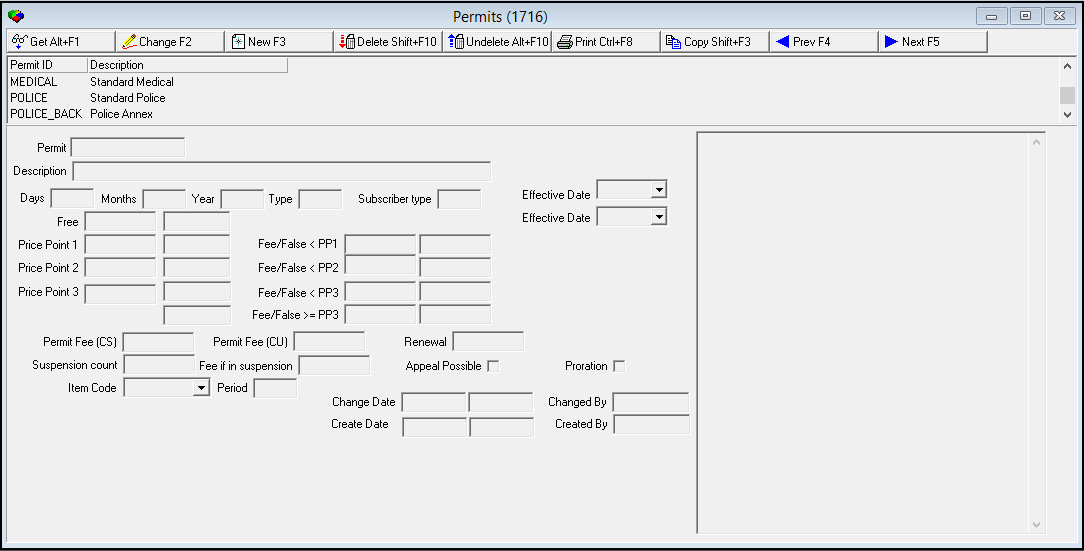
Field/Column Descriptions
The following table describes the fields and columns used in Permit Profiles.
Field/Column |
Description |
Permit |
Abbreviation that identifies the permit profile. Note: This field holds a maximum of 12 alphanumeric characters. |
Description |
Text description of the permit profile. |
Days |
Number of days in the term during which the permit is valid. |
Months |
Number of months in the term during which the permit is valid. |
Years |
Number of years in the term during which the permit is valid. |
Type |
Indicates when the permit term ends. 1 - Anniversary (a fixed period, such as 12 months from the Effective Date) 2 - Calendar Year (January 1 to December 31) 3 - Rolling Year (renews each year from Create Date) |
Subscriber Type |
Subscriber type (commercial, residential, etc.) that determines the permit rules. (Some agencies apply different rules to commercial and residential subscribers.) |
Effective Date (From) |
Date on which the permit becomes effective. |
Free |
Number of free dispatches the agency allows per permit term. |
Free Range (No label) |
Range of free dispatches the agency allows per permit term. |
Effective Date (To) |
Date on which the permit expires. |
Price Point 1 |
Number of false alarm dispatches up to which the agency charges the fee amount in the Fee/False < PP1 field. |
Price Point 1 Range (No label) |
Range of false alarm dispatches within which the agency charges the fee amount in the Fee/False < PP1 field. |
Fee/False < PP1 |
Fee that the agency charges for a false alarm dispatch within the Price Point 1 range. If the agency uses a range rather than a flat fee, this is the minimum fee amount of the range. |
Fee/False < PP1 Range |
Maximum fee amount that the agency charges for a false alarm dispatch within the Price Point 1 range, if the agency uses a range rather than a flat fee. |
Price Point 2 |
Number of false alarm dispatches up to which the agency charges the fee amount in the Fee/False < PP2 field. |
Price Point 2 Range (No label) |
Range of false alarm dispatches within which the agency charges the fee amount in the Fee/False < PP2 field. |
Fee/False < PP2 |
Fee that the agency charges for a false alarm dispatch within the Price Point 2 range. If the agency uses a range rather than a flat fee, this is the minimum fee amount of the range. |
Fee/False < PP2 Range |
Maximum fee amount that the agency charges for a false alarm dispatch within the Price Point 2 range, if the agency uses a range rather than a flat fee. |
Price Point 3 |
Number of false alarm dispatches up to which the agency charges the fee amount in the Fee/False < PP3 field. |
Price Point 3 Range (No label) |
Range of false alarm dispatches within which the agency charges the fee amount in the Fee/False < PP3 field. |
Fee/False < PP3 |
Fee that the agency charges for a false alarm dispatch within the Price Point 3 range. If the agency uses a range rather than a flat fee, this is the minimum fee amount of the range. |
Fee/False < PP3 Range |
Maximum fee amount that the agency charges for a false alarm dispatch within the Price Point 3 range, if the agency uses a range rather than a flat fee. |
Maximum Price Point |
Number of false alarm dispatches after which the agency charges the fee amount in the Fee/False >= PP3 field. |
Fee/False >= PP3 |
Fee that the agency charges for a false alarm dispatch beyond the number in the Maximum Price Point field. If the agency uses a range rather than a flat fee, this is the minimum fee amount of the range. |
Fee/False >= PP3 Range |
Maximum fee amount that the agency charges for a false alarm dispatch beyond the number in the Maximum Price Point field, if the agency uses a range rather than a flat fee. |
Permit Fee (CS) |
Fee the central station pays for the permit. |
Permit Fee (CU) |
Fee the customer pays for the permit. |
Renewal |
Permit renewal fee amount. |
Suspension Count |
Number of false alarms allowed before an account is suspended and the agency will no longer be dispatched to the installation premises. |
Fee if in Suspension |
Fee the customer is charged if the account has been suspended. |
Appeal Possible |
Select this check box to indicate if the customer can appeal the agency's decision to suspend an account. (This check box has no SBN functionality.) |
Proration |
Select this check box to indicate that the agency prorates permit fees. |
Item Code |
Select an item to associate with the permit that can be used to set up a cycle fee for the permit. (This menu originates from program #1535.) |
Period |
Cycle period, in months, when the agency invoices the permit fee. |
Change Date |
Date on which a user last changed the permit record. |
Change Time |
Time at which a user last changed the permit record. |
Changed By |
User ID that last changed the permit record. |
Create Date |
Date on which a user created the permit record. |
Create Time |
Time at which a user created the permit record. |
Created By |
User ID that created the permit record. |
Comment |
Permit profile comment text. Note: Comment text may be entered on separate lines. Press Ctrl+Enter on your keyboard to move the cursor to the next line. |
Using Common Functions
See the reference document Common Functions in SBN for more information.
Button Functions
The following table displays the buttons, describes the shortcut keys, actions, and functionality.
Button |
Name |
Shortcut Key |
Action |
Description |
|
Get |
ALT+F1 |
1716/ 1 |
Get record. |
|
Change |
F2 |
1716/ 2 |
Change selected record. |
|
New |
F3 |
1716/ 3 |
Create new record. |
|
Delete |
SHIFT+F10 |
1716/ 4 |
Delete selected record. |
|
Undelete |
ALT+F10 |
1716/ 5 |
Restore deleted record. |
|
CTRL+F8 |
1716/ 6 |
Print selected records. |
|
|
Copy |
SHIFT+F3 |
1716/ 999 |
Copy selected field. |
|
Previous |
F4 |
1716/ 999 |
Select last record. |
|
Next |
F5 |
1716/ 999 |
Select next record. |









Modifications and Updates to Permit Profiles
The following table lists modifications and updates to the Permit Profiles document.
Mod Number |
Date |
Description |
n/a |
7/22/14 |
Images updated. |