
Cancel Write Off Batches
Cancel Write Off Batches
Cancel Write-Off Batches
Program #: 1585
Module: Accounting
Overview
Use Cancel Write-off Batches (program #1585) to cancel previously posted write-off batches. When you cancel a write-off batch, SBN reduces the written-off amount and increases the balance owed by the customer. All amounts in this program must be negative to apply properly to the account.
The Add Write-Off Batches Window
The following graphic shows the Add Write-off Batches window.
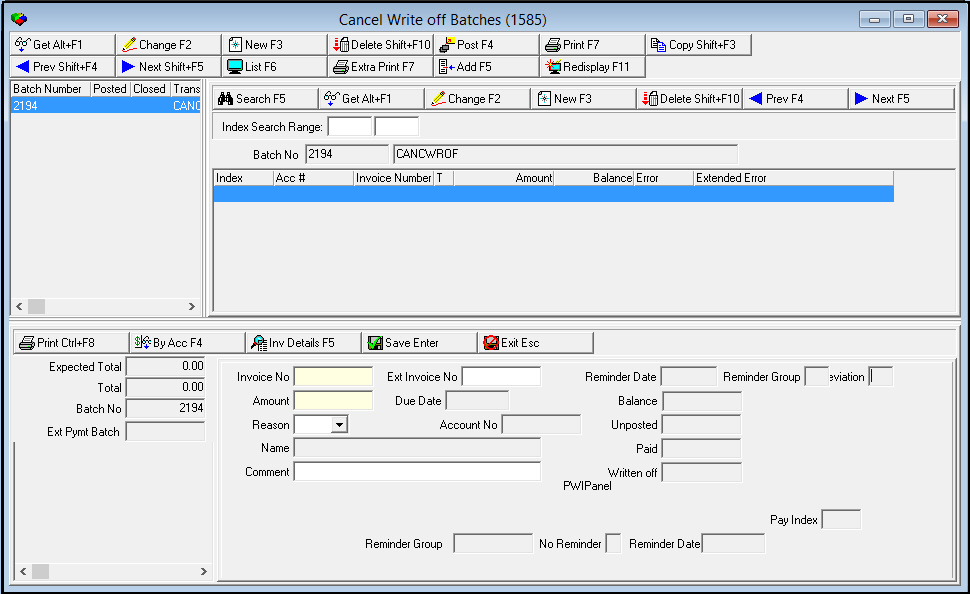
Column Descriptions - Add Write-Off Batches List
The following table describes the columns used in this pane.
Column |
Description |
Batch Number |
SBN-assigned batch number to identify this batch of open payments. |
Posted |
If this column displays an X, a user attempted to post the batch but was unsuccessful. |
Closed |
If this column displays a +, the expected total and the actual total of the batch match and are ready to post. If this column displays an X, a user attempted to post the batch but was unsuccessful. |
Transaction Code |
Code for the type of transactions included in this batch. (This menu originates from program #1586.) |
System Date |
SBN-assigned date that on which this batch was created. |
Transaction Date |
User-entered date on which this payment transaction occurred. |
Batch Total |
Total amount of this batch. This information comes from the Expected Total Amount field below. |
Expected Total |
Total amount expected from all sub batches together. |
File Name |
If this batch has been exported to a file, the export file name displays. |
Index |
Sequential number of individual line item. |
Acc # |
Account number associated with the selected batch. |
Invoice Number |
Invoice number to which the payment applies. |
Type |
Type of selected invoice. |
Amount |
Amount of the payment. |
Balance |
Open balance of the selected invoice. |
Error |
Issue detected in the selected invoice. |
Extended Error |
Detail of detected issue. |
Field Descriptions - Add Write-Off Batches List
The following table describes the columns used in this pane.
Field |
Description |
Invoice Number |
Invoice number to which the payment applies. |
Inquiry No |
|
Ext Invoice No |
Customer-defined external invoice number. |
Amount |
Amount of the payment. |
Due Date |
Due date of the invoice. |
Balance |
Open balance of the selected invoice. |
Reason |
Reason code for the payment. (This menu originates from program #1521.) |
Account No |
Account number associated with the current invoice. |
Unposted |
Total amount of unposted payments for the account. |
Name |
Name of account holder. |
Paid |
Amount of payments previously posted to the current invoice. |
Comment |
Text comment to associate with the payment. |
Written Off |
Total amount written off the current invoice. |
Reminder Group |
Code for the last reminder group sent to the customer. |
No Reminder |
If this box displays an x, reminder notices are not sent with this invoice. |
Reminder Date |
Last date a reminder was sent for the current invoice. |
Expected Total |
Total amount expected from each sub batch. |
Total |
Total amount of a batch. |
Batch No |
Batch number for the selected invoice batch. |
Ext Pymt Batch |
Ext Pymt Batch field added in lower left of Add screen. |
Search for Write-off Batches by Name
The following graphic shows the Search window that displays if the Name Search button is selected.
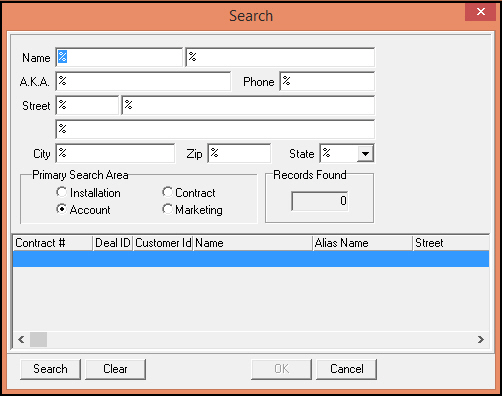
Column Descriptions - Add Write-Off Batches List
The following table describes the columns used in this pane.
Column |
Description |
Contract # |
Displays the contract number of the batch. |
Deal ID |
Displays the Deal ID. |
Customer id |
Displays the associated customer ID. |
Name |
Displays the customer name. |
Alias Name |
Displays the customer nickname. |
Street |
Displays the customer street address. |
Field Descriptions - Add Write-off Batches Details
The following table describes the fields used in this pane.
Field |
Description |
Name |
Free-text field that allows search parameters based upon the customer name. |
A.K.A |
Free-text field that allows search parameters based upon the customer nickname. |
Phone |
Free-text field that allows search parameters based upon the customer phone number. |
Street |
Free-text field that allows search parameters based upon the customer street address. |
City |
Free-text field that allows search parameters based upon the customer city. |
Zip |
Free-text field that allows search parameters based upon the customer zip code. |
State |
Free-text field that allows search parameters based upon the customer state. |
Primary Search Area |
|
Installation |
Define the search parameters for Installation. |
Account |
Define the search parameters for Account. |
Contract |
Define the search parameters for Contract. |
Marketing |
Define the search parameters for Marketing. |
Records Found |
|
Records Found |
Displays the number of records retrieved based upon the search parameters. |
The Cancel Write-off Batches Window
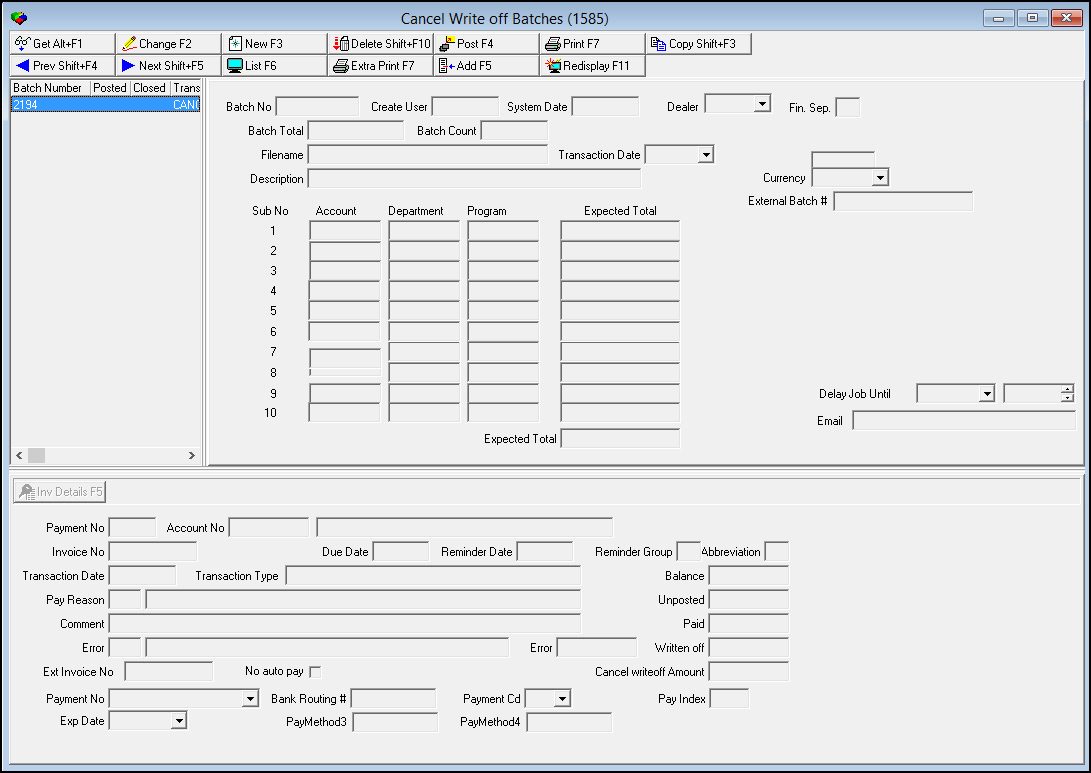
The Cancel Write-off Batches window contains three main panes:
The following graphic shows the Cancel Write-off Batches window.
The Cancel Write-off Batches List
The following graphic shows the Cancel Write-off Batches List. This pane displays open cancel write-off batches.
Note: If your user profile contains a dealer ID, you see only those cancel write-off batches associated with that dealer ID.

Column Descriptions - Cancel Write-Off Batches List
The following table describes the columns used in this pane.
Column |
Description |
Batch Number |
SBN-assigned batch number. |
Posted |
An X indicates that a user attempted to post the batch, but was unsuccessful. |
Closed |
l A + indicates that the expected total and the actual total of the batch match, and are ready to post. l An X indicates that a user attempted to post the batch, but was unsuccessful. |
Transaction Code |
Code indicates the type of payment/write-off posted to the account. (For cancel write-off batches, this appears as CANCWROF.) |
Sys Date |
SBN-assigned date when the batch was created. |
Tran Date |
User-entered date for the batch. |
Batch Total |
Total amount of all cancel write-off amounts included in this batch. |
Expected Total |
Amount entered as the expected batch total for the items to enter. |
Filename |
Filename of batch data, if applicable. |
Description |
Text description of the batch. |
Dealer ID |
ID of the dealer associated with the cancel write-off batch. O If your user profile contains a dealer ID, you only see those cancel write-off batches associated with that dealer ID. |
Common Functions in SBN
See the reference document Common Functions in SBN for more information.
The Cancel Write-off Batches Details
The following graphic shows the details of the selected Cancel Write-off Batch. The pane contains fields for entering or changing batch information.
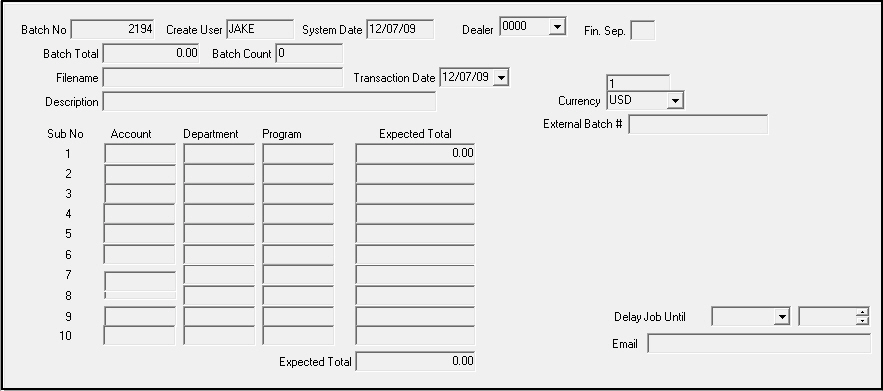
Field Descriptions - Cancel Write-off Batches Details
The following table describes the fields used in this pane.
Field |
Description |
Batch Number |
SBN-assigned batch number. |
Create User |
ID of the user who created the batch. |
System Date |
SBN-assigned date when the batch was created. |
Dealer |
ID of the dealer associated with the cancel write-off batch.
|
Batch Total |
Total amount of all transactions in the batch. |
Batch Count |
Number of transactions in the batch. |
Filename |
Filename of batch data, if exported. |
Transaction Date |
User-entered date for the batch. |
Description |
Text description of the batch. |
Sub No |
Sub batch number. |
GL Acc # |
The GL Account number to which you want to apply a cancel write-off. |
Expected Total |
Amount expected to be applied. |
Expected Total |
Total expected amount for the batch. |
Displaying the Cancel Write-offs in a Batch
Use the following steps to display the list for a cancel write-off batch:
1. In Cancel Write-off Batches, in the Cancel Write-off Batches List select the batch for which you want to display details.
2. Choose Display List.
‰ The Display List pane appears.
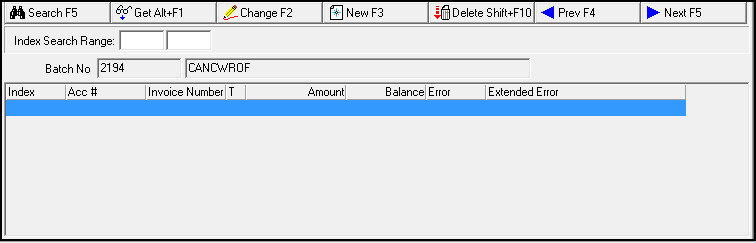
3. In Index Search Range - enter the range of index lines you want to view.
Note: If you leave these fields blank, SBN displays all indexed lines in the batch.
4. Choose Search.
‰ The results appear in the lower section of the pane.
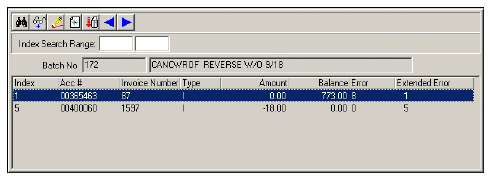
5. To view details of a line
a. Select the line for which you want to view details.
b. Choose Get Record.
‰ The Invoice Detail Pane fills with the details of the selected line.
The Invoice Detail Pane
The following graphic shows the Invoice Details pane. The pane displays details for a selected invoice contained within a cancel write-off batch.
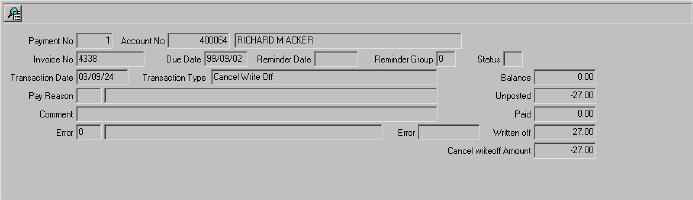
Field Descriptions - Invoice Details
The following table describes the fields used in this pane.
Field |
Description |
Payment No |
SBN-generated index number for this invoice. |
Account No |
Account number of the account this invoice is for. |
Account Name (No label) |
Name of the primary person on the account this invoice is for. |
Invoice No |
SBN-assigned invoice number for this invoice. |
Due Date |
Date that payment is due for this invoice. |
Reminder Date |
Last date a reminder was sent for this invoice. |
Reminder Group |
Code that identifies the last reminder group sent to the customer. |
Abbreviation |
Invoice status. |
Transaction Date |
Date that this invoice transaction occurred. |
Transaction Type |
Type of transaction entered for this invoice on the transaction date. |
Pay Reason |
Code to define the reason for payment for this invoice. |
Pay
Reason Text |
Free-form text to explain the pay reason. |
Comment |
Free-form text for this invoice. |
Error |
If an error occurred during posting, this field displays a numerical code that identifies the error. For more information, see Transaction Error Codes. |
Error Text |
Text description of the error code, if any. For more information, see Transaction Error Codes. |
Error (External) |
If an external error occurred during the import process, this field displays text supplied by the external application. |
Balance |
Open balance on this invoice. |
Unposted |
Amount of any unposted payments for this invoice. |
Paid |
Total of all previous payments for this invoice. |
Written Off |
Total amount previously written-off of this invoice. |
Amount |
Amount that was written-off of this invoice. |
The following table describes the transaction errors that may occur during posting. If a transaction error occurs, you will need to correct it.
Error Code |
Description |
-1 |
Payment is being held |
0 |
No description. No error. |
1 |
Total payout exceeds credit balance. |
2 |
Payment on a written-off invoice. |
3 |
Resulting balance on credit positive. |
4 |
Invalid invoice number. |
5 |
Invalid account number. |
6 |
Resulting balance on credit exceeds credit amount. |
7 |
Payout on invoice larger than available amount. |
8 |
Zero payment. |
9 |
The data record was flagged as bad in received file. |
10 |
A non-digit found in a digit field. |
11 |
Check-digit error. |
12 |
Write-off does not match invoice balance. |
13 |
Invoice has unposted payments. |
14 |
Cancel write-off on non-written off invoice. |
15 |
Calculated cancel write-off does not match write-off. |
16 |
Open credits on contracts to be written off. |
17 |
Written-off invoices exist. Apply payment per invoice. |
18 |
Unallocated payment. |
19 |
Payment awaiting invoice generation. |
20 |
Invoice has been paid/partially paid. |
92 |
Invoice has scheduled payments. |
Transaction Details
When adding or changing write-off transactions, you may enter transactions:
By account number
or...
By invoice number
SBN displays different panes for either method of entering a transaction. For more information on adding and changing payments, see
Field Descriptions - Transactions by Account Number
The following table describes the fields used in this pane.
Field |
Description |
Account Number |
Account number to apply payment. |
Work Order No |
Work order number associated with the invoice. |
Balance |
Open balance of the invoice. |
Amount |
The payment amount to apply to the invoice. |
Reason |
Reason code for the payment. (This menu originates from program #1521.) |
Hold |
If this box displays a check mark, SBN places the payment on hold. The payment does not post, and is visible in the Held Payments window. |
Unposted |
Total amount of unposted payments for the account. |
Name |
Name of the account holder. |
Last Payment Date |
Last date a payment was received on the account. |
Comment |
Text comment to associate with the payment. |
Check # |
Customers’ check number used to make the payment. |
PMisc1 |
Text field for defining bank drawer information. |
PMisc2 |
Text field for defining bank information. |
PMisc3 |
Text field for defining bank branch information. |
PMisc4 |
Text field for defining bank state information. |
Transactions by Invoice Number
The following graphic shows the Transactions by Invoice pane with information displayed.
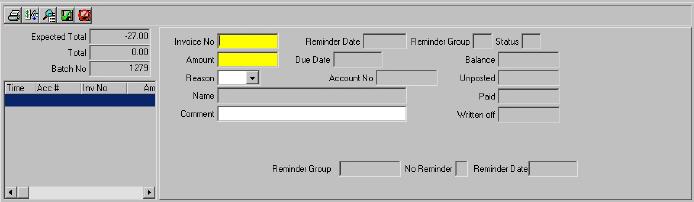
Field Descriptions - Transactions by Invoice Number
The following table describes the fields used in this pane
Field |
Description |
Invoice Number |
Invoice number to which the payment applies. |
Reminder Date |
Last date a reminder was sent for the current invoice. |
Reminder Group |
Code for the last reminder group sent to the customer. |
Abbreviation (Status) |
Status of the invoice; indicates if the invoice has been sent to a collection agency. |
Amount |
Amount of the payment. |
Due Date |
Due date of the invoice. |
Balance |
Open balance of the selected invoice. |
Reason |
Reason code for the payment. (This menu originates from program #1521.) |
Account No |
Account number associated with the current invoice. |
Unposted |
Total amount of unposted payments for the account. |
Name |
Name of account holder. |
Paid |
Amount of payments previously posted to the current invoice. |
Comment |
Text comment to associate with the payment. |
Written Off |
Total amount written off the current invoice. |
Reminder Group |
Code for the last reminder group sent to the customer. |
No Reminder |
If this box displays a check mark, reminder notices were not sent with this invoice. |
Reminder Date |
Last date a reminder was sent for the current invoice. |
Button Functions
The following table displays the buttons, describes the shortcut keys, actions, and functionality.
Button |
Name |
Shortcut Key |
Action |
Description |
|
Get Record |
alt+f1 |
1585/ 1 |
View details of selected record. |
|
Change Record |
f2 |
1585/ 2 |
Change details of selected record. |
|
New Record |
f3 |
1585/ 3 |
Create new record. |
|
Delete Record |
shift+f10 |
1585/ 4 |
Delete selected record. |
|
Post Batch |
f4 |
1585/ 5 |
Post a batch. |
|
Print selected records |
f7 |
1585/ 6 |
Print selected records. |
|
Add |
f5 |
1585/ 7 |
Add invoice details. |
|
Reprint report locally |
f7 |
1585/ 8 |
Print selected report locally. |
|
By Account |
f4 |
1585/ 52 |
Enter the record information by account number. |
|
By Invoice |
f5 |
1585/ 53 |
Enter the record information by invoice number. |
|
Name Search |
f9 |
1585/ 55 |
Search for records by name. |
|
Invoice Lookup |
f8 |
1585/ 56 |
Lookup an invoice based upon the associated account number entered. |
|
Invoice Details |
f5 |
1585/ 57 |
Display selected invoice details. |
|
Copy current record |
shift+f3 |
Copy current record. |
|
|
Previous Record |
shift+f4 |
Go to previous record. |
|
|
Next Record |
shift+f5 |
Go to next record. |
|
|
List Details |
f6 |
Display list for cancel write off batch. |
|
|
Redisplay Screen |
f11 |
Redisplay screen. |
|
|
Exit without saving |
ESC |
Exit without saving changes. |
|
|
Save New Record |
ENTER |
Save existing changes to record. |




















Modifications and Updates to Cancel Write Off Batches
The following table lists modifications and updates to the Cancel Write Off Batches document.
Mod Number |
Date |
Description |
n/a |
8/1/14 |
Images updated. |