
Phone Types
Phone Types
Phone Types
Program #: 1840
Module: System Administration
Overview
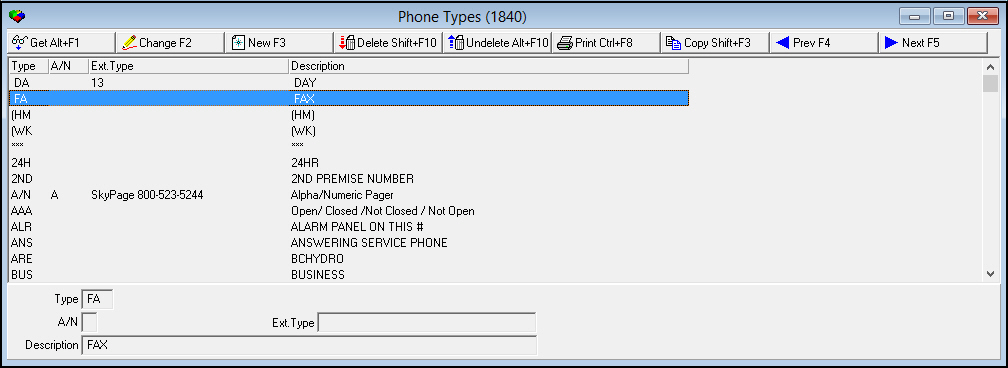
Use Phone Types (Program #1840) to define types of phones and pagers. A menu of Phone Types appears in Personnel (program #1811) for identifying pager phone numbers for employees. In Phone Types, you can categorize phone numbers for both alphanumeric and numeric pagers.
Note: SBN supports GSM modem integration for sending Short Message Service (SMS) pager messages.
Navigating to Phone Types
Use the following steps to navigate to Banks:
1. From the main SBN toolbar, select Menu.
2. From the drop-down menu, select Go To.
3. In the Go To Program dialog box, type in "1840" and press Enter.
w The Phone Types program opens.
The Phone Types Window
The following graphic shows Phone Types as the program opens. The upper pane displays previously defined phone types.
Field/Column Descriptions
The following table describes the fields and columns used in Phone Types.
Field/Column |
Description |
Type |
Abbreviation that identifies the phone type. |
A/N |
Code that identifies the pager type: l A = Alphanumeric l n = Numeric Leave this field blank if this type is not a pager. |
Ext Type |
ID of the paging company. |
Description |
Text description of the phone type. |
Enable SMS
In Phone Types Program #1840, when a user enters an "M" in the A/N field, it enables SMS for a phone type associated with an incident.
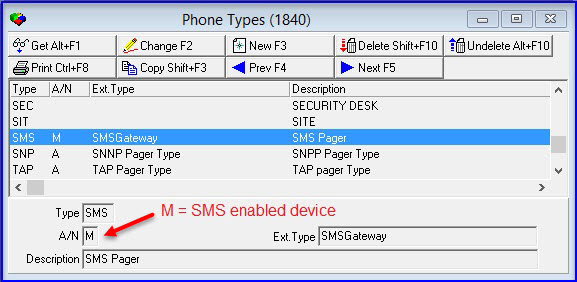
When an incident is associated with a contact number in an Action Plan, the contacts must have a phone number associated with a Phone Type. If the phone type has an "M" in the A/N field the SMS will be enabled.
Using Common Functions
See the reference document Common Functions in SBN for more information.
Button Functions
The following table displays the buttons, describes the shortcut keys, actions, and functionality.
Button |
Name |
Shortcut Key |
Action |
Description |
|
Get |
ALT+F1 |
1840/ 1 |
Get phone type. |
|
Change |
F2 |
1840/ 2 |
Change selected phone type. |
|
New |
F3 |
1840/ 3 |
Create new phone type. |
|
Delete |
SHIFT+F10 |
1840/ 4 |
Delete selected phone type. |
|
Undelete |
ALT+F10 |
1840/ 5 |
Restore deleted record. |
|
CTRL+F8 |
1840/ 6 |
Print selected records. |
|
|
Copy |
SHIFT+F3 |
1840/ 999 |
Copy selected field. |
|
Previous |
F4 |
1840/ 999 |
Select last record. |
|
Next |
F5 |
1840/ 999 |
Select next record. |









Modifications and Updates to Phone Types
The following table lists modifications and updates to the Phone Types document.
Mod Number |
Date |
Description |
n/a |
8/22/14 |
Images updated. |
08.85.10732, 07.85.24994 |
10/04/16 |
Images updated. |