
Referral Types
Referral Types
Referral Types
Program #: 1879
Module: System Administration
Overview
Use Referral Types (program #1879) to define and maintain valid referral types to link to a marketing record. Entries here populate menus for Type, Employee, and Customer types in the Referrals tab in Marketing (program #562).
When you select a Referral Type in Marketing, you may select an employee or customer; if you leave the field blank, you designate a referral type that is neither employee nor customer.
To access this program, select Referral Types (program #1879) from the main menu of SBN.
The Referral Types Window
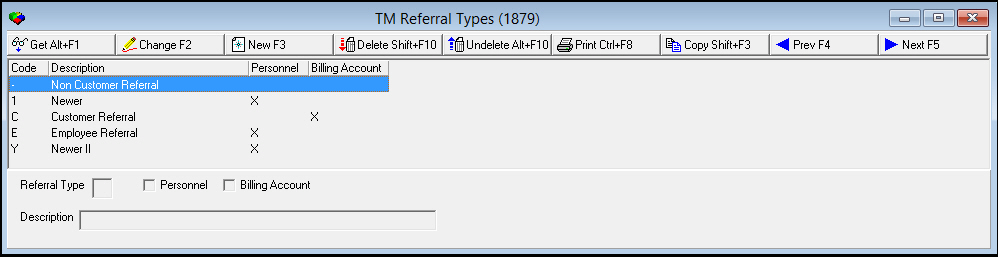
The following graphic shows Referral Types as the program opens. The upper pane displays previously defined Referral Types.
Field/Column Descriptions
The following table describes the fields and columns used in Referral Types.
|
Field/Column |
Description |
|
Code/Referral Type |
Code that identifies the referral type. |
|
Personnel |
Enter a check mark in this field for the Referrals tab in Marketing (program #562) to use the Employee field dropdown list as defined by Personnel (program #1811). |
|
Billing Account |
Enter a check mark in this field for the Referrals tab in Marketing (program #562) to allow you to enter an installation number in the Customer field. |
|
Description |
Text description of the referral type. |
Using Common Functions
See the reference document Common Functions in SBN for more information.
Using Referral Types
The main program pane shows the currently available referral types available for use. Referral Types is the source for the Type, Employee, and Customer fields in the Referrals tab of Marketing (program #562). As such, Referral Types opens with three default types, and more may be added.
To create a new referral type:
1. From the Referral Types page, click the New Record button or press F3 to open the editing pane.
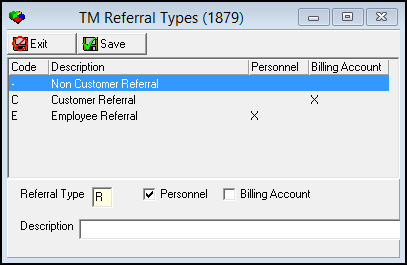
2. In the editing pane, enter a letter or number in the Referral Type field. Compare it to the codes on display to make sure that it is not copying another referral type.
3. Click either the Personnel or the Billing Account checkbox to label the referral type as one or the other. Note: both checkboxes may not be checked at the same time.
4. Give a short description of the new referral type in the Description field.
5. To save your changes and return to the main Referral Types page, click the Save button or press ENTER. To return to the main Referral Types page without saving any changes, click the Exit button or press ESC. The referral type will appear in the window.
To change an existing referral type:
1. From the Referral Types page, select the referral type you wish to change.
2. Click the Change button or press F2 to open the editing pane.
3. In the editing pane, change the information on the referral type as necessary.
4. To save your changes and return to the main Referral Types page, click the Save button or press ENTER. To return to the main Referral Types page without saving any changes, click the Exit button or press ESC. Your changes will appear in the window.
To delete a referral type,
1. From the Referral Types page, select the referral type you wish to delete.
2. Click the Delete button or press SHIFT+F10. At the prompt asking "Are you sure?", click Yes.
3. The deleted referral type no longer appears in the Referral Types page.
To undelete a referral type:
1. From the Referral Types page, click the Undelete button or press ALT+F10 to open the Undelete window.
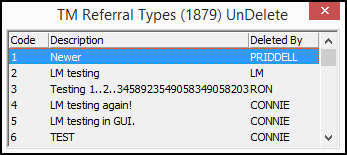
2. Double-click on the referral type or types you wish to undelete. Each one will appear in the Referral Types page.
3. When finished, close the Undelete window.
To copy a referral type:
1. From the Referral Types page, select the referral type you wish to copy.
2. Press the Copy button or press SHIFT+F3 to open the Referral Types editing window.
3. Change the referral type information, particularly the Referral Type code and the description.
4. To save your changes and return to the main Referral Types page, click Save or press ENTER. To return to the main Referral Types page without saving your changes, click Exit or press ESC.
Button Functions
The following table displays the buttons, describes the shortcut keys, actions, and functionality.
|
Button |
Name |
Shortcut Key |
Action |
Description |
|
|
Get |
ALT+F1 |
1879/ 1 |
Get record. |
|
|
Change |
F2 |
1879/ 2 |
Change selected record. |
|
|
New |
F3 |
1879/ 3 |
Create new record. |
|
|
Delete |
SHIFT+F10 |
1879/ 4 |
Delete selected record. |
|
|
Undelete |
ALT+F10 |
1879/ 5 |
Restore deleted record. |
|
|
|
CTRL+F8 |
1879/ 6 |
Print selected records. |
|
|
Copy |
SHIFT+F3 |
1879/ 999 |
Copy selected agency. |
|
|
Previous |
F4 |
1879/ 999 |
Select last record. |
|
|
Next |
F5 |
1879/ 999 |
Select next record. |









Modifications and Updates to Referral Types
The following table lists modifications and updates to the Referral Types document.
|
Mod Number |
Date |
Description |
|
n/a |
8/22/14 |
Images updated. |
|
n/a |
11/25/14 |
Added more detail in the Personnel and Billing Account descriptions. |