
Copy Tasks
Copy Tasks
Copy Tasks
Module: System Administration
Overview
The copy tasks available in SBN allow you to synchronize data between multiple machines. Copy tasks run in the background and copy information from tables specified in the various copy task options from the primary host server to the secondary. You can also use the Copy Data Between Machines (program #551) program for moving data over to backup machines.
Several options control which information SBN copies during the copy task. Option ba103 must be on for any copy task function to run. All other options control copy tasks for each module.
There are two sets of copy tasks. The first set takes database information from the primary server (A) and copies it to the secondary server (B). If your primary server goes down, the first set of copy tasks stops running. When you make B the primary server, the second set of copy tasks begins copying information from Server B to Server A.
The following chart demonstrates how copy tasks copy information from one server to another according to which server is primary.
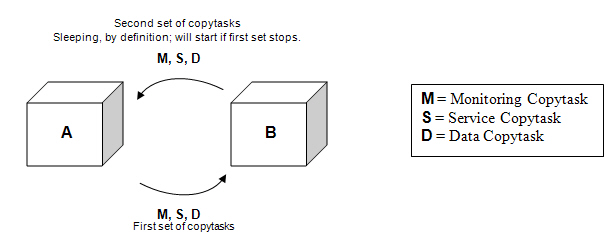
Copy tasks produce output files that you should delete periodically to keep from taking up too much disk space. If copy tasks stop running, immediate queue sizes grow very quickly. Signals cannot be deleted if the information is not saved to the backup server.
Copy Task Options
Option ba100 - copies the following tables from the Monitoring system:
|
Table Description |
Table Name |
|
Alarm Queue |
ma_alarmqueue1, ...ma_alarmqueue16 |
|
Test / Runaway Queue |
ma_testqueue |
|
Open Close Log |
oc_toclog |
|
Alarm Log |
ma_alarmlog, ma_alarmlogsum |
|
Alarm Generation Pointers |
ma_alarmsource |
|
Timers |
ma_timers |
|
Delays |
ma_alarmqdelay |
Option ba101 - copies the following tables from the Data Entry system:
|
Table Description |
Table Name |
|
Installations |
ma_installations, ma_instcurr |
|
Codewords |
ins_codewords |
|
Permit Numbers |
ins_permit_numbers |
|
Alarmids |
ma_alarmids |
|
Installation / Mailing Addresses |
addresses |
|
Base Action Plan |
ma_actplan, ma_actplan_text, ma_actplan_replace |
|
Call Lists |
ma_actplan_call |
|
Passcard Holders / Contacts |
ma_passcard, contper |
|
Temporary Comments |
ma_temp_comments |
|
Zones |
ma_zone |
|
Schedule |
oc_schedule_basics, oc_schedule_times, oc_schedule_calendars, oc_composite_schedules |
|
Special Watch |
comm_wtch_plan, comm_wtch_plan_dtl, comm_wtch_record, comm_wtch_ticket |
|
Data Entry Log |
data_entry_log O The chdt field in cp_inst is used to determine which entries must be flagged for copy. Since cp_inst is a "no index table insert" a new entry with an older date following an entry with a newer date that has not been copied does NOT work. |
|
Zone Test |
ma_zonetest |
|
Detectors |
ma_zone_detector, ma_zone_detector_base, ma_zone_link |
|
SIM Card |
ma_sim_phone |
If there are multiple occurrences of an account in the queue, the data entry copy task copies the current version and flags them all at one time.
In case of an error, SBN flags the account in the copy queue (opc=15) and continues with the next batch. (These accounts will be returned to the queue for retry.)
The accounts may be found in the error/out file by looking for the term "REFLAG_ACC"
Option ba102 - copies the following tables from the Service system:
|
Table Description |
Table Name |
|
Service Requests |
sv_requests |
Note: You must run the Schedule copy task to include the schedule information for the service requests.
Option ba103 - copies the following tables from the Marketing system:
|
Table Description |
Table Name |
|
Marketing Basic |
ta_basic, ta_basic_stat, ta_basic_referral |
|
Marketing Log |
ta_log |
|
Mailing Address |
ta_addresses |
|
Contacts |
ta_contper |
Option ba113 - copies the following tables from the Scheduling system:
|
Table Description |
Table Name |
|
Schedule Requests |
schedule_req |
|
Schedule Capacity |
schedule_ccap |
Option ba106 - copies the following tables from the Work Order system:
Note: If option ba279 is on, the work order copy task can copy a work order only one time.
|
Table Description |
Table Name |
|
ba_work_order_inst |
|
|
Work Order History |
ba_work_order_log |
|
Commission |
pers_commis_cl |
|
Sales Resources |
pers_sales_cl |
|
Commission |
ba_work_order_commis |
|
Work Order Items |
ba_work_order_items |
|
Item Change Log |
ba_work_order_item_change_log |
|
Work Order Texts |
ba_work_order_texts |
|
Text Log |
ba_work_order_text_log |
|
Invoice Log |
ba_work_order_invoice_log |
|
Vendor Information |
ba_work_order_vend |
|
Prebill Information |
ba_work_order_prebill |
|
Miscellaneous Fields |
ba_work_order_misc |
|
Work Orders |
ba_work_orders |
|
Adjustment Distribution |
ba_work_order_disc_dist |
Option ba104 - copies the following tables for the Billing system:
|
Table Description |
Table Name |
|
Billing Accounts |
billing_accounts |
|
Billing Aging |
bl_aging_queue |
|
Contract Basics |
contract_basics |
|
Contract Basics for Billing Accounts |
contract_basics_accounts |
|
Contract Details |
contract_details |
|
contract_details_ca |
|
|
Billing Comments |
ba_comments |
|
Cycle Fees Change Log |
cycle_fee_change_log |
|
Cycle Fees |
cycle_fees |
|
Billing Accounts Lo |
gl_billing_accounts_log |
|
Contract Details Log |
gl_contract_details_log |
|
Communication Log |
communication_log |
|
Communication Text |
communication_texts |
|
Billing Address |
bill_addresses |
|
Billing Contacts |
bill_contper |
|
Contract Change Log |
billctr_data_entry_log |
|
account_controls |
The cp_maxs Table
Control of the amount of data copied cannot be directly accomplished from the standard user interface. The data is kept in table cp_maxs, which displays one row per task.
For monitoring, the table displays the number of minutes in each batch. Any number is supported.
For Data Entry and Service, it is the maximum number of changes that each batch contains. The supported values are 50, 100, 150, 200, 250, 300, 350, 400, 450, and 500. If a non-supported value is entered, SBN uses 25 as the default.
Note: If option syb12 is on, SBN supports any row value.
Note: When you run these copy tasks, their order can be significant. For example, if the scheduling copy task gets ahead of the others, the schedule board does NOT display the correct inquiry number (service request/work order) or time for the sales person (technician/installer).
Note: In case of a deadlock, copy tasks will retry applying batch.
Copy Task Clean Procedure
To clean tables when copying information, use the following procedure:
cp_ma_deancleanX - where X is the task id 1, 2, or 3
Use the parameter @opc to specify
-
0 = clean cpi
-
1 = clean cpo
Copy Task Setback
Use the following procedure from ISQL:
pro_cp_copytasksetback �051221 00:00�,1,1,1,0,0,0,0
-
Parameter 1 = Date to copy from
-
Parameter 2 = Time to copy from
-
Parameter 3 = Monitoring
-
Parameter 4 = Data Entry
-
Parameter 5 = Service
-
Parameter 6 = Marketing
-
Parameter 7 = Work Orders
-
Parameter 8 = Scheduling
-
Parameter 9 = Billing/Contracts
For each set of copy tasks you want to set back, change the parameter value from 0 (inactive) to 1 (active).
Modifications and Updates to Copy Tasks
The following table lists modifications and updates to the Copy Tasks document.
|
Mod Number |
Date |
Description |