
Countries
Countries
Countries
Program #: 1865
Module: System Administration
Overview
Use Countries (program #1865) to define the countries in which your company intends to do business. Menus of Countries appear in many programs throughout SBN.
This document covers the following topics:
Viewing the Details of a Country
Changing the Details of a Country
Navigating to Countries
Use the following steps to navigate to Countries:
1. From the main SBN toolbar, select Menu.
2. From the drop-down menu, select Go To.
3. In the Go To Program dialog box, type in "1865" and press Enter.
w The Countries program opens.
The Countries Window
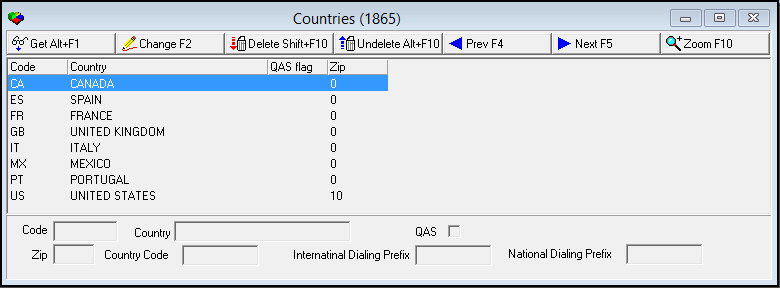
The following graphic shows Countries as the program opens. The upper pane displays previously defined countries.
Field/Column Descriptions
The following table describes the fields and columns used in Countries.
|
Field/Column |
Description |
|
Code |
Two-letter code to define the country. |
|
Country |
Full name of the country. |
|
QAS |
Select this check box if a QAS database is available for this country. If a QAS database is not available for this country, do not select this check box; you will not be able to enter addresses for this country. Note: Currently, SBN only supports the United States, United Kingdom, and Canada for QAS address validation. |
|
Zip |
Enter the number of digits that must exist for SBN to consider a zip code for this country valid. Note: If this value is zero (0), then SBN uses option zipml. |
|
Country Code |
Prefix that SBN uses when auto-dialing a phone number to the selected country from another country. |
|
International Dialing Prefix |
Prefix that SBN uses when auto-dialing a phone number from the selected country to another country. |
|
National Dialing Prefix |
Prefix that SBN uses when auto-dialing a phone number within the selected country, from one city to another. |
Viewing the Details of a Country
You can view the details of a country in the fields in the lower pane.
Use the following steps to view the details of an country:
1. Select the country for which you want to view details from the upper pane.
2. Double-click your selection or choose Get.
w The fields in the lower pane display the details of the selected country.
Changing the Details of a Country
Use the following steps to change the details of a country:
1. Select the country you want to change from the upper pane.
2. Choose Change.
w The fields in the lower pane open for changes.
3. Enter changes, as needed.
4. Choose Save.
Deleting a Country
Use the following steps to delete a country:
1. Select the country you want to delete.
2. Choose Delete.
w A Confirmation dialog box appears: "Delete XX. Are you sure?"
3. Choose Yes.
w SBN deletes the selected country.
Restoring a Deleted Country
You can restore a deleted country back into SBN.
Use the following steps to restore a deleted Country:
1. Choose Undelete.
w The Undelete window appears.
2. In the Undelete window, find the country you want to restore and double-click it, or choose [Enter].
w SBN restores the country to the active list of defined countries.
Zooming into the Sublevel
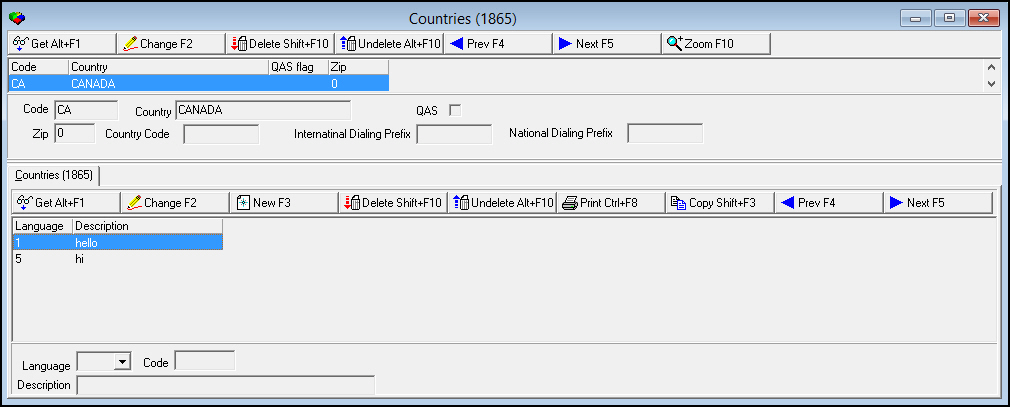
You can zoom into the sublevel of Countries and add language translations for each country. The following graphic shows the Countries sublevel.
Field/Column Descriptions
The following table describes the fields and columns used in the Countries sublevel.
|
Field/Column |
Description |
|
Language |
Select a language to add to the selected country. |
|
Code |
Two-letter code that indicates to which country you are adding the language. |
|
Description |
Free-form text description of the language. |
Related Programs
The following table lists programs related to Countries.
|
Program |
Number |
Document Link |
Description |
|
Data Entry Master and Basics |
559 |
Enter addresses for QAS address validation. |
|
|
Contract Master |
548 |
Enter addresses for QAS address validation. |
Button Functions
The following table displays the buttons, describes the shortcut keys, actions, and functionality.
|
Button |
Name |
Shortcut Key |
Action |
Description |
|
Countries - Main Window |
||||
|
|
Get |
ALT+F1 |
1865/ 1 |
View the details of the selected country. |
|
|
Change |
F2 |
1865/ 2 |
Make changes to the selected country. |
|
|
Delete |
SHIFT+F10 |
1865/ 4 |
Delete the country. |
|
|
Undelete |
ALT+F10 |
1865/ 5 |
Restore the deleted country. |
|
|
Previous |
f4 |
1865/ 8 |
View the previous record. |
|
|
Next |
f5 |
1865/ 9 |
View the next record. |
|
|
Zoom |
f10 |
1865/ 10 |
Zoom into the sublevel to add translations. |
|
Countries - Sublevel |
1865/ 12 |
|||
|
|
Get |
ALT+F1 |
1865/ 13 |
View the details of a language. |
|
|
Change |
F2 |
1865/ 14 |
Make changes to the description of the language. |
|
|
New |
F3 |
1865/ 15 |
Add a language to the selected country. |
|
|
Delete |
SHIFT+F10 |
1865/ 16 |
Delete selected record. |
|
|
Undelete |
ALT+F10 |
1865/ 17 |
Restore the deleted record. |
|
|
|
CTRL+F8 |
1865/ 18 |
Print selected records. |
|
|
Copy |
SHIFT+F3 |
1865/ 19 |
Copy the current language to use as a template. |
|
|
Previous |
F4 |
1865/ 20 |
View the previous record. |
|
|
Next |
F5 |
1865/ 21 |
View the next record. |










Modifications and Updates to Countries
The following table lists modifications and updates to the Countries document.
|
Mod Number |
Date |
Description |
|
08.03.06447 |
03/31/09 |
document created |
|
07.02.18928, 08.03.07031 |
09/02/09 |
Added Country Code, International Dialing Prefix, and National Dialing Prefix fields. |
|
n/a |
08/15/14 |
Image updated. |