
Service Log Report
Service Log Report
Service Log Report
Report #: 2001
Module: Account Management
Overview
Use Service Log Report to print information from service requests that have a status that requires a service visit. This report sorts results by branch, then by installation number. You may create both detailed and summary versions of this report.
To access this report, choose Service Log (report #2001) from the main menu of SBN.
The Service Log Report
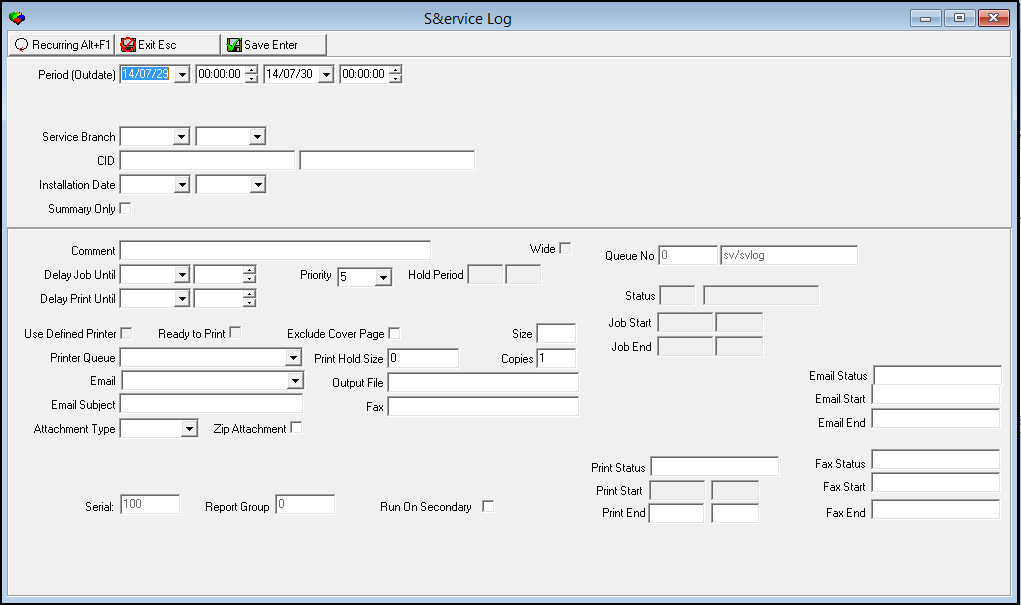
This window contains two panes: in the upper pane you define the content of the report; in the lower pane you defining the job output - how, when, and where you want to print the report.
Note: See Report Parameters Pane for information on the fields in the lower pane, which are the same in every report.
Field Descriptions
The following table describes the fields used in the upper pane of this report.
Field |
Description |
Period |
|
Date
- From |
You may select a range of dates to limit the report to service requests that were outdated within that range. Select the beginning date of the range. O This field defaults to today’s date. |
Time
- From |
You may select a range of time to limit the report to service requests that were outdated within that range. Select the beginning time of the range. O This field defaults to 00:00 (Midnight). |
Date
- To |
You may select a range of dates to limit the report to service requests that were outdated within that range. Select the ending date of the range. O This field defaults to tomorrow’s date. |
Time
- To |
You may select a range of time to limit the report to service requests that were outdated within that range. Select the ending time of the range. O This field defaults to 00:00 (Midnight). |
Service Branch Range |
|
Branch
- From |
You may select a range of service branches to limit the report to service requests associated with branches within that range. Select the beginning branch of the range. O If you leave these fields blank, the report includes all service branches. |
Branch
- To |
You may select a range of service branches to limit the report to service requests associated with branches within that range. Select the ending branch of the range. O If you leave these fields blank, the report includes all service branches. |
CID Range |
|
CID
- From |
You may type a range of CIDs to limit the report to service requests for CIDs within the range. Type the ending CID of the range. O If you leave these fields blank, the report includes all CIDs. |
CID
- To |
You may type a range of CIDs to limit the report to service requests for CIDs within the range. Type the ending CID of the range. O If you leave these fields blank, the report includes all CIDs. |
Installation Date Range |
|
Date
- From |
You may select a range of installation dates to limit the report to installations that occurred within that range. Select the beginning date of the range. O If you leave these fields blank, the report includes all installation dates. |
Date
- To |
You may select a range of installation dates to limit the report to installations that occurred within that range. Select the ending date of the range. O If you leave these fields blank, the report includes all installation dates. |
Summary Only |
Enter a check mark in this box to limit the report to a summary version. |
Running and Viewing a Report
For information on running and viewing a report, see Common Functions in SBN.
Report Example 1
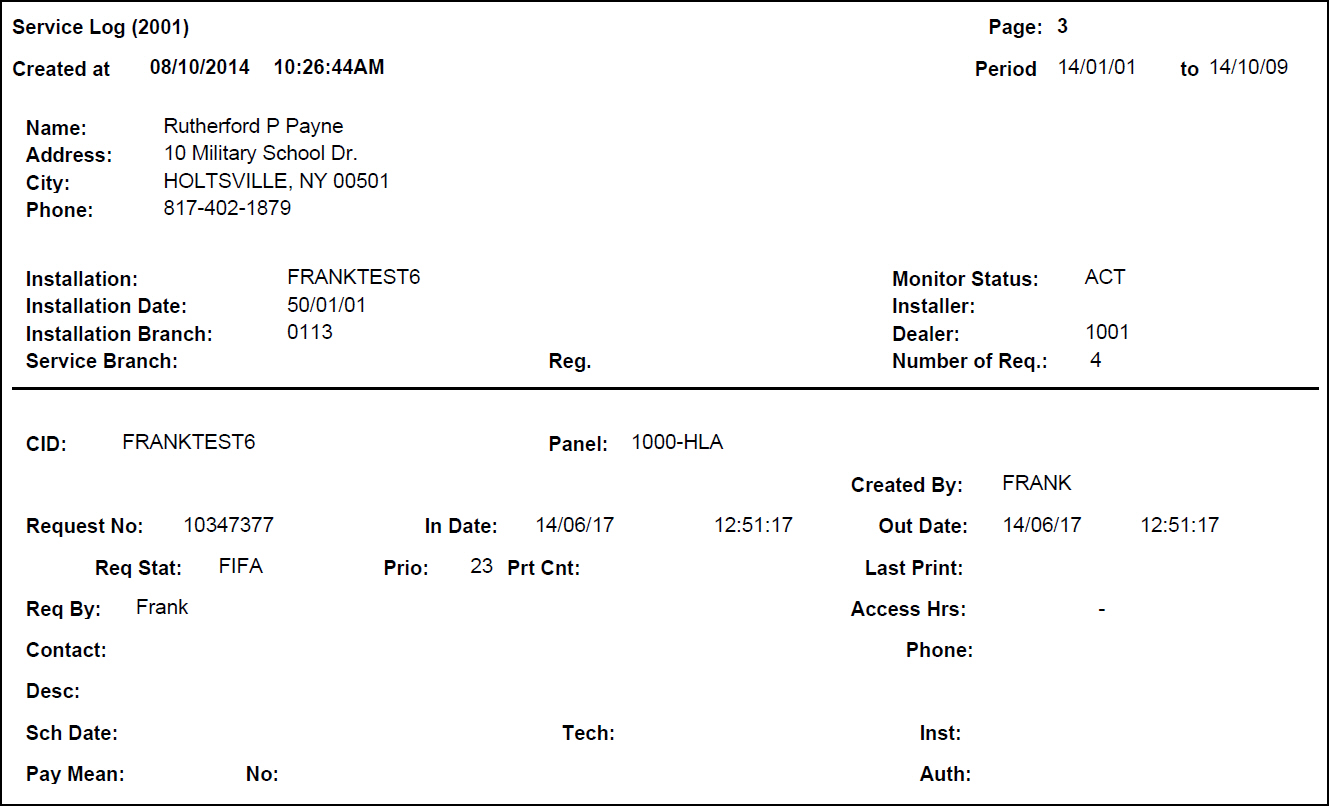
The following graphic shows an example of the detail version of the output of the Service Log Report.
Column Descriptions 1
The following table describes the columns used in the detail version of the output of the report.
Column |
Description |
Installation Information |
|
Name |
Name of the installation. |
Address |
Street address of the installation. |
City |
City, state, and zip code of the installation. |
Phone |
Phone1 from Data Entry. |
Installation |
Installation number. |
Monitor Status |
Displays the monitoring status of the installation at the time the report runs. |
Installation Date |
Date of installation. |
Installer |
The original installer of the installation. |
Installation Branch |
ID of the installation branch associated with the installation. |
Dealer |
ID of the dealer associated with the installation. |
Service Branch |
ID of the service branch associated with the installation. |
Reg |
ID of the branch region, if applicable. |
Number of Req |
Number of service requests in the Service Log for the installation. |
Service Request Information |
|
CID |
CID associated with the installation. |
pane |
ID of the pane type. |
Created By |
Name of the user who created the service request. |
Request No |
SBN-assigned number for the service request. |
In Date |
Date and time the user created the service request. |
Out Date |
Date and time the service request was outdated. |
Req Stat |
The status of the service request. |
Prio |
The priority of the service request. |
Prt Cnt |
The number of times the service request has been printed. |
Last Print |
Date and time the service request was last printed. |
Req By |
Information from the Req by field in the service request. |
Access Hrs |
Hours in which a service technician may access the installation. |
Contact |
Person to contact about the service request. |
Phone |
Phone number for the contact. |
Desc |
Text from the Description field of the service request. |
Sch Date |
Schedule date / work type / slots from the service request. |
Tech |
Identifies the technician listed on the service request. |
Inst |
Identifies the installer listed on the service request. |
Pay Mean |
Method of paying for the service. |
No. |
Bank account or credit card number used for paying for the service. |
Auth |
Authorization code for paying for the service. |
Work Order Information (If Invoiced) |
|
Work Order No |
The work order number attached to the service request. |
Invoice No |
Invoice number for the work order. |
Invoice Amount |
Amount invoiced for the work order. |
Codes Information |
|
Date |
Date the problem code was entered into SBN. |
Time |
Time the problem code was entered into SBN. |
Code |
The problem code. |
Item |
The problem Item code. |
Zone |
The problem zone ID. |
Caus |
The resolution cause. |
Code |
The resolution code. |
Item |
The resolution item code. |
Zone |
The resolution zone ID. |
(No label) |
Problem call type, code, and item description. |
(No label) |
Resolution cause, code, and item description. |
(No label) |
Text from the service request. |
(No label) |
Comments from the service request. |
Misc Log Information |
|
User |
ID of the user who entered the en route information. |
Tech |
Name of the technician performing the service. |
Disp |
Time the technician was dispatched. |
Enro |
En route time. |
On-S |
Time the technician was marked on-site. |
Off-S |
Time the technician was marked off-site. |
Tran |
Transit time, in minutes. |
Work |
Work time, in minutes. |
Mile-I |
Starting mileage. |
Mile-O |
Ending mileage. |
Mileage |
Total mileage for the technician on this service request. |
Report Example 2
The following graphic shows an example of the summary version of the output of the Service Log Report.
Column Descriptions 2
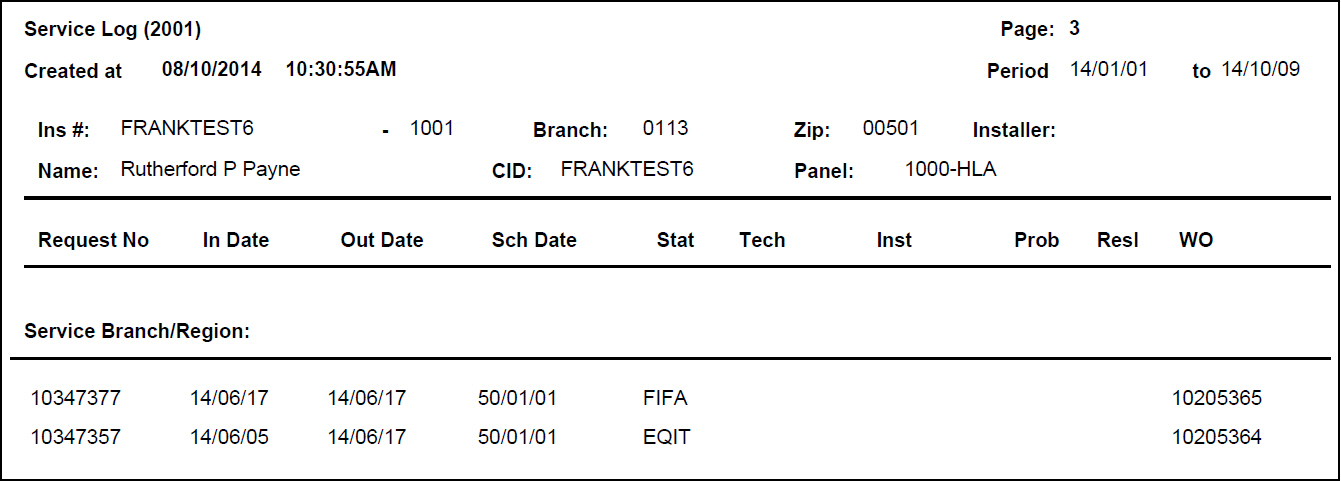
The following table describes the columns used in the summary version of the output of the report.
Column |
Description |
Service Branch / Region |
Identifies the Service Branch and Region associated with the installation. |
Installation Information |
|
Ins# |
Installation number and dealer ID. |
Branch |
Installation branch. |
Zip |
Zip code. |
Installer |
Original installer. |
Name |
Name of the installation. |
CID |
CID of the installation. |
pane |
pane type. |
Service Request Information |
|
Request No |
Service Request number. |
In Date |
Date the selected service request was created. |
Out Date |
Date the selected service request was outdated. |
Sch Date |
Date the selected service request was scheduled. |
Stat |
Status of the selected service request at the time the report runs. |
Tech |
ID of the technician associated with the selected service request. |
Inst |
ID of the installer associated with the selected service request. |
Prob |
Problem code listed on the selected service request. |
Resl |
Resolution code listed on the selected service request. |
WO |
Work order number for the selected service request. |
Button Functions
The following table displays the buttons, describes the shortcut keys, actions, and functionality.
Button |
Name |
Shortcut Key |
Action |
Description |
|
Recurring |
Alt+F1 |
2001 |
Open fields for recurring/template reports. |
|
Exit |
Esc |
2001 |
Exit without saving. |
|
Save |
Enter |
2001 |
Save existing record. |



Modifications and Updates to Service Log Report
The following table lists modifications and updates to the Service Log Report document.
Mod Number |
Date |
Description |
n/a |
7/29/14 |
Images updated. |