
Collection Log Queue
Collection Log Queue
Collection Log Queue
Program #: 536
Module: Accounting
Overview
Use the Collection Log Queue (program #536) to view and edit entries that originate from the Contract Master. You cannot add entries directly to the Collection Log Queue. All new entries come from the Contract Master.
The Collection Log Queue
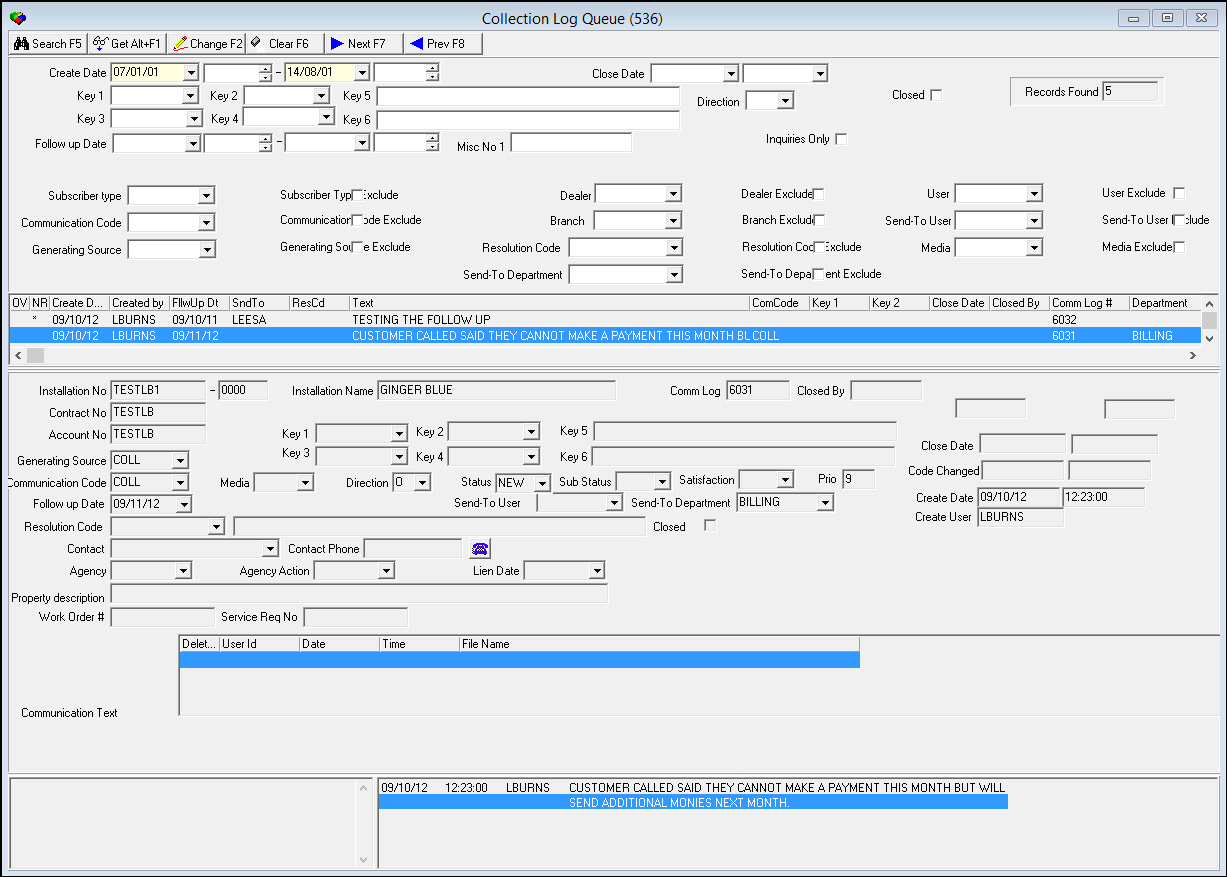
The Collection Log Queue contains three panes:
-
The upper pane — which contains search parameters
-
The middle pane (the List pane) — which displays search results
-
The lower pane (the Details pane) — which displays details of a selected entry in the Communication Log
The following graphic shows the Collection Log Queue window after a search.
Field Descriptions — Search Parameters
The following table describes the search parameters in the Collection Log Queue.
|
Field |
Description |
|
Create Date-From |
Beginning of a range of dates when matching log entries were created. |
|
Create Time-From (no label) |
Beginning of a range of times when matching log entries were created. |
|
Create Date-To (no label) |
End of a range of dates when matching log entries were created. |
|
Create Time-To (no label) |
End of a range of times when matching log entries were created. |
|
User |
ID of user who created the log entry. |
|
Close Date-From |
Beginning of a range of dates when matching log entries were closed. |
|
Close Date-To (no label) |
End of a range of dates when matching log entries were closed. |
|
Resolution Code |
Resolution code assigned to the log entry. (This menu originates from program #1877.) |
|
Key 1- Key 4 |
Company-specific variables used for searching and reporting. (These menus originate from program #1519.) |
|
Key 5 / Key 6 |
Company-specific free text fields for entering additional information about the log entry. |
|
Follow up Date-From |
Beginning of a range of dates when matching log entries must be resolved. |
|
Follow up Date-To |
End of a range of dates when matching log entries must be resolved. |
|
Send-To User |
User ID the log entry was sent to. |
|
Send-To Department |
Department the log entry was sent to. (This menu originates from program #1590/28.) |
|
Branch |
Branch ID associated with the log entry. (This menu originates from program #1530.) |
|
Dealer |
Dealer ID associated with the log entry. (This menu originates from program #1537.) |
|
Direction |
Identifies who initiated communication: l I — Incoming if the customer initiated communication l O — Outgoing if the company initiated communication |
|
Subscriber Type |
Code for subscriber type. (This menu originates from program #1534.) |
|
Media |
Code for media type. (This menu originates from program #1520.) |
|
Generating Source |
Code for the program from which the log entry originates. (This menu originates from program #1518.) |
|
Communication Code |
Code for type of comment created. (This menu originates from program #1517.) |
|
Closed |
Check this box to search for closed log entries. |
|
Records Found |
Number of records returned for the search. |
Column Descriptions — Search Results
The following table describes the columns used in the List pane of the Collection Log Queue.
|
Column |
Description |
|
Overdue Flag |
If this column displays an !, the log entry's follow-up date passed and the entry was not resolved. |
|
Not Yet Read Flag |
If this column displays an *, the user has not yet read the log entry. |
|
Create Date |
Date log entry was created. |
|
Created By |
ID of the user who created the log entry. |
|
Follow-Up Date |
Deadline to follow up on the log entry. |
|
Send-to-User |
ID of the user to whom the log entry was sent. |
|
Resolution Code |
Code that indicates how a closed entry was resolved. |
|
Text |
Text that was entered when the log entry was created or changed. |
|
Communication Code |
Code that identifies the type of entry in the Communication Log. |
|
Key 1 |
Company-specific variable used for searching and reporting. (This menu originates from program #1519.) |
|
Key 2 |
Company-specific variable used for searching and reporting. (This menu originates from program #1519.) |
|
Close Date |
Date the entry was resolved and closed. |
|
Closed By |
ID of the User who resolved and closed the entry. |
|
Comm Log # |
Communication Log ID number assigned to the entry. |
|
Department |
Department to which the log entry was sent. |
|
Installation Number |
Installation number associated with the log entry. |
|
Installation Name |
Installation name associated with the log entry. |
|
Source |
Generating source code for log entry. |
|
Duration |
Length of time in days, hours, minutes, and seconds since entry was created. |
|
Priority |
Priority level assigned to the entry. |
|
Branch |
Installation branch associated with the log entry. |
|
Dealer |
ID of the dealer associated with the account. |
|
Create Date |
Date log entry was created. |
|
Monitoring Status |
Current monitoring status of the account. |
|
Subscriber Type |
Subscriber type of the account. |
Field Descriptions — Details
The following table describes the fields used in the Detail pane of the Collection Log Queue.
|
Field |
Description |
|
Installation No |
Installation number of account in selected log entry. |
|
Dealer (no label) |
Dealer ID associated with the installation. |
|
Installation Name |
Name of installation contact for the selected log entry. |
|
Comm Log |
ID number assigned to the selected entry in the Communication Log. |
|
Closed By |
User ID who closed the selected log entry. |
|
Contract No |
Contract number of account in the selected log entry. |
|
Account No |
Account number of account in the selected log entry. |
|
Key 1 / Key 2 |
Company specific variables used for searching and reporting. (These menus originate from program #1519.) |
|
Key 5 |
Company-specific free text field for entering additional information about the log entry. |
|
Generating Source |
Generating source code for the selected log entry. |
|
Key 3 / Key 4 |
Company specific variables used for searching and reporting. (These menus originate from program #1519.) |
|
Key 6 |
Company-specific free text field for entering additional information about the selected log entry. |
|
Communication Code |
Communication code for type of comment in the selected log entry. (This menu originates from program #1517.) |
|
Media |
Code for media type. (This menu originates from program #1520.) |
|
Direction |
Identifies who initiated communication:
|
|
Status |
Status of the selected log entry. (This menu originates from program #1525.) |
|
Sub Status |
Sub status of the selected log entry. (This menu originates from program #1525.) |
|
Satisfaction |
Satisfaction level of the customer. |
|
Priority |
Priority level of the selected log entry. |
|
Follow-Up Date |
Date set for resolution of selected log entry. |
|
Send-To User |
ID of the user to whom the selected log entry was sent. |
|
Send-To Department |
Department to which the selected log entry was sent. (This menu originates from program #1590/28.) |
|
Resolution Code |
Code that indicates how a closed entry was resolved. |
|
Resolution Code Text (no label) |
Describes the resolution code. |
|
Closed |
A check mark in this box indicates the selected log entry is closed. |
|
Contact |
Name of contact associated with the selected log entry. |
|
Contact Phone |
Phone number of the contact associated with the selected log entry. |
|
Close Date |
Date the selected log entry was closed. |
|
Agency |
Collection Agency associated with the selected log entry. Entered from collections tab. |
|
Agency Action |
Action code that the collection agency used. Entered from Collections tab. |
|
Lien Date |
Lien date attached to the account, if applicable. |
|
Code Changed |
Date the Communication Code last changed. |
|
Property Description |
Text description of property lien was attached to. |
|
Create Date |
Date log entry was created. |
|
Create Time (no label) |
Time log entry was created. |
|
Create User |
ID of the user who created the log entry. |
|
Communication Text |
Area for adding text to the log entry. |
|
Communication Text Log |
Area for viewing text added to the log with the date, user ID and time for the text displayed. |
Searching the Collection Log Queue
Before you can view or edit entries in the Collection Log Queue, you must perform a search for entries.
Use the following steps to search the Collection Log Queue:
1. In Collection Log Queue, select your search parameters.
Note: You must fill in at least one date in Create Date.
2. Choose Begin Search.
‰ The List pane displays the results that match your search parameters.
3. To perform another search, choose Clear Search Screen.
4. Repeat steps 1-2.
Using Common Functions
See the reference document Common Functions in SBN for more information.
Changing an Entry in the Collection Log Queue
You can edit certain fields in the Collection Log Queue and make changes to the log entry without using the Communication Log (program #1888).
Change the following fields, as needed:
l In Code — select code for communication type.
l In Key 1 and Key 2 — select company defined variables.
l In Follow up Date — select date for resolution deadline.
l In Media — select code for media type.
l In Direction — select Incoming or Outgoing.
l In Communication Text — type any additional communication text.
Note: After you save the entry, the Communication Text Log — to the right — displays any text typed in Communication Text. You can also edit any text contained in that field.
Button Functions
The following table displays the buttons, describes the shortcut keys, actions, and functionality.
|
Button |
Name |
Shortcut Key |
Action |
Description |
|
|
Begin Search |
f5 |
536/ 3 |
Search for entries. |
|
|
Get Record |
alt+f1 |
536/ 1 |
View details of selected record. |
|
|
Change Record |
f2 |
536/ 2 |
Change details of selected record. |
|
|
Clear Search Screen |
f6 |
536/ 4 |
Clear search parameters. |
|
|
Next Record |
f7 |
Go to next record. |
|
|
|
Previous Record |
f8 |
Go to previous record. |
|
|
|
Exit without saving |
ESC |
Exit without saving changes. |
|
|
|
Save New Record |
ENTER |
Save existing changes to record. |







Modifications and Updates to Collection Log Queue
The following table lists modifications and updates to the Collection Log Queue document.
|
Mod Number |
Date |
Description |
|
n/a |
8/1/14 |
Images updated. |