
External FE
Module: System Administration
Overview
External FE (Program #1598) allows you to define commands to send to an external Front End.
Navigating to External FE
Use the following steps to navigate to External FE:
1. From the main SBN toolbar, select Menu.
2. From the drop-down menu, select Go To.
3. In the Go To Program dialog box, type in "1598" and press Enter.
w External FE opens.
The External FE Window
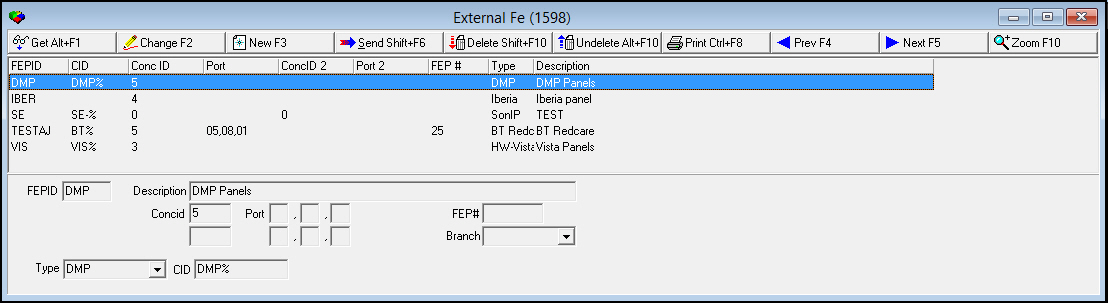
The following graphic shows External FE as the program opens.
Field/Column Descriptions
The following table describes the fields and columns used in the main window of External FE.
Field/Column |
Description |
FEPID |
Identifies the command. |
Description |
Text description of the command. |
Concid |
ID of the primary concentrator. |
Port |
Three fields in which you type the port numbers from the primary concentrator stack. Note: These numbers must match the route that the message takes, from the top down. |
FEP# |
Front End Processor number. (Read-only.) |
Concid - Secondary (No label) |
ID of the secondary concentrator. |
Port 2 |
Three fields in which you type the port numbers from the secondary concentrator stack. Note: These numbers must match the route that the message takes, from the top down. |
Branch |
Branch ID. (This menu originates from program #1530 and is restricted by the miscellaneous user profile.) |
Type |
Front End Process ID associated with the command. |
CID |
Prefix mask for all CIDs that correspond to the command. |
Using Common Functions
See the reference document Common Functions in SBN for more information.
Sending a Command to the Receiver
Use the following steps to send a command to the receiver:
1. Select the FEPID from which you want to send a command.
2. Choose Send to another user [Shift+F6].
w SBN opens a Send Command dialog box.
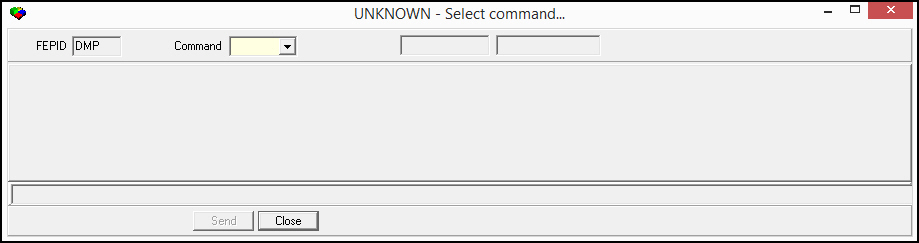
3. Select the command you want to send to the receiver.
4. Choose Send.
Zooming into the Sublevel of External FE
External FE contains a sublevel with two tabs:
The Display tab - in which you can view all commands waiting to be sent to the receiver
The Results tab - in which you can view the results of all commands already sent to the receiver
The Display Tab
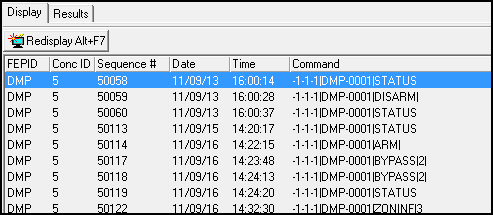
The Display tab shows a list of all commands waiting to be sent to the receiver. Choose Redisplay Screen to refresh the display to show any commands entered since you initially opened the window.
Column Descriptions
The following table describes the columns used in the External FE Display tab.
Field/Column |
Description |
FEPID |
Identifies the command. |
Conc ID |
ID of the primary concentrator. |
Sequence # |
Indicates the order in which commands were entered. |
Date |
Date when the command was entered. |
Time |
Time when the command was entered. |
Command |
Description of the command waiting to be sent. |
The Results Tab
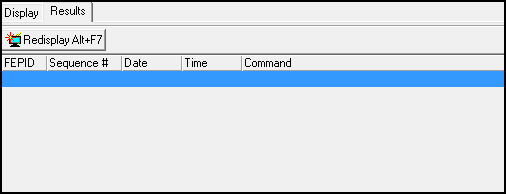
The Results Tab displays the results of all commands already sent to the receiver. SBN limits the display to the previous hour and to the default branch for the user. Choose Redisplay Screen to refresh the display to show any results that have arrived since you initially opened the window.
Column Descriptions
The following table describes the columns used in the External FE Results tab.
Field/Column |
Description |
FEPID |
Identifies the command. |
Sequence # |
Indicates the order in which commands were sent. |
Date |
Date when the command was sent. |
Time |
Time when the command was sent. |
Command |
Description of the command. |
Button Functions
The following table displays the buttons, describes the shortcut keys, actions, and functionality.
Button |
Name |
Shortcut Key |
Action |
Description |
|
Get |
ALT+F1 |
1598/1 |
Get record. |
|
Change |
F2 |
1598/2 |
Change selected record. |
|
New |
F3 |
1598/3 |
Create new record. |
|
Send |
SHIFT+F6 |
1598/4 |
Send a command to the receiver. |
|
Delete |
SHIFT+F10 |
1598/7 |
Delete selected record. |
|
Undelete |
ALT+F10 |
1598/8 |
Restore deleted record. |
|
CTRL+F8 |
1598/9 |
Print selected records. |
|
|
Previous |
F4 |
|
Select last record. |
|
Next |
F5 |
|
Select next record. |
|
Zoom |
F10 |
|
Zoom in/out of sublevel. |
Display Tab |
||||
|
Redisplay |
ALT+F7 |
1598/22 |
Refresh the display to show any commands entered since you initially opened the Display tab. |
Results Tab |
||||
|
Redisplay |
ALT+F7 |
1598/32 |
Refresh the display to show any results that have arrived since you initially opened the Results tab. |











Pre-Filling the CID
The CID can be pre-filled when sending from the program 1598 external front-end.
Modifications and Updates to External_FE
The following table lists modifications and updates to the External FE document.
Mod Number |
Date |
Description |
n/a |
8/18/14 |
Images updated. |
|
|
|
|
|
|