
Rental Contract Types
Rental Contract Types
Rental Contract Types
Program #: 1638
Module: Utilities
Overview
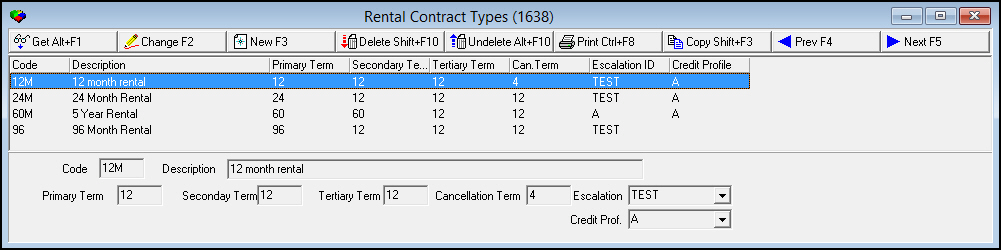
Use Rental Contract Types (program #1638) to define the Contract Type field menu in the Rental Contract section of the Work Order window. A rental contract type determines the escalation rate, credit profile, primary term, secondary term, tertiary term, and cancellation term of a rental contract.
The Rental Contract Types Window
The following graphic shows Rental Contract Types as the program opens.
Field/Column Descriptions
The following table describes the fields and columns in the Rental Contract Types window.
|
Field/Column |
Description |
|
Code |
Code that identifies the contract type. |
|
Description |
Text description of the contract type. |
|
Primary Term |
Number of months in the initial contract period. |
|
Secondary Term |
Number of months in the secondary contract period. |
|
Tertiary Term |
Number of months in the tertiary contract period. |
|
Cancellation Term |
Number of months prior notice required from the customer to cancel the contract at the end of a future term (primary, secondary, or tertiary) without a penalty. |
|
Escalation ID |
Fixed percentage or currency amount at which the rental payment rate increases annually. (This menu originates from program #1636.) |
|
Credit Profile |
Credit rating profile, which SBN uses to calculate the cost of financing the rental contract. (This menu originates from program #1637.) |
Creating a Contract Type
Use the following steps to create a contract type:
1. Choose New Record.
‰ The fields open for changes.
2. Enter the details of the new contract type.
3. Choose Save to save changes and close.
Changing a Contract Type
You can change the details of an existing contract type.
Use the following steps to change a contract type:
1. Double-click the contract type you want to change, or choose Get Record.
2. Choose Change Record.
‰ The fields open for changes.
3. Change the details as needed.
4. Choose Save.
Deleting a Contract Type
Use the following steps to delete a contract type:
1. Select the contract type you want to delete.
2. Choose Delete Record.
‰ The contract type no longer appears in the list of contract types.
Button Functions
The following table displays the buttons, describes the shortcut keys, actions and functionality.
|
Button |
Name |
Shortcut Key |
Action |
Description |
|
|
Get Record |
alt+f1 |
1638/ 1 |
View details of the selected contract type. |
|
|
Change Record |
f2 |
1638/ 2 |
Change the selected contract type. |
|
|
New Record |
f3 |
1638/ 3 |
Create a new contract type. |
|
|
Delete Record |
shift+f10 |
1638/ 4 |
Delete the selected contract type. |
|
|
Select Record to Undelete |
alt+f10 |
1638/ 5 |
Restore a deleted contract type. |
|
|
Print Selected Records |
ctrl+f8 |
1638/ 6 |
Print the selected contract type. |
|
|
Copy Current Record |
shift+f3 |
Copy the current contract type. |
|
|
|
Previous Record |
f4 |
Go to the previous contract type. |
|
|
|
Next Record |
f5 |
Go to the next contract type. |
|
|
|
Exit without saving |
esc |
Exit without saving changes to the selected contract type. |
|
|
|
Save Existing Record |
enter |
Save changes to the selected contract type. |











Modifications and Updates to Rental Contract Types
The following table lists modifications and updates to the Rental Contract Types document.
|
Mod Number |
Date |
Description |
|
n/a |
09/02/14 |
Images updated. |