
Tax Codes
Module: System Administration
Overview
Use Tax Codes (program #1515) to define the effective date and tax rate percentage for all tax types associated with tax codes. To access this program, select Tax Codes (program #1515) from the main menu of SBN.
The Tax Codes Window
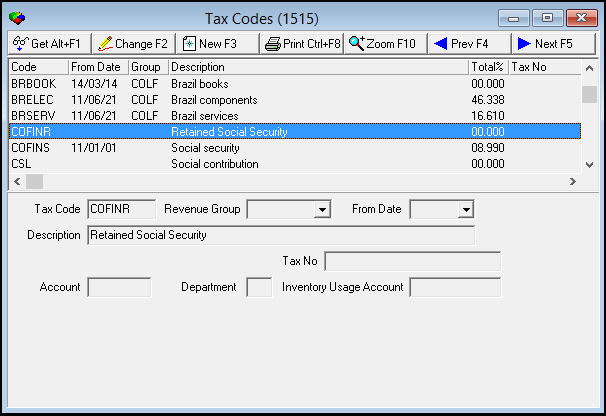
The following graphic shows Tax Codes. The upper pane displays previously defined tax codes as well as the sum of the tax rate to collect for each code.
Field/Column Descriptions
The following table describes the fields and columns used in the main window of Tax Codes.
Field/Column |
Description |
Tax Code |
Identifies the tax code. O For U.S. customers, type the zip code. O When option bl020 is on, zip codes generate the tax codes. |
Revenue Group |
Identifies the Revenue Group associated with the selected tax code. (This menu originates from Revenue Groups program #1513). |
From Date |
The effective date for the selected tax code and tax rate. |
Description |
Text description of the selected tax code. O For U.S. customers, type the city and state that correspond to the zip code. |
GL Account No |
If option bl058 is off, select the general ledger account number to which the selected tax code applies. (This menu originates from program #1835.) O If your company does not restrict user access by Dealer, this menu displays all available GL account numbers. O If your company restricts user access by dealer, this menu displays only l Those GL accounts associated with the same dealer as the user’s access profile l Those GL accounts not associated with a dealer |
Tax No |
Identifies the Tax Number associated with the selected tax code. This field holds a maximum of 50 characters. |
Using Common Functions
See the reference document Common Functions in SBN for more information.
Adding a New Tax Code
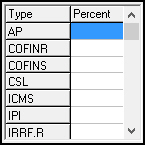
You can add a new tax code to SBN. When you choose New Record in Tax Codes (program #1515), additional fields and columns appear in the lower pane of the window.
Field/Column Descriptions - Additional Fields
The following table describes the additional fields and columns used in the New mode of Tax Codes.
Field/Column |
Description |
Type |
These fields correspond to the types of tax that can be collected. (Tax types originate from program #1511.) |
Percentage |
Type the tax rate percentage for each tax type associated with the selected tax code. |
Description |
Description field associated with each Type of tax that can be collected. |
Use the following steps to add a new tax code:
1. In Tax Codes (program #1515), choose New Record.
‰ The fields in the lower pane of the window open.
2. Enter information in the fields.
3. Choose Save.
4. Choose Yes.
Zooming into the Sublevel of Tax Codes
Tax Codes contains a sublevel in which you enter changes to tax rates associated with the selected tax code.
The Tax Code Details Tab
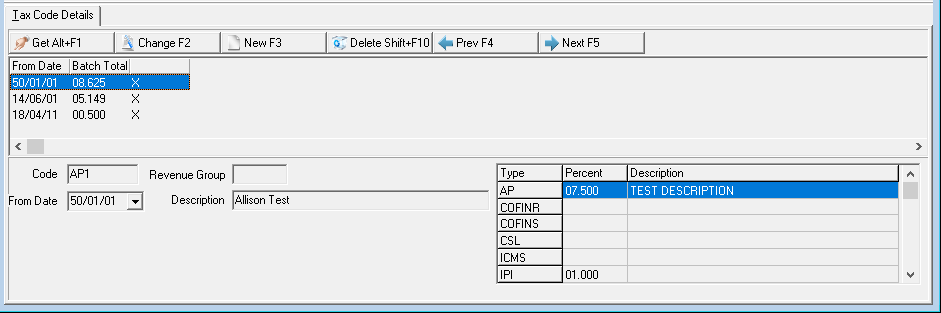
In the Tax Code Details tab you can view the tax rate history or change the tax rates for the tax types associated with the selected tax code. However, you may not delete or change the tax rate history for a selected tax code.
The following graphic shows the Tax Code Details tab. The grid displays the tax rate history for the selected tax code.
Field/Column Descriptions - Tax Code Details
The following table describes the fields and columns used in the Tax Code Details tab.
Field/Column |
Description |
From Date |
The effective date for the new tax rate. |
Batch Total |
The total of the tax rate percentages for all tax types associated with the selected tax code. |
Code |
The tax code to which the new tax rate applies. |
Revenue Group |
The revenue group to which the selected tax code applies. |
From Date |
The effective date for the new tax rate. |
Description |
Text description of the tax code. |
Type |
These fields correspond to the types of tax that can be collected. (Tax types originate from program #1511.) |
Percent |
The tax rate percentage for each tax type associated with the selected tax code. Note: When you type a new tax rate, you must type a rate for each tax type. SBN calculates the total tax to collect on the sum of the rates for all tax types. If the tax types have a sequence number other than 0 (normal) assigned in program #1511, the total tax to collect will not match the sum of the rates for all tax types in this column. |
Description |
Description field associated with each Type of tax that can be collected. |
Button Functions
The following table displays the buttons, describes the shortcut keys, actions, and functionality.
Button |
Name |
Shortcut Key |
Action |
Description |
|
Get |
ALT+F1 |
1515/ 1 |
Get record. |
|
Change |
F2 |
1515/ 2 |
Change selected record. |
|
New |
F3 |
1515/ 3 |
Create new record. |
|
CTRL+F8 |
1515/ 6 |
Print selected records. |
|
|
Zoom |
F10 |
1515/ 8 |
Zoom in/out of sublevel. |
|
Previous |
F4 |
1515/ 999 |
Select last record. |
|
Next |
F5 |
1515/ 999 |
Select next record. |







Tax Code Length
A tax code accepts up to 8 characters in program 1515, so the full tax-code value is stored without truncation.
Modifications and Updates to Tax Codes
The following table lists modifications and updates to the Tax Codes document.
Mod Number |
Date |
Description |
n/a |
08/26/14 |
Images updated. |
07.88.25773, 07.02.00013, 08.88.11328 |
04/18/18 |
Images updated and new Description field under Tax Code Details tab. |
|
|
|