
Offers
Offers
Offers
Program #: 1665
Module: Utilities
Overview
Use Offers (program #1665) to define the details of discount offers to make to customers in the Customer Offers tab of Contract Master (program #548). This program is client-specific for Company 106.
Navigating to Offers
Use the following steps to access the Offers program:
1. From the main SBN toolbar, select Menu.
2. From the drop-down menu, select Go To.
3. In the Go To Program dialog box, type in "1665" and press ENTER.
w The Offers window opens.
The Offers Window
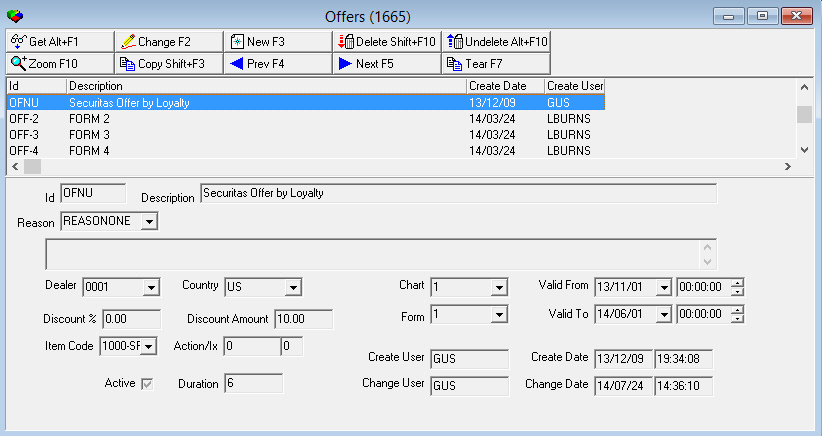
The following graphic shows Offers as the program opens.
Field/Column Descriptions
The following table describes the fields and columns used in Offers.
Field/Column |
Description |
ID |
ID number of the offer. |
Description |
Description of the offer. |
Reason |
Select an offer reason for the selected offer type. In the Customer Offers tab of program #548, when you select an offer reason in the Reason field, the drop-down menu of the Offer field displays only those offer types associated with the selected reason in program #1665. (This menu originates from program #1687.) |
Text (No label) |
Free-form text about the offer. |
Dealer |
Dealer associated with the offer. The offer is only available on installations with the selected dealer. (This menu originates from program #1537.) |
Country |
Country associated with the offer. The offer is only available on installations in the selected country. (This menu originates from program #1865.) |
Chart |
Offer flow steps that SBN takes to determine whether a customer is eligible to receive the selected offer in the Customer Offers tab of program #548. (This menu originates from program #1663.) |
Valid From |
Date and time when the period in which the discount can be offered to customers begins. |
Discount % |
Discount percentage that the offer includes. |
Discount Amount |
Discount currency amount that the offer includes. |
Form |
Form that appears in the Offer Details window of the Customer Offers tab of program #548 when you add, view, or change the selected offer on a contract. |
Valid To |
Date and time when the period in which the discount can be offered to customers ends. |
Item Code |
Item code associated with the offer. When you approve the selected offer in the Customer Offers tab of program #548, SBN creates a cycle fee using this item code. (This menu originates from program #1535.) |
Action/Ix |
Action and action index that you must enable in your action profile in program #1502 in order to use the selected offer. |
Create User |
User ID that created the offer. |
Create Date |
Date and time when a user created the offer. |
Active |
Select this check box to indicate that the offer is active and can be added to contracts in the Customer Offers tab of program #548. |
Duration |
Number of months that the discount will be in effect when a customer accepts the offer. |
Change User |
User ID that last made changes to the offer. |
Change Date |
Date and time when a user last made changes to the offer. |
Creating an Offer
Use the following steps to create an offer:
1. Choose New Record.
w The fields in the lower pane open for changes.
2. Enter details for the offer.
3. Choose Save.
w The new offer appears in the list in the upper pane.
Changing an Offer
You can change the description of an existing offer.
Use the following steps to change an offer:
1. From the upper pane, select the offer you want to change by double-clicking or choosing Get Record.
w The offer details appear in the lower pane.
2. Choose Change Record.
w The fields in the lower pane open for changes.
3. Change as necessary.
4. Choose Save.
Deleting an Offer
Use the following steps to delete an offer:
1. Select the offer you want to delete.
2. Choose Delete Record.
w The offer no longer appears in the list in the upper pane.
Restoring a Deleted Offer
Use the following steps to restore deleted offers:
1. Choose Select Record to Undelete.
w The Undelete window appears.
2. In the Undelete window, find the offer you want to restore and double-click it, or choose [ENTER].
w SBN restores the offer to the list in the upper pane.
Zooming into the Sublevel
Offers contains a sublevel in which you may define other offers that cannot be applied to a contract when the selected offer is applied.
Actions 1665/10-14 control access to the Offers Exclusion tab and its buttons.
The Offers Exclusion Tab
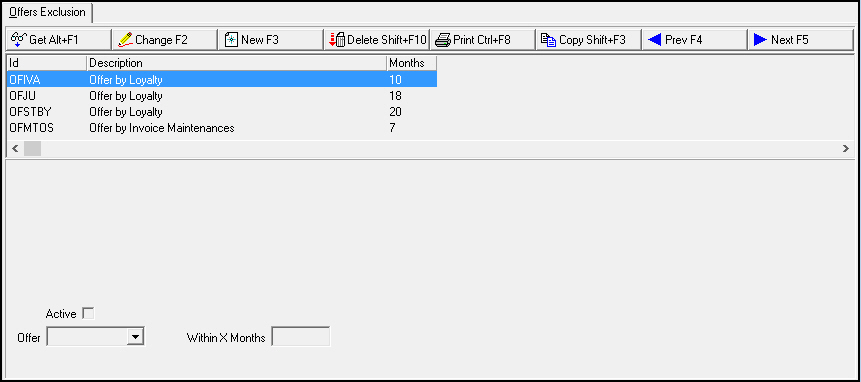
The following graphic shows the Offers Exclusion tab. The tab displays previously defined offers that cannot be applied to a contract when the selected offer is applied.
Field/Column Descriptions
The following table describes the fields and columns used in the Offers Exclusion tab.
Field/Column |
Description |
Offer ID |
ID of an offer that cannot be applied to a contract when the selected offer is applied. |
Description |
Description of the offer. |
Active |
Select this check box to indicate that only an active offer of the selected type is not allowed. If this check box is blank, the selected type is never allowed, including expired or future offers. |
Within X Months |
Enter the number of months within which an offer was added to a contract to not be allowed. If this field is blank, the selected offer type is not allowed regardless of when the offer was added to a contract. |
Button Functions
The following table displays the buttons, describes the shortcut keys, actions and functionality.
Button |
Name |
Shortcut Key |
Action |
Description |
|
Get Record |
alt+f1 |
1665/ 1 |
View details of selected record. |
|
Change Record |
f2 |
1665/ 2 |
Change selected record. |
|
New Record |
f3 |
1665/ 3 |
Create new record. |
|
Delete Record |
shift+f10 |
1665/ 4 |
Delete selected record. |
|
Select Record to Undelete |
alt+f10 |
1665/ 5 |
Restore deleted record. |
|
Copy Current Record |
SHIFT+f3 |
1665/ 1 |
Copy details of selected record into new record. |
|
Previous Record |
f4 |
1665/ 1 |
View details of previous record. |
|
Next Record |
f5 |
1665/ 1 |
View details of next record. |
|
Zoom In/Out of Sublevel |
F10 |
1665/ 1 |
Access sublevel tab. |
|
Tear Away Selected Tab |
F7 |
1665/ 1 |
View sublevel tab in separate window. |










Modifications and Updates to Offers
The following table lists modifications and updates to the Offers document.
Mod Number |
Date |
Description |
07.79.22961, 08.79.09409 |
11/27/2013 |
Document created |
08.81.09740, 07.81.23516 |
08/08/2014 |
Added Reason field |