
Contract Types
Contract Types
Contract Types
Module: System Administration
Overview
Use Contract Types (program #1531) to define types of contracts. A menu of Contract Types appears in Contract Master (program #548), and in Contract Defaults (program #1803).
To access this program, select Contract Types (program #1531) from the main menu of SBN.
The Contract Types Window
The following graphic shows Contract Types as the program opens. The upper pane displays previously defined contract types.
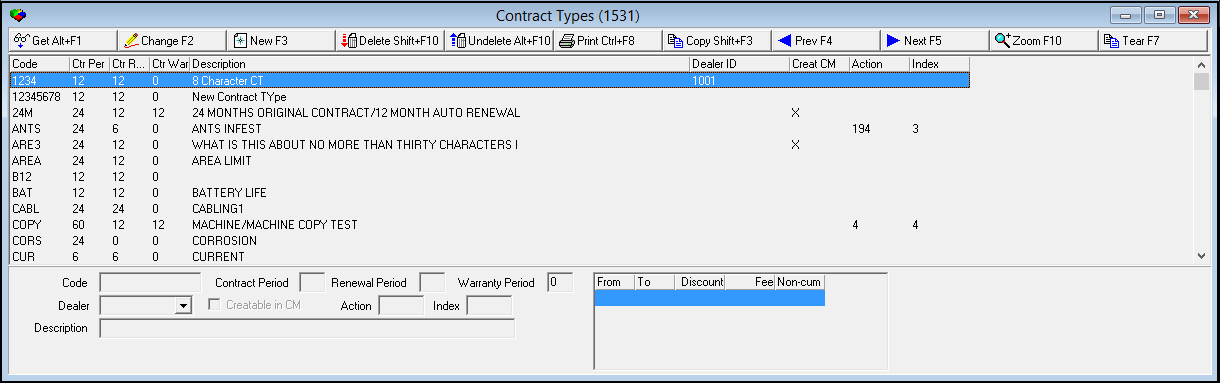
Note: Contract Types limits default options for Dealer selection in Contract Master (program #548). SBN looks up dealer automatically if only one exists.
Field/Column Descriptions
The following table describes the fields and columns used in Contract Types.
|
Field/Column |
Description |
|
Code |
Abbreviation that identifies the selected contract type. |
|
Contract Period |
The number of months in the initial contract period for the selected contract type. |
|
Contract Renewal |
The number of months in the contract renewal period for the selected contract type. |
|
Contract Warranty |
Number of months in the warranty period for the selected contract type. |
|
Dealer ID |
Identifies the dealer associated with the selected contract type. (This menu originates from program #1537.) |
|
Creatable in CM |
Identifies the contract types available in the Contract Defaults menu in Contract Master (program #548) when a user has dealer restrictions. If the user’s profile allows access to all dealers, then all contract types are available in Contract Master. |
|
Action |
Type the number of the action that a user profile must contain for the user to view the selected contract type. |
|
Index |
Type the number of the sub action that a user profile must contain for the user to view the selected contract types. |
|
Description |
Text description of the selected contract type. |
|
Discount/Fee Grid Note: You may enter either discounts or flat fees for periods for the selected contract type but not both. The discounts or fees are applied when a user cancels a contract of the selected type in program #548. |
|
|
From |
Beginning month of the contract term the discount or fee applies to. |
|
To |
Ending month of the contract term the discount or fee applies to. |
|
Discount |
Discount percentage to subtract from the balance of cycle fees remaining in the contract term if a contract of the selected type is canceled during the selected time period. |
|
Fee |
Flat fee to charge a customer if a contract of the selected type is canceled during the selected time period. (If you use this field, SBN does not apply cycle fees to the cancel contract work order.) |
|
Non-cumulative |
Select this check box if the discount or fee applies only to the selected time period. If you do not select this check box, SBN applies the total of all discounts or fees for all periods until the end of the contract term to the cancel contract work order. (For example, if you cancel a 24-month contract in month 10, and a fee of $100 is defined for months 1-12 and $50 for months 13-24, if this check box is selected, a $100 fee will appear on the work order. If this check box is not selected, a $150 fee will appear on the work order.) |
Using Common Functions
See the reference document Common Functions in SBN for more information.
Zooming into the Sublevel
The sublevel of Contract Types contains a Details tab.
Note: Actions 1531/10-13 control access to the Details tab in Contract Types.
The Details Tab
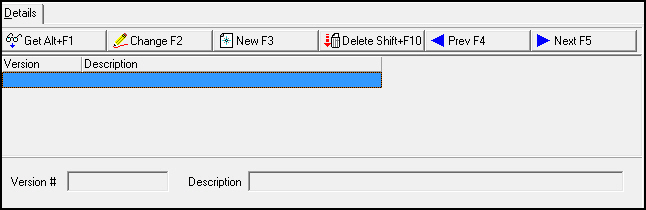
Use the Details tab to assign a contract version to a contract type. The following graphic shows the Details tab as the tab opens. The tab displays previously defined versions.
Field/Column Descriptions
The following table describes the fields and columns used in the Details tab.
|
Field/Column |
Description |
|
Version |
Code that identifies the contract version associated with the selected contract type. O This code appears in the Version field in the Installation pane and New/Change Contract windows of Contract Master (program #548.) |
|
Description |
Text description of the contract version. |
Button Functions
The following table displays the buttons, describes the shortcut keys, actions, and functionality.
|
Button |
Name |
Shortcut Key |
Action |
Description |
|
|
Get |
ALT+F1 |
1531/ 1 |
Get record. |
|
|
Change |
F2 |
1531/ 2 |
Change selected record. |
|
|
New |
F3 |
1531/ 3 |
Create new record. |
|
|
Delete |
SHIFT+F10 |
1531/ 4 |
Delete selected record. |
|
|
Undelete |
ALT+F10 |
1531/ 5 |
Restore deleted record. |
|
|
|
CTRL+F8 |
1531/ 6 |
Print selected records. |
|
|
Zoom |
F10 |
1531/ 7 |
Zoom in/out of sublevel |
|
|
Previous |
F4 |
1531/ 999 |
Select last record. |
|
|
Next |
F5 |
1531/ 999 |
Select next record. |









Modifications and Updates to Contract Types
The following table lists modifications and updates to the Contract Types document.
|
Mod Number |
Date |
Description |
|
n/a |
8/15/14 |
Images updated. |