
Month End Revenue
Month End Revenue
Month-End Revenue
Module: Accounting
Overview
The Month-End Revenue report displays details of revenue for the month. This report includes deferred revenue from prior periods and revenue from the current month that is deferred to future periods.
Note: You may run this report in Export mode by selecting the Run in Export Mode check box in the lower pane. In Export mode, SBN generates the report as a text file in the report directory.
To access this report, select Month-End Revenue (report #1172) from the main menu of SBN.
The Month-End Revenue Report
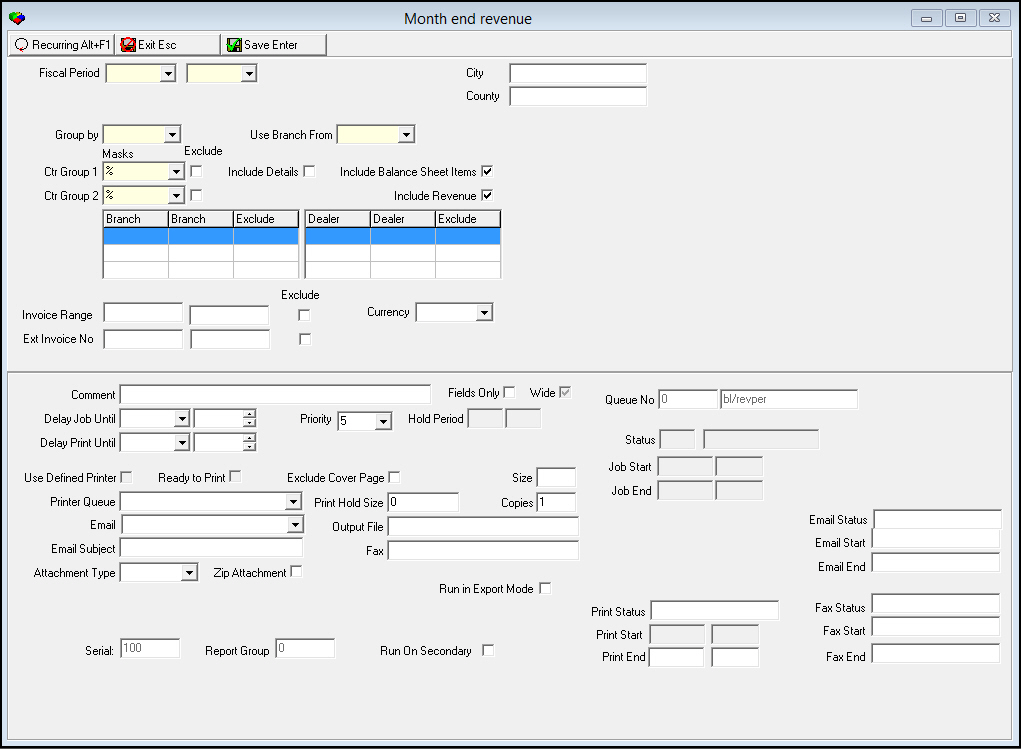
This window contains two panes: use the upper pane to define the contents of the report; use the lower pane to define the job output - how, when, and where you want to print the report.
Note: See Report Parameters Pane for information on the fields in the lower pane, which are the same in every report.
Field Descriptions
The following table describes the fields used in the upper pane of this report.
Note: You can use wildcard characters in selected fields. For more information on using wildcards, see Searches.
Field |
Wildcards |
Description |
Fiscal Period |
||
Date - From |
No |
You must select a fiscal period range for the report. Select the beginning month/year of the range. |
Date
- To |
No |
You must select a fiscal period range for the report. Select the ending month/year of the range. |
City |
No |
You may enter a city to restrict the report to installations within that city. You must enter the city name exactly as it appears in the installation record in order to include the installation in the report. (This field is case sensitive.) |
County |
No |
You may enter a county to restrict the report to installations within that county. You must enter the county name exactly as it appears in the installation record in order to include the installation in the report. (This field is case sensitive.) |
Group by |
No |
You must select a grouping parameter for the report. Note: If you select GL# / Installation Branch, SBN sorts the report by Installation Branch, regardless of the selection in the Use Branch Field. If you select Branch, the report includes entries from Company 105's Percent of Completion calculation as revenue. |
Use Branch From |
No |
You must select the category of branch records that the report uses: l Accounts l Contract l Installation |
Masks / Exclude |
||
Ctr Group 1 |
Yes |
You must either select a Contract Group 1 to limit the report to records that match the selected Contract Group 1 or use the % wildcard to include all Control Group 1 groups. (This menu originates from program #1868.) |
Ctr Group 1 Exclude |
No |
You may exclude a Contract Group 1 from the report by selecting the group and then entering a check mark in this box. |
Ctr Group 2 |
Yes |
You must either select a Contract Group 2 to limit the report or use the % wildcard to include all Control Group 2 groups. (This menu originates from program #1868.) |
Ctr Group 2 Exclude |
No |
You may exclude a Contract Group 2 from the report by selecting the group and then entering a check mark in this box. |
Include Details |
No |
Enter a check mark in this box to print one line for each invoice number that falls within the defined parameters. |
Include Balance Sheet Items |
No |
This field defaults to a check mark. When this field displays a check mark, the report includes revenue types that are linked to general ledger accounts that are flagged as balance sheet items. O Remove the check mark to exclude revenue types from the report that are linked to general ledger accounts that are flagged as balance sheet items. |
Include Revenue |
No |
This field defaults to a check mark. When this field displays a check mark, the report includes revenue types that are linked to general ledger accounts that are not flagged as balance sheet items (true revenue types). O Remove the check mark to exclude revenue types from the report that are linked to general ledger accounts that are not flagged as balance sheet items. |
Branch Ranges |
||
Branch |
No |
You may select up to three ranges of branches to limit the report to branches within the ranges. Select the beginning branch number of a range. (These menus originate from program #1530.) O If you leave the ranges of Branches blank, the report includes all records contained in the batch. O Users’ Branch restrictions apply. |
Branch |
No |
You may select up to three ranges of branches to limit the report to branches within the ranges. Select the ending branch number of a range. (These menus originate from program #1530.) O If you leave the ranges of Branches blank, the report includes all records contained in the batch. O Users’ Branch restrictions apply. |
Exclude |
No |
You may exclude ranges of branches from the report by selecting the ranges and then entering a check mark in the corresponding Exclude box. |
Dealer Ranges |
||
Dealer |
No |
You may select up to three ranges of dealer IDs to limit the report to dealer IDs within the ranges. Select the beginning dealer ID of a range. (These menus originate from program #1537.) O If you leave the ranges of Dealers blank, the report includes all records contained in the batch. |
Dealer |
No |
You may select up to three ranges of dealer IDs to limit the report to dealer IDs within the ranges. Select the ending dealer ID of the range. (These menus originate from program #1537.) O If you leave the ranges of Dealers blank, the report includes all records contained in the batch. |
Exclude |
No |
You may exclude ranges of dealer IDs from the report by selecting the ranges and then entering a check mark in the corresponding Exclude box. |
Invoice Range (From) |
No |
You may select a range of invoices to include in the report. Enter the beginning invoice number of the range. |
Invoice Range - To |
No |
You may select a range of invoices to include in the report. Enter the ending invoice number of the range. |
Exclude |
No |
You may exclude a range of invoices from the report by entering a range and then selecting this check box. |
Ext Invoice No (From) |
No |
You may select a range of external invoice numbers to include in the report. Enter the beginning external invoice number of the range. |
Ext Invoice No - To |
No |
You may select a range of external invoice numbers to include in the report. Enter the ending external invoice number of the range. |
Exclude |
No |
You may exclude a range of external invoice numbers from the report by entering a range and then selecting this check box. |
Currency |
No |
You may select a currency type to limit the report to records with that currency. |
Running and Viewing a Report
For information on running and viewing a report, see Common Functions in SBN.
Report Example
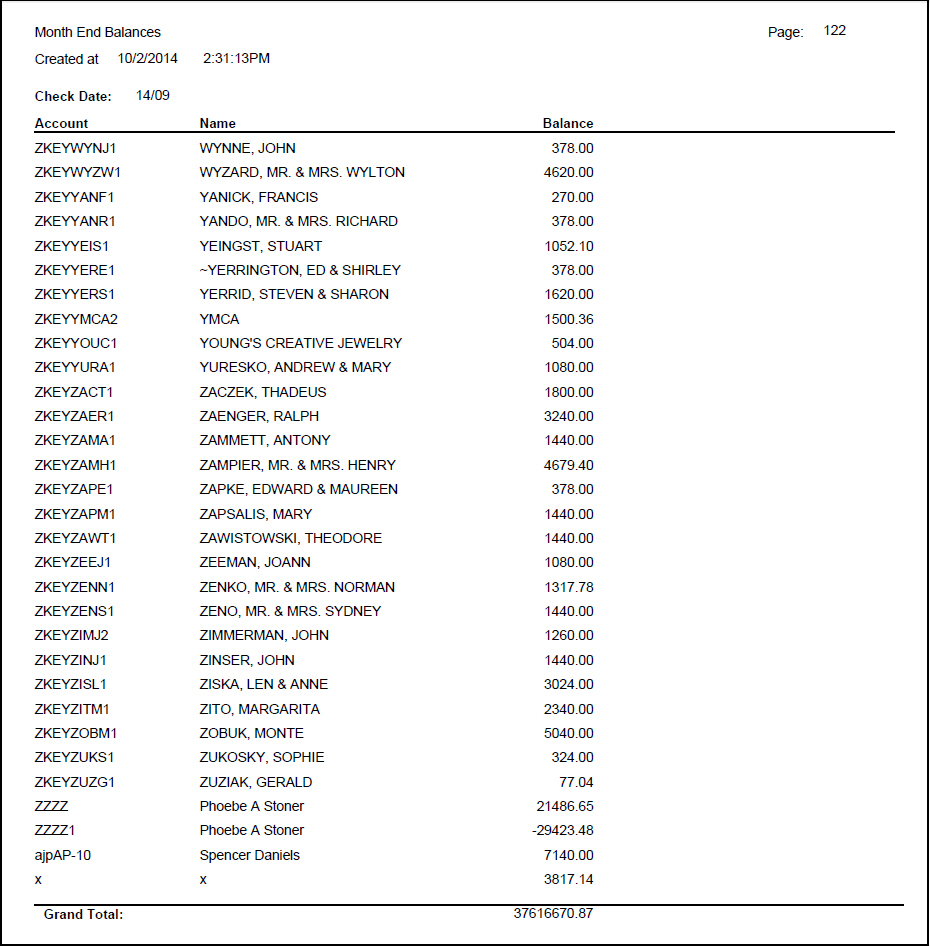
The following graphic shows an example of the output of the Month End Revenue report.
Column Descriptions
The following table describes the columns used in the output of the report.
Column |
Description |
Branch |
Prints one line for each branch. |
Dealer |
Prints one line for each dealer. |
GLACNT |
Prints one line for each general ledger account number / department number combination. |
GLBCH |
Prints one line for each general ledger account number / invoice batch combination. |
GLBR |
Prints one line for each general ledger account number / installation branch combination. |
Group 1 |
Prints one line for each Contract Group 1 type. This grouping identifies cost centers other than branches, such as divisions or regions. |
Group 2 |
Prints one line for each Contract Group 2 type. This secondary field can identify cost centers other than branches. |
INSTP |
Prints one line for each subscriber type. |
ITPRGP |
Prints one line for each subscriber type / revenue group combination. |
ITPRTP |
Prints one line for each subscriber type / revenue type combination. |
PRCLST |
Prints one line for each price list. |
PRCRTP |
Prints one line for each price list / revenue type combination. |
REVBR |
Prints one line for each revenue type / installation branch combination. |
REVGRP |
Prints one line for each revenue group. |
REVTP |
Prints one line for each revenue type. |
RGPATP |
Prints one line for each revenue group / invoice amount type (i.e., one-time or cycle) combination. |
RTPATR |
Prints one line for each revenue type / invoice amount (i.e., one-time or cycle) combination |
From Past |
Revenue billed in a prior period that SBN should recognize in this period. |
From Future |
Revenue to transfer from deferred billing into this period. |
This Period |
Revenue billed in this period that SBN should recognize as revenue in this period. |
To Past |
Revenue billed in this period that should have been recognized in a prior period. |
To Future |
Revenue billed in this period that SBN should recognize in a future period. |
Button Functions
The following table displays the buttons, describes the shortcut keys, actions, and functionality.
Button |
Name |
Shortcut Key |
Action |
Description |
|
Open fields for recurring/template reports |
alt+f1 |
Open fields for recurring/template reports. |
|
|
Exit without saving |
esc |
Exit without saving changes to selected record. |
|
|
Save Existing Record |
enter |
Save changes to selected record. |



Modifications and Updates to Month End Revenue
The following table lists modifications and updates to the Month End Revenue document.
Mod Number |
Date |
Description |
n/a |
8/05/14 |
Images updated. |