
SBN Dependencies
How SBN.exe fetches dependencies
SBN Dependencies
What this page covers
How SBN.exe (and the related Concentrator and BackupHostImport hosts) fetch the small set of runtime payload files it needs in addition to the .exe itself: sbn.txt, WebView2Loader.dll, ibs_bcp.bat, and the OpenSSL DLL pair.
Current mechanism -- HTTPS via support.innovative247.com
As of the builds listed below, SBN downloads its dependencies over HTTPS from https://support.innovative247.com/api/dependencies/.
The endpoint is unauthenticated and self-contained: no FTP credentials, no Indy stack, no OpenSSL dependency on the SBN side -- Schannel/WinHTTP only.
Applies to builds
Release | First build with HTTPS dep-mgr |
|---|---|
08.96 | 08.96.0001.0001 |
08.95 | 08.95.0006.0001 |
08.94 | 08.94.0003.0001 |
08.93 | 08.93.0011.0001 |
08.92 | 08.92.0075.0001 |
Earlier builds on each line still use FTP per the legacy section at the bottom of this page.
Files served
Name | Purpose | Where it lands |
|---|---|---|
| Legacy help-text catalog used by tool_menu popup help and the messages_help form | %LOCALAPPDATA%\IBS\SBN\<db>\sbn.txt |
| Microsoft Edge WebView2 host stub used by every embedded-browser form (Cameras tab, AVHS Connect, generic video viewers, dialer, broadcasts, etc.) | Same folder as SBN.exe. |
| Legacy BCP utility wrapper | Same folder as SBN.exe. |
plus license/readme | Used by RestJson for HTTPS to non-Schannel endpoints | Same folder as SBN.exe. |
When and how files are fetched
- Pre-login --
sbn.txtis fetched if missing, before the login form opens. Required for SBN.exe to render help text correctly. - Post-login --
WebView2Loader.dll,ibs_bcp.bat, and the OpenSSL folder are fetched after a successful database login. Optional in the sense that SBN.exe will still launch without them (with degraded functionality). - Skip-if-exists -- A file is only downloaded when not already present locally. To force a refresh, click Download Now on the Dependencies tab in Main Menu > View > Options.
- Logging -- Every check / fetch / success / failure is written to
<exe_dir>\log\pid_<ProcessId>.log.
The Dependencies tab in Options
Found at Main Menu > View > Options > Dependencies:
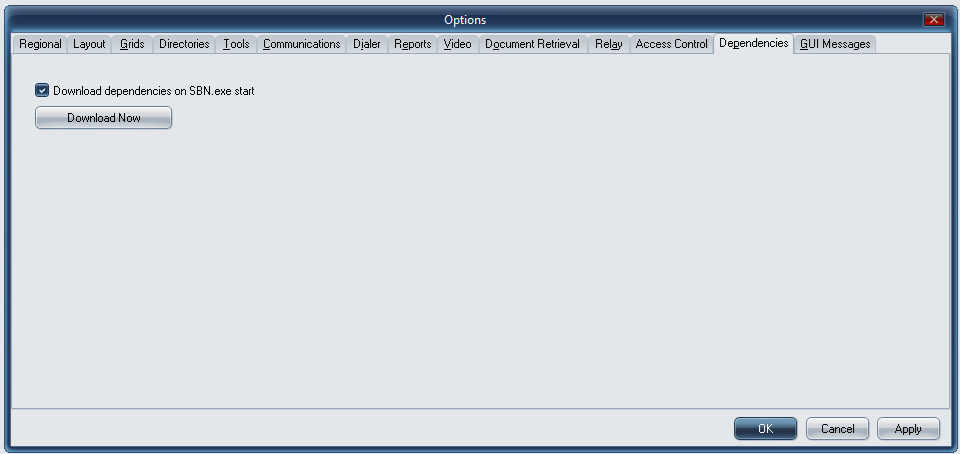
Two controls:
- Download dependencies on SBN.exe start (checkbox) -- toggles automatic fetch on launch. Persisted per-workstation.
- Download Now (button) -- forces an immediate re-download of every dependency, ignoring "already exists" checks. Use this after a Loader/runtime upgrade or to recover after a failed launch.
Dependency Management -- failure prompts
If the SBN client cannot reach support.innovative247.com (firewall, DNS, or expired certificate), the user sees one of:
- "Download failed. Possible causes are User Permissions or Firewall rules." (msg 17571)
- "Access denied: Insufficient permissions to write to the destination directory." (msg 18177)
followed by a one-time prompt:
- "There was an issue downloading files. Do you want to turn off Dependency Checking?" (msg 18164)
The prompt is suppressed for the rest of the SBN session regardless of how many dependency fetches subsequently fail; the user-driven Download Now button resets the suppression so the prompt can fire again on the next forced retry.
Workaround when no internet is available
If the workstation cannot reach support.innovative247.com at all, copy the file set manually:
- From any reachable workstation, navigate to
https://support.innovative247.com/Releases/and download the matching release zip. - Extract
sbn.txt,WebView2Loader.dll,ibs_bcp.bat, and theOpenSSL\folder. - Drop them next to
SBN.exe; forsbn.txton SBN.exe, also place a copy under%LOCALAPPDATA%\IBS\SBN\<db>\. - Disable Download dependencies on SBN.exe start in Options to stop SBN from re-attempting the fetch.
Legacy mechanism (FTP) -- pre-12795 builds
Before MOD 08.96.12795 (SR 52989), SBN.exe used FTPS port 990 against ftp://ftp.innovative247.com with a baked-in service account. That mechanism is no longer maintained. If a customer is on an older build that still attempts FTP and the connection fails, recommend they upgrade to one of the builds in the table above; the HTTPS path replaces it entirely.