
Alarm Queue Colors
Alarm Queue Colors
Alarm Queue Colors
Program #: 1649
Module: Utilities
Overview
Use Alarm Queue Colors (program #1649) to define the colors of incidents in the Alarm Queue tab of Data Entry (program #559). IBS defines the default colors, which are the same as in previous releases.
This program replaces options alqcol0-15 and a2qcol0-15, which are now retired.
This document covers the following topics:
Navigating to Alarm Queue Colors
Viewing Details of a Color Setting
Changing Details of a Color Setting
Navigating to Alarm Queue Colors
Use the following steps to navigate to Alarm Queue Colors:
1. From the main SBN toolbar, select Menu.
2. From the drop-down menu, select Go To.
3. In the Go To Program dialog box, type in "1649" and press enter.
w The Alarm Queue Colors program opens.
The Alarm Queue Colors Window
The following graphic shows Alarm Queue Colors as the program opens.
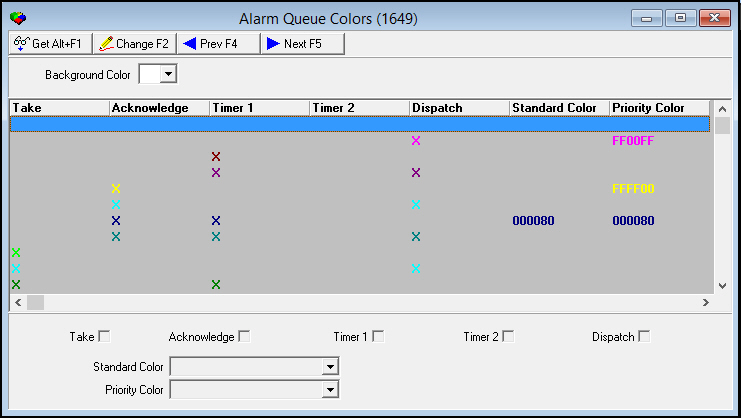
Field/Column Descriptions
The following table describes the fields and columns used in Alarm Queue Colors.
|
Field/Column |
Description |
|
Background Color |
Select a background color for the Alarm Queue Colors grid. |
|
Take |
An X in this column indicates that SBN applies the selected color to an incident when an operator uses the Alarm Take monitoring action in Dispatch (program #537). |
|
Acknowledge |
An X in this column indicates that SBN applies the selected color to an incident when an operator acknowledges the incident in Dispatch. |
|
Timer 1 |
An X in this column indicates that SBN applies the selected color to an incident when an operator applies an operator timer (Timer 1) to the incident in Dispatch. |
|
Timer 2 |
An X in this column indicates that SBN applies the selected color to an incident when an operator applies a patrol timer (Timer 2) to the incident in Dispatch. |
|
Dispatch |
An X in this column indicates that SBN applies the selected color to an incident when an operator uses the Guard Dispatch monitoring action in Dispatch. |
|
Standard Color |
You may select a color that SBN applies to an incident if the incident priority is a lower number than the value of option a2prio. When the default color is in place and you choose Get on a line item, this field appears blank. If you change the color from the default, your selected color appears in this field. |
|
Priority Color |
You may select a color that SBN applies to an incident if the incident priority is a higher number than the value of option a2prio. When the default color is in place and you choose Get on a line item, this field appears blank. If you change the color from the default, your selected color appears in this field. |
Viewing Details of a Color Setting
You can view the details of color settings listed in the upper pane.
Use the following steps to view color setting details:
1. Select the color setting you want to view from the upper pane.
2. Double-click your selection or choose Get.
w The fields in the lower pane display the details of the selected color setting.
Changing Details of a Color Setting
Use the following steps to change the details of a color setting:
1. Select the color setting you want to change.
2. Choose Change.
w The fields that can be changed open for changes in the lower pane.
3. Enter changes, as needed.
4. Choose Save.
Related Programs
The following table lists programs related to Alarm Queue Colors.
|
Program |
Number |
Document Link |
Description |
|
Alarm Queue Tab |
N/A |
Displays unresolved alarm incidents. You can see colors as defined in program #1649 applied to incidents in the Alarm Queue. |
|
|
Alarm Log Tab |
n/a |
Displays recorded alarm events for installations. You can see what actions were taken on incidents. |
|
|
Dispatch |
View and treat incoming alarm incidents. Take actions on incidents that change incident colors in the Alarm Queue according to the settings in program #1649. |
||
|
Data Entry/Customer Service |
Enter customer contact and monitoring information about alarm system installations. |
Button Functions
The following table displays the buttons, describes the shortcut keys, actions and functionality.
|
Button |
Name |
Shortcut Key |
Action |
Description |
|
|
Get Record |
alt+f1 |
1649/ 1 |
View details of selected color setting. |
|
|
Change Record |
f2 |
1649/ 2 |
Change details of selected color setting. |
|
|
Previous Record |
f4 |
1649/ 1 |
Go to previous record. |
|
|
Next Record |
f5 |
1649/ 1 |
Go to next record. |
|
|
Exit without saving |
esc |
Exit without saving changes. |
|
|
|
Save Existing Record |
enter |
Save changes. |






Modifications and Updates to Alarm Queue Colors
The following table lists modifications and updates to the Alarm Queue Colors document.
|
Mod Number |
Date |
Description |
|
08.03.08731 |
05/31/12 |
Document created. |
|
n/a |
08/27/14 |
Images updated. |