
Outbound Branch Priorities
Outbound Branch Priorities
Outbound Branch Priorities
Program #: 1713
Module: System Administration
Overview
Use Outbound Branch Priorities (program #1713) to control the percentages of which branch’s accounts enter the Collections Call Queue after SBN has used the timed-out accounts in each user’s queue. SBN chooses accounts from the general call list of collection accounts not yet assigned to a user. SBN chooses accounts according the priorities set in this program. Entries in Outbound Branch Priorities also affect the output of the Get Next feature in Marketing and Marketing Basics (program #562).
If you do not define branch priorities, SBN allocates percentages randomly. Any percentage not defined for a branch will be a random selection for all undefined branches. Setting a percentage in Outbound Branch Priorities affects the output of the Get Next Record button in Marketing (program #562).
To access this program, select Outbound Branch Priorities (program #1713) from the main menu of SBN.
The Outbound Branch Priorities Window
The following graphic shows Outbound Branch Priorities as the program opens. The upper pane displays previously defined Outbound Branch Priorities.
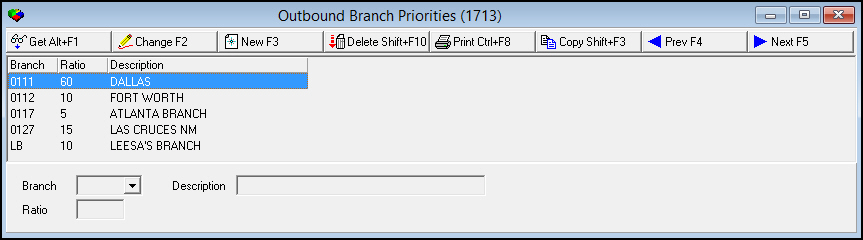
Field/Column Descriptions
The following table describes the fields and columns used in Outbound Branch Priorities.
|
Field/Column |
Description |
|
Branch |
ID of the selected branch. (This menu originates from program #1530.) |
|
Ratio |
Percentage assigned to the selected branch. O SBN uses 1000 to represent 100%. A ratio of 600 equals 60%. |
|
Description |
Text description of the selected branch. |
Using Common Functions
See the reference document Common Functions in SBN for more information.
Button Functions
The following table displays the buttons, describes the shortcut keys, actions, and functionality.
|
Button |
Name |
Shortcut Key |
Action |
Description |
|
|
Get |
ALT+F1 |
1713/ 1 |
Get record. |
|
|
Change |
F2 |
1713/ 2 |
Change selected record. |
|
|
New |
F3 |
1713/ 3 |
Create new record. |
|
|
Delete |
SHIFT+F10 |
1713/ 4 |
Delete selected record. |
|
|
|
CTRL+F8 |
1713/ 6 |
Print selected records. |
|
|
Previous |
F4 |
1713/ 999 |
Select last record. |
|
|
Next |
F5 |
1713/ 999 |
Select next record. |







Modifications and Updates to Outbound Branch Priorities
The following table lists modifications and updates to the Outbound Branch Priorities document.
|
Mod Number |
Date |
Description |
|
n/a |
8/20/14 |
Images updated. |
|
n/a |
11/25/14 |
Added note about Get Next feature in Marketing and Marketing Basics. |