
Media
Media
Media
Program #: 1520
Module: System Administration
Overview
Use Media (program #1520) to enter specific contact and phone information for the branch. Users can view this information from anywhere in SBN by choosing [CTRL+xxx] to display the Media window or by choosing Media (1520) from the Main Menu.
Navigating to Media
You may access this program by using any of the following methods:
-
-
From the SBN Main Menu menu bar:
-
-
-
Select Menu.
-
Select Locate Item.
-
Enter 1520.
-
Select Media (1520).
-
From anywhere in SBN,
-
Select [CTRL+xxx].
-
The Media Window
When the Media window displays, you can add new branches or make changes to existing branches. The window contains a sublevel with five tabs in which you enter your sources. The following graphic shows the Media window as the program opens.
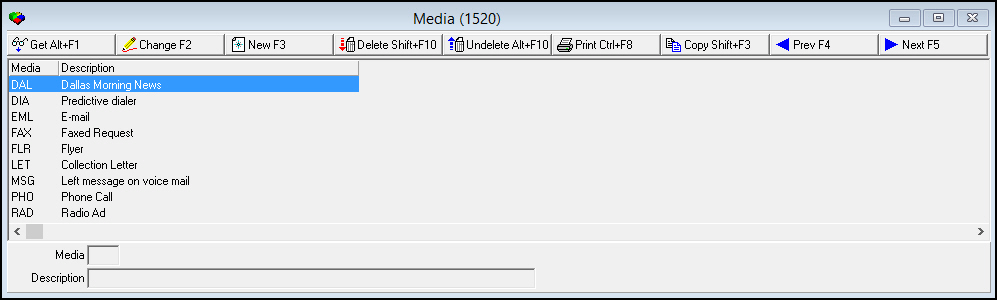
Field/Column Descriptions
The following table describes the fields and columns used in the upper pane of the Media window.
|
Field/Column |
Description |
|
Media |
|
|
Description |
Function Button Descriptions
The following table displays the buttons, describes the shortcut keys, actions and functionality.
|
Button |
Name |
Shortcut Key |
Action |
Description |
|
|
Get |
ALT+F1 |
1520/ 1 |
Get record. |
|
|
Change |
F2 |
1520/ 2 |
Change selected record. |
|
|
New |
F3 |
1520/ 3 |
Create new record. |
|
|
Delete |
SHIFT+F10 |
1520/ 4 |
Delete selected record. |
|
|
Undelete |
ALT+F10 |
1520/ 5 |
Restore deleted record. |
|
|
|
CTRL+F8 |
1520/ 6 |
Print selected records. |
|
|
Copy current record |
SHIFT+F3 |
1520/ 999 |
Make a copy of the current record. |
|
|
Previous |
F4 |
1520/ 999 |
Select last record. |
|
|
Next |
F5 |
1520/ 999 |
Select next record. |









Modifications and Updates to the Media Document
The following table lists modifications and updates to the Media document.
|
Mod Number |
Date |
Description |
|
n/a |
8/19/14 |
Images updated. |
F1 Help
| Delphi Forms | bacommunicationmediaform |
| Program Numbers | 1520 |