
Alarm Translation Tables
Program #: 1876
Module: System Administration
Overview
Use Alarm Translation Tables (program #1876) to set up and manage alarm translations.
The Alarm Translation Table translates incoming signals from SBN GUI Concentrators. Incoming signals may originate as alarms from installations, error signals, test signals, or other types of signals. Additionally, incoming signals originate in many different protocols. Some protocols have fixed definitions (e.g., SIA), and others have flexible definitions (e.g., ADEMCO High Speed).
After an alarm receiver receives an incoming signal, the alarm receiver sends the message to an SBN GUI Concentrator. SBN GUI Concentrators collect and concentrate signals from multiple receivers and pass these signals to Monitoring in SBN in formats that allow companies to interpret these signals in a customizable manner. See Concentrator for more detailed information about SBN GUI Concentrators.
The messages sent from alarm receivers to SBN GUI Concentrators consist of several parts:
Date and time
Receiver and Line Card Identifier
Customer ID
Zone
User
Area
Event
Status
Note: Different protocols may send more or less information.
Alarm Translation Tables (program #1876) translate each receiver and protocol type message so that the SBN database can match the originating signal with a customer’s record and determine the appropriate action to take. For example
Create an alarm
Log only
Discard
When Monitoring receives an incoming signal, SBN checks the incoming signal against Alarm Translation Tables. If a translation exists, SBN tries to match the information. SBN looks first to the customer record (in program #559) for a Customer ID. If SBN does not find a Customer ID, it looks to the panel record (program #1742) for a translation ID. If SBN does not find a translation ID in either record, SBN uses a value of 0 for the ID and processes the raw data as Monitoring receives it.
The Alarm Translation Tables Window
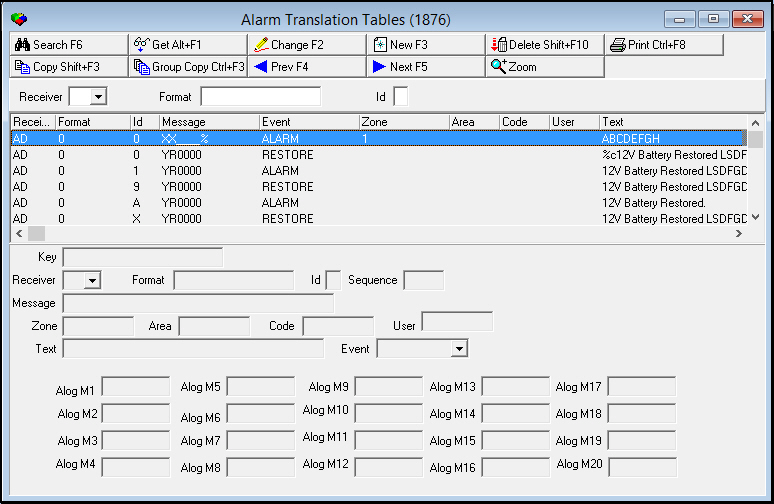
The following graphic shows the Alarm Translation Tables. The window contains three panes:
The upper pane contains fields to use to select search parameters.
The middle pane displays previously defined translations or the results of a search.
The lower pane contains fields for viewing, changing, or creating alarm translations.
Field/Column Descriptions
The following table describes the fields and columns used in Alarm Translation Tables.
Field/Column |
Description |
Receiver |
Identifies the receiver type. |
Format |
Identifies the receiver format. |
Id |
Format ID. The customer record in Service/Data Entry (program #559) or Panel Types (program #1742) may define this field. O You may define more than one format ID. This could be used to create special translations for subsets of accounts. Note: The ID field accepts alphanumeric entries in formats 0-9 and A-Z (uppercase only). |
Message |
Mask that is compared with the message sent from the Concentrator; defines how Alarm Translations interprets the Concentrator message following the protocol definition. Example: AHS 1 6 7 = â€1 6 7†or †_ 6 7†where the underscore represents the zone number in AHS format. |
Event |
Event type to report for this translation. l ALARM l RESTORE l BATTERY l CANCEL l SUPERVISOR l BYPASSED l TROUBLE l LOGGING l UNRESTORED l AREA UPD l CON UPDATE l CODE UPD l CON DEL l RES REQ l NO RES/CAN l CALL ID - This event enables SBN to update the Telco# with the new phone number received, if the field is blank. If not blank and the number matches, SBN logs the event. If the number is different than the current number, SBN creates an exception. l EV110 - EV139 - Additional events for customer use. l ACCESS EV1 - EV3 l VIDEO VIEW l DISREGARD - Use this event ONLY if the signal is totally disregarded. l OPEN l CLOSE l EXT CLOSE |
Zone |
May be one or any combination of four values: l Hard coded value l Positional replacement value (%n) that represents the location of the zone number in the message string l Decimal representation of the underscored values (%d) l Hexadecimal representation of the underscored values (%h) Example 1: %3%4 indicates that the zone numbers appear in the third and fourth positions of the message string. Example 2: 001 is a fixed value. Example 3: 0%1%2 indicates a leading zero on the values in position 1 and 2 of the message string. Example 4: %d converts a hexadecimal C into a zone 12 (decimal). |
Area |
May be one or a combination of two values: l Hard coded value l Positional replacement value (%n) that represents the location of the area number in the message string, if any. |
Code |
May be one or a combination of two values: l Hard coded value l Positional replacement value (%n) that represents the location of the zone code in the message string, if any. |
User |
May be one or a combination of two values: l Hard coded value l Positional replacement value (%n) that represents the location of the user number in the message string, if any. |
Text |
May be one or a combination of three values: l Hard coded value l Positional replacement value (%1, etc.) that represents what appears in the Comment field of the Alarm Log. l Special parameter q %c places the comment information passed from the Concentrator into the Comment field in the Alarm Log q %d places the decimal representation of the zone number into the Comment field in the Alarm Log q %h places the hexadecimal representation of the zone number into the Comment field in the Alarm Log q %a places the alarm ID (CID) where the signal originated into the Comment field in the Alarm Log |
Key |
SBN-generated key that identifies the translation. |
Alog M1 - Alog M20 |
Customer-defined subsection displayed in Alarm Log tab in Data Entry (program #559). Extracts and displays alarm log messages customized by the monitoring company. |
Note: Added ovf table to both Copy Tasks and Background Tasks (program #1712). In program #1712 the message is covered under Alarm Log.
Using Common Functions
See the reference document Common Functions in SBN for more information.
Searching for Alarm Translations
You may search for defined alarm translations by:
Receiver
Format
ID
Use the following steps to search for an alarm translation:
1. In the upper pane of Alarm Translation Tables, select your search parameters.
2. Choose Search.
‰ In the middle pane of the window, SBN displays the results that match your search parameters.
Adding Alarm Translations
Use one of the following methods to add alarm translations:
Add a completely new alarm translation.
Use an existing alarm translation as a template for a new alarm translation.
Copy all of the alarm translations for a selected receiver to use as templates for a new receiver.
When you choose New Record or Copy Current Record complete the following fields:
l Skip the Key field as it displays an SBN-generated identifier.
l In Receiver - choose a receiver from the menu. You may type a receiver type not in the menu, but it must correspond to the 2-character alpha field displayed in the erroribs.txt file from the Concentrator. (For more information, see Erroribs.txt, in the Concentrator documentation.)
l In Format - type the receiver format ID, which identifies the type of data string sent by the receiver.
l In Id - type the format ID. The customer record in Service/Data Entry (program #559) or Panel Types (program #1742) may define this field. You can use more than one format ID.
l In Message - type a mask that defines how Alarm Translations interprets the Concentrator message following the protocol definition.
l In Event - select an event type from the menu to report for this translation.
l In Zone - type a position number(s) to identify where the zone number appears in the message string, preceded by a percent sign (%).
l In Area - type a position number(s) to identify where the zone area appears in the message string, preceded by a percent sign (%).
l In Code - type a position number(s) to identify where the zone code appears in the message string, preceded by a percent sign (%).
l In User - type a position number(s) to identify where the user number appears in the message string, preceded by a percent sign (%).
l In Text - type a position number(s) to identify where the text appears in the message string, preceded by a percent sign (%).
Copying a Group of Alarm Translations for a Receiver
You can copy a group of alarm translations for a receiver.
Use the following steps to copy a group of alarm translations
1. In Alarm Translation Tables (program #1876), select any translation for the receiver type you want to copy.
2. Choose Group Copy.
‰ The Group Copy dialog box opens. It automatically displays the receiver information in the Copy From fields.
3. Complete the remaining fields:
l In Group Copy - enter a check mark to copy all translations from the selected receiver.
l In Copy To Rcvr - select the receiver ID to which you want to copy the new translation records.
l Disregard the Copy To Format field; group copy does not use this field.
l Disregard the Copy To Id field; group copy does not use this field.
4. Choose OK.
‰ SBN copies the alarm translations to the new receiver type and adds them to the list of defined alarm translations.
Supported Receivers
The following table lists the receivers supported by SBN GUI Concentrator and Alarm Translation Tables (program #1876).
ADEMCO (Ademco 685, Contact ID) |
ALARM FORCE |
ALARM NET |
ARITEC TAC-90 MODIF |
AUDIOLITE |
CARE NET |
CELLULARM |
COMPUTEC |
DCX |
DEBUGGER RX |
DERIVED CHANNEL 1 |
DM8 DOMITECH |
DMP SCS-q |
ELEKTROLUX ETM |
EMERSON |
FBI |
FRANKLIN |
FUTURE 56 |
FUTURE 57 |
HSL1 |
HSL PRN READER |
IBS GSM |
IEI E6800 |
INFRANET |
ITI |
KELTRON |
MC II |
MORSE POLLING |
MULTICOM |
OSBORNE HOFFMAN |
OZVISION |
POLLING MACHINE (Datavision) |
PRO-COM EXTENDED |
RADIONICS 6500/6000 |
RC-4000 |
RECEIVER TEST |
ROBOFON |
ROBOFON RBM-600 |
SAFECOM |
SCANCOM |
SDN SMS |
SDS |
SEABOARD RF |
SECOM Note: Signals with Event 28 and a zone like HEARTBEAT will now be acknowledged and not sent to ALGEN. |
SECURITEL |
SESCOA 3000 |
SIA |
SILENT KNIGHT 9000 |
SPC-5000 MORSE POLLING |
SURGARD MLR 2000 |
SURGARD SIA (Contact ID) |
TAR-200 AUDIOLITE |
VERITECH V300 |
VIGILANTE FIRE PANEL |
WESTEC |
Axis |
Translation Example
The following example displays:
An original receiver message
The protocol definition of the message
The SBN GUI Concentrator format of the message
The check of customer and/or panel for a special translation ID
The check with a â€closest match†algorithm
The customer’s alarm log
Example Receiver Message
An ADEMCO Receiver sends a high-speed message in the format: rl<sp>cccc<sp>zzzz<sp>zzzz<sp>s
Example: 12 7777 5555 5155 7
Protocol Definition of the Message
The following table describes the ADEMCO protocol definition of this message.
Symbol |
Definition |
Example Value |
R |
Receiver No |
1 |
L |
Line Card No |
2 |
<sp> |
Space |
|
cccc |
Customer ID (4 digits may have a prefix of 0) |
7777 |
zzzz |
Zone status codes l 1 = New event l 2 = Opening l 3 = Restore l 4 = Closing l 5 = Normal l 6 = Previously reported |
5555 5155 |
s |
Status l 1 = Duress l 2 = Openings l 3 = Bypasses l 4 = Closings l 5 = Zone troubles l 6 = System troubles l 7 = Alarms l 8 = Alarms and low battery l 9 = Alarms and test |
7 |
The SBN GUI Concentrator Format of the Message
The SBN GUI Concentrator forwards the signal to SBN in the following format.
Label |
Description |
Rec# |
Record sequence number |
Log# |
Log sequence number |
Date |
yy/mm/dd |
Time |
hh:mm:ss |
R# |
Receiver number = nn |
P# |
Concentrator port number = nn |
L# |
Line Card number = nn |
RX |
Receiver type (SBN two-character identifier) |
Alarm ID |
Customer ID = nnnn (up to 13 digits). |
Alarm |
Alarm type = alarm |
Zone |
Zone = 0 |
Comment |
Protocol definition, zone #, zone code, status Example: AHS 6 1 7 |
The SBN GUI Concentrator has added:
The date
The time
The protocol definition with the zone #, zone code, and zone status
Prefix on CID
The following information has passed through:
Receiver and line card numbers
Receiver Type
Customer ID with prefix
Translation ID
SBN checks the customer record (CID 7777 in this example) in Service/Data Entry (program #559) for a special translation ID.
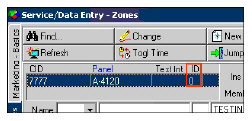
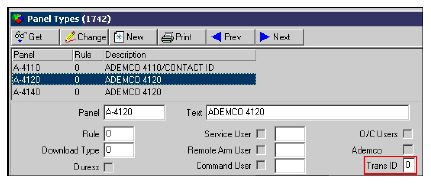
If the translation ID field is blank, SBN checks the Panel type (A-4120 in this example) in Panel types (program #1742) for a special translation ID. If the translation ID field is blank, SBN uses 0 for the ID, then SBN uses the â€closest match†algorithm to check Alarm Translation Tables.
Closest Match Algorithm
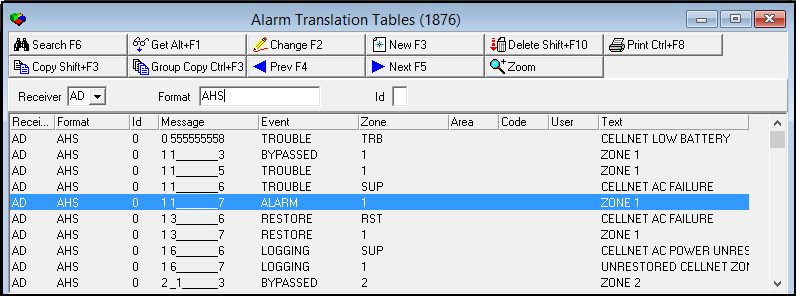
SBN searches Alarm Translation Tables for the closest match, if any, based on the available information. The following graphic displays the results of the search for the closest match in Alarm Translation Tables.
The match is a pattern match against the incoming message. A percent sign (%) in a row's message stands for any run of characters, and an underscore (_) stands for exactly one character; a row becomes a wildcard definition by using either symbol in its own message field, not by anything in the signal itself.
SBN checks the table in two passes. The first pass considers only rows whose format matches the incoming message's format exactly. If nothing matches, a second pass considers rows whose format field is itself a pattern. An exact-format row always wins over a wildcard-format row. Within either pass, the first matching row in table order is used, so a broad wildcard row placed early in the table can shadow a narrower, more specific row that comes later. Language-specific overrides are checked with the identical match test, so they can never widen a match — only a row that already matches the base rule can be overridden.
| Format | Message | When it's used |
|---|---|---|
| AHS | _17 | Exact-format row — matched in the first pass whenever the incoming format is AHS. |
| A% | % | Wildcard-format row — only considered in the second pass, and only if no exact-format row matched. |
Note: The order of information in the table has no significance.
Column Descriptions
The following table describes the columns used in the translation.
Column |
Data |
Receiver Type |
AD |
Format |
AHS - ADEMCO High Speed |
Format ID |
- Neither the customer nor panel type changed the format ID from the default of 0. |
Message |
_ 1 7 - The closest match |
Event |
Alarm |
Zone |
%1 - Zone in position one = zone 6 |
Text |
%c - Raw signal |
The Customer’s Alarm Log
The customer’s Alarm Log displays the translated message. In the example, an alarm occurred in the customer’s zone 6, a smoke type, with a priority of 20.

Zooming into the Sublevel
Alarm Translation Tables contains a sublevel with a Translations tab in which you may attach alternate text translations to Alarm Translations that appear in the Alarm Log for users with the selected language.
Use the following steps to access the sublevel tab of Alarm Translation Tables:
1. Select the Alarm Translation you want to add a language translation to.
2. Choose Zoom In/Out of Sublevel.
w The sublevel tab appears below the main window.
The Translations Tab
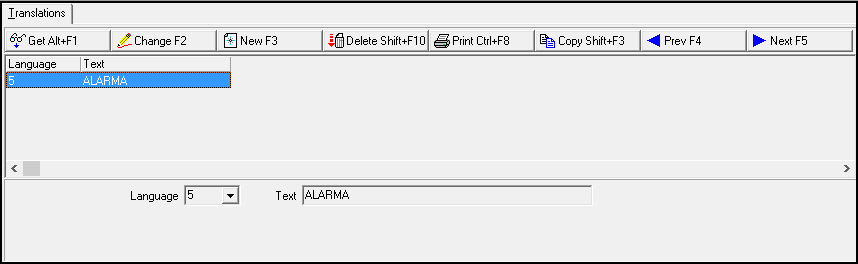
The following graphic shows the Translations tab. The tab displays previously defined language translations for the selected Alarm Translation.
Field/Column Descriptions
The following table describes the fields and columns used in the Translations tab.
Field/Column |
Description |
Language Code |
Code that identifies the language of the attached translation. Note: Contact IBS before using codes 11-17. |
Text |
Alternate text, in the selected language, of the Alarm Translation. |
Button Functions
The following table displays the buttons, describes the shortcut keys, actions, and functionality.
Button |
Name |
Shortcut Key |
Action |
Description |
|
Search |
F6 |
1876/ 7 |
Search. |
|
Get |
ALT+F1 |
1876/ 1 |
Get record. |
|
Change |
F2 |
1876/ 2 |
Change selected record. |
|
New |
F3 |
1876/ 3 |
Create new record. |
|
Delete |
SHIFT+F10 |
1876/ 4 |
Delete selected record. |
|
Copy |
SHIFT+F3 |
1876/ 8 |
Copy current record. |
|
Group Copy |
CTRL+F3 |
1876/ 9 |
Copy all translations from the selected receiver. |
|
CTRL+F8 |
1876/ 6 |
Print selected records. |
|
|
Previous |
F4 |
1876/ 999 |
Select last record. |
|
Next |
F5 |
1876/ 999 |
Select next record. |
|
Zoom In/Out of Sublevel |
no shortcut |
1876/10 |
Access sublevel Translations tab. |











Supported Receivers - RC-4000 and RSM-02
The RC-4000 and RSM-02 receivers are supported.
Release 95 Alarm-Translation Updates
Cloud users can be granted access to the alarm-translation tables in program 1876. Overflow miscellaneous fields are retained when an alarm carries immediate-queue misc fields, and signals containing a percent sign in the comment are handled.
Modifications and Updates to Alarm Translation Tables
The following table lists modifications and updates to the Alarm Translation Tables document.
Mod Number |
Date |
Description |
n/a |
08/14/14 |
Images updated. |
07.88.25759, 07.88.25736, 08.88.11303 |
04/04/18 |
Added AXIS to list of Receivers within Alarm Translation Tables. |