
Change Password
Change Password
Change Password
Module: System Administration
Overview
Change Password (program #544) enables users to change their passwords. Users may change their passwords at any time, but administrators can require users to change their passwords at certain time intervals as set up in Users (program #1501). For more information, see Users in the System Administration module.
Password Rules
Password length depends on option passleng. Depending on value set in option passleng, users may set the required maximum password length from 2 to 30 characters. The default password length is 6 characters. Additionally, if option secpaswd is on, users must:
Choose a password that is different from the user name.
Choose a password that contains at least one numeric character.
Choose a new password until the 11th password change.
Choose a new password that does not have more than two characters in sequence from the old password.
Choose a new password that sounds different from the old password. (For example, a user cannot change Mary123 to Merry123.)
To access this program, select Change Passwords (program #544) from the main menu of SBN.
The Change Passwords Window
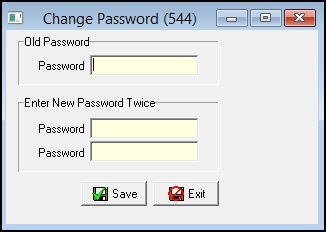
The following graphic shows the Change Passwords window.
Changing a Password
Use the following steps to change your password:
1. In Change Passwords, type your current password in Old Password.
2. In the Enter New Password fields, type your new password twice.
3. Choose Save.
w SBN changes your password.
Note: If you run SBN on separate servers for Billing and Monitoring, a password change on one server automatically updates the password on the other server. If the password change does not successfully transfer to the other server, the password remains unchanged on both servers.
Modifications and Updates to Change Password Document
The following table lists modifications and updates to the Change Password document.
Mod Number |
Date |
Description |
n/a |
8/14/14 |
Images updated. |
F1 Help
| Delphi Forms | chgpasswdform |
| Program Numbers | 544 |