
Monthly Quarterly Tax Report
Monthly Quarterly Tax Report
Monthly / Quarterly Tax Report
Module: Accounting
Overview
Use the Monthly / Quarterly Tax Report to view the following tax information for a specified period in month-to-date and quarter-to-date branch totals:
Total taxable revenue
Total non-taxable revenue
Sales tax for invoiced work orders
Sales tax for cycle fees
This report groups data by
Tax profile revenue type
Branch
County
To access this report, select Monthly / Quarterly Tax Report (report #2074) from the main menu of SBN.
The Monthly / Quarterly Tax Report
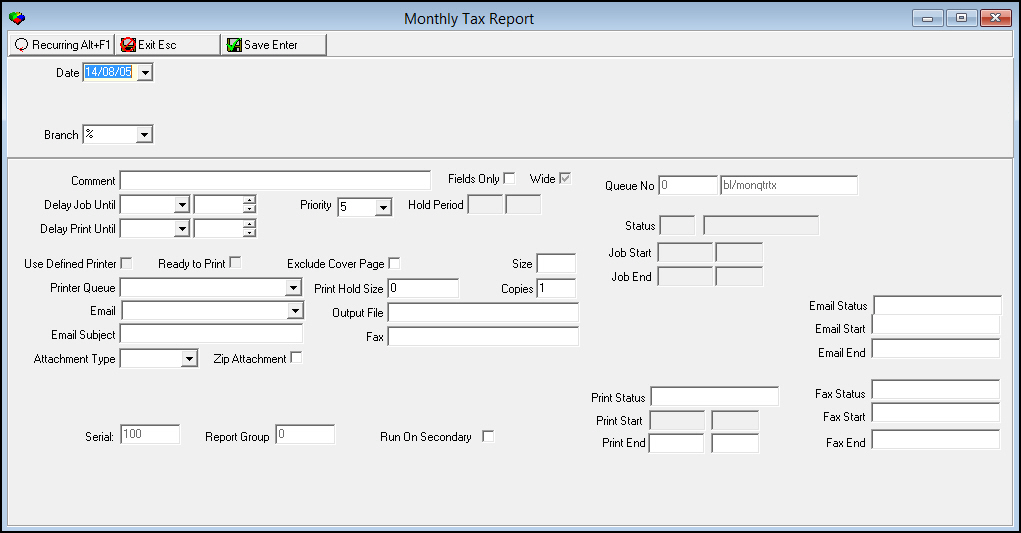
This window contains two panes: use the upper pane to define the contents of the report; use the lower pane to define the job output - how, when, and where you want the report printed.
Note: See Report Parameters Pane for information on the fields in the lower pane, which are the same in every report.
Field Descriptions
The following table describes the field used in the upper pane of this report.
Note: You can use wildcard characters in selected fields. For more information on using wildcards, see Searches.
Field |
Wildcards Allowed |
Description |
Date |
No |
You must select the ending transaction date of invoiced work orders to limit the report to transactions that occurred within the range of the selected date and the first day of the month selected the last time this report was run. O If option bl031 is on, the report compares the fiscal date of the invoice to the date selected. O The month of the selected date determines which quarter to total invoice activity. |
Branch |
Yes |
You may either select a specific branch to limit the report to records associated with that branch, or use the % wildcard to include all branches. (This menu originates from program #1530.) O If you use the % wildcard, the report also includes records that do not have an installation branch. O Branch restrictions do not apply to this report. |
Running and Viewing a Report
For information on running and viewing a report, see Common Functions in SBN.
Report Example
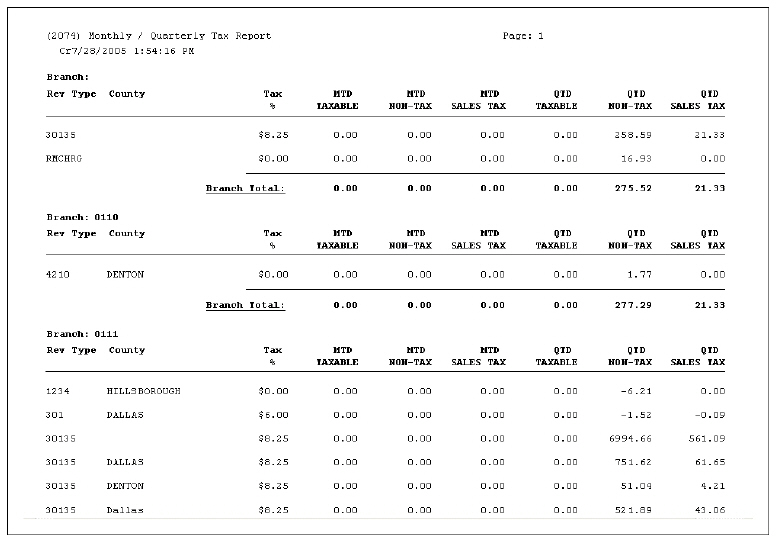
The following graphic shows an example of the output of the Monthly / Quarterly Tax Report.
Column Descriptions
The following table describes the columns used in the output of the report.
Column |
Description |
Branch |
The branch ID. |
Rev Type |
The revenue type created, based on the tax profile. |
County |
The county associated with the tax profile. |
Tax % |
The rate of sales tax associated with the tax profile. |
MTD Taxable |
Month-to-date taxable revenue from all invoice activity. |
MTD Non-Tax |
Month-to-date non-taxable revenue from all invoice activity. |
MTD Sales Tax |
Month-to-date sales tax charged from all invoice activity. |
QTD Taxable |
Quarter-to-date taxable revenue from all invoice activity. |
QTD Non-Tax |
Quarter-to-date non-taxable revenue from all invoice activity. |
QTD Sales Tax |
Quarter-to-date sales tax charged from all invoice activity. |
Branch Total |
Totals for all monthly and quarterly tax and revenue columns for the specified branch. |
Button Functions
The following table displays the buttons, describes the shortcut keys, actions, and functionality.
Button |
Name |
Shortcut Key |
Action |
Description |
|
Open fields for recurring/template reports |
alt+f1 |
Open fields for recurring/template reports. |
|
|
Exit without saving |
esc |
Exit without saving changes to selected record. |
|
|
Save Existing Record |
enter |
Save changes to selected record. |



Modifications and Updates to Monthly Quarterly Tax Report
The following table lists modifications and updates to the Monthly Quarterly Tax Report document.
Mod Number |
Date |
Description |
n/a |
8/05/14 |
Images updated. |